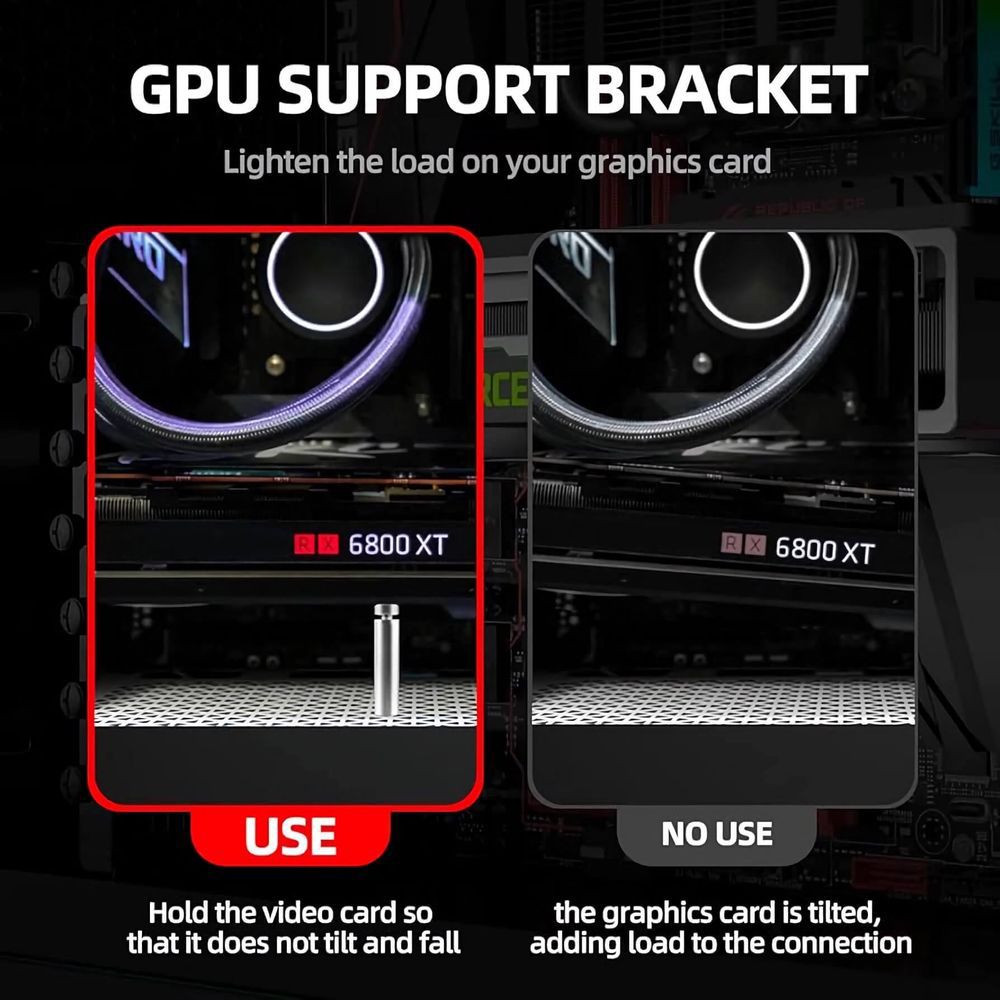
تُعدّ بطاقات الرسومات الحديثة إنجازات هندسية رائعة، لكنها أصبحت ضخمة للغاية. ومع ازدياد سُمك وحدات التبريد لتحمّل استهلاك الطاقة العالي، يُشكّل الوزن الهائل لهذه البطاقات العملاقة ذات الفتحات الثلاثية ضغطًا كبيرًا على فتحة PCIe في اللوحة الأم.
لا يقتصر الأمر على المظهر الجمالي فحسب؛ فقد يؤدي انحناء وحدة معالجة الرسومات إلى تلف هيكلي طويل الأمد أو حتى تشقق لوحات الدوائر المطبوعة. إليك كيفية اختيار الدعامة المناسبة للحفاظ على استواء جهازك وسلامته.
دعامة العمود الأفقي (المستقلة)
تُعد هذه الأقواس الحل الأكثر قوة في السوق، حيث توضع في الجزء السفلي من علبة الكمبيوتر أو غطاء وحدة تزويد الطاقة لتوفير رفع رأسي قوي.
الأفضل لـ: وحدات معالجة الرسومات الضخمة والرائدة (مستوى RTX 4090/4080).
المفاضلة: إنه يشغل مساحة في الجزء السفلي من الهيكل، مما قد يتعارض مع مراوح السحب المثبتة في الأسفل.
قوس فتحة التوسعة (المثبتة على PCIe)
يتم تثبيت هذا النوع مباشرة في فتحات التوسعة PCIe الخاصة بالهيكل، ويمتد بشكل متوازٍ أسفل وحدة معالجة الرسومات.
الأفضل لـ: وحدات معالجة الرسومات متوسطة إلى كبيرة الحجم في الحالات التي تكون فيها المساحة السفلية محدودة.
المزايا: يحافظ على نظافة الجزء السفلي من الهيكل لتحقيق أقصى تدفق للهواء أو المراوح.
المفاضلة: نظرًا لأنه يعتمد على الإطار الخلفي للعلبة، فإنه يتمتع بمرونة أكبر قليلاً من العمود الثابت وقد يوفر دعمًا أقل للبطاقات الثقيلة للغاية.
دعامة من نوع جاك (تلسكوبية)
حلم كل محبي البساطة. تعمل هذه الأسطوانات الصغيرة ذات آلية البرغي كرافعة سيارة صغيرة لوحدة معالجة الرسومات الخاصة بك.
الأفضل لـ: التصاميم البسيطة أو المدمجة حيث تكون المساحة محدودة للغاية.
المزايا: يتميز بسهولة التركيب وسريته العالية.
العيوب: نطاق ارتفاع محدود. إذا كانت وحدة معالجة الرسومات (GPU) موضوعة في مكان مرتفع جدًا فوق غطاء وحدة تزويد الطاقة (PSU)، فقد لا يصل إليها مقبس صغير.
الخلاصة: هل أنت حقاً بحاجة إلى واحد؟
إذا كنت تمتلك وحدة معالجة رسومات حديثة متوسطة إلى عالية الأداء، فالإجابة على الأرجح هي نعم . مع أن العديد من البطاقات المتميزة تأتي الآن مزودة بأقواس تثبيت أساسية، إلا أنها غالباً ما تفتقر إلى المظهر الجمالي أو إمكانية التعديل الدقيقة التي توفرها حلول ما بعد البيع.