So optimieren Sie die Lendenwirbelstütze für eine bessere ergonomische Stuhlpassform
Die meisten Leute geben dem Stuhl die Schuld.
Die meisten Leute raten einfach. Die Bürostuhlindustrie hat Käufer darauf trainiert, sich von Schlagwörtern, gepolsterten Kopfstützen und „4D“-Knöpfen leiten zu lassen, während das eigentliche Problem meist viel banaler und leichter zu beheben ist: Die Lendenwirbelstütze sitzt falsch, der Sitz ist zu hoch, der Schreibtisch ist zu hoch oder die Rückenlehne drückt gegen das Becken, anstatt es zu stützen. Warum sollte man das immer wieder als schlechten Stuhl bezeichnen, wenn es oft nur an einer falschen Einstellung liegt?
Ich will es mal ganz deutlich sagen: Die Verletzungsdaten des BLS für 2024 weisen immer noch 248.180 Arbeitsunfähigkeitstage aufgrund von Verletzungen der äußeren und muskuloskelettalen Strukturen des Rückens aus. Und die OSHA definiert Ergonomie weiterhin als die Anpassung des Arbeitsplatzes an die Person, anstatt die Person zu zwingen, die Diskrepanz zu tragen. Deshalb nehme ich die Lendenwirbelstütze von Bürostühlen sehr ernst und betrachte Rückenschmerzen nicht als persönliche Schwäche oder als etwas, woran man sich gewöhnen müsse.
Und nein, es geht hier nicht nur um Komfort. Beim Rückruf des Amazon Basics Executive Desk Chair durch die CPSC im Jahr 2023 gingen laut der Behörde 13 Meldungen über gebrochene Stuhlbeine ein, darunter eine Schulterverletzung. Beim Rückruf des TJX-Bürostuhls im selben Jahr gab es 12 Meldungen über gebrochene oder sich lösende Rückenlehnen und 10 gemeldete Verletzungen. Und beim Rückruf des IKEA ODGER-Drehstuhls im Jahr 2023 wurden rund 12.000 Stühle wegen defekter Stuhlbeine zurückgerufen. Glauben Sie immer noch, die Passform eines Stuhls sei ein unwichtiges Thema?
Wo sollte die Lendenwirbelstütze eines Bürostuhls eigentlich angebracht sein?
Er sitzt tiefer. Die OSHA-Richtlinien für Bürostühle sind erfreulich einfach: Die Rückenlehne sollte der natürlichen Krümmung der Wirbelsäule folgen, die Lendenwirbelstütze höhenverstellbar sein und die nach außen gewölbte Rückenlehne den unteren Rücken stützen. Das bedeutet: Die optimale Position der Lendenwirbelstütze ist weder auf Höhe des Gürtels noch unter den Schulterblättern und schon gar nicht direkt am Becken. Warum stellen so viele Leute ihren Stuhl immer noch so ab, wie er vom Hersteller eingestellt wurde?
Meine Regel ist einfach. Ich beginne mit der Lendenwirbelstütze, die mittig im unteren Rückenbereich positioniert ist. Dann verschiebe ich sie in kleinen Schritten nach oben oder unten, bis ich eine Stütze spüre, ohne dass ein harter Druckpunkt entsteht. Denn sobald die Stütze zu hoch sitzt, drückt sie den Brustkorb nach vorne, und sobald sie zu tief sitzt, entsteht Druck auf das Kreuzbein, der fälschlicherweise als „Stütze“ getarnt wird. Das deckt sich auch mit einer in PubMed indexierten Studie, in der Forscher die Höhe und den Vorsprung der Lendenwirbelstütze anpassten und die Stütze während der Tests zwischen L2 und L4 zentrierten.
Und hier die bittere Wahrheit: Wenn sich die Unterstützung nur deshalb „stark“ anfühlt, weil sie drückt, ist sie wahrscheinlich falsch. Eine radiologische Untersuchung von Bürostuhlfunktionen aus dem Jahr 2017 zeigte, dass die Neigung der Sitzfläche die Beckenhaltung verbesserte und Lendenwirbelstützen einige Sitzpositionen positiv beeinflussten. Allerdings konnte keine einzelne Funktion allein eine Beugung des Beckens auf magische Weise beheben. Genau deshalb rate ich immer wieder dazu, den gesamten Arbeitsplatz optimal einzustellen, anstatt sich auf eine einzelne Einstellung zu versteifen.
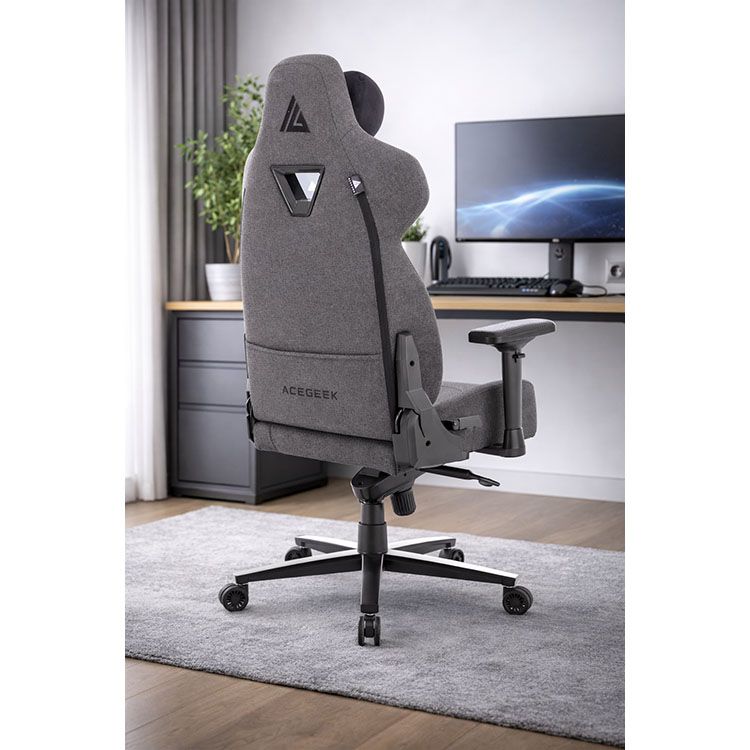
Die Fünf-Minuten-Methode zur Anpassung der Lendenwirbelstütze, der ich tatsächlich vertraue.
Stellen Sie die Sitzhöhe ein, bevor Sie die Rückenlehne berühren.
Die richtige Sitzhöhe ist entscheidend. Laut OSHA ist die optimale Stuhlhöhe erreicht, wenn die gesamte Fußsohle den Boden berührt und die Kniekehle etwas höher als die Sitzfläche ist. Ist der Sitz zu hoch, rutschen Menschen nach vorne, verlieren den Kontakt zum Rücken und beeinträchtigen unbewusst die Lendenwirbelstütze. Warum sollte man die Lendenwirbelstütze eines Stuhls optimieren, der das Becken ohnehin schon in eine ungünstige Position bringt?
Anschließend Sitztiefe und Rückenlehnenkontakt einstellen
Die Sitztiefe ist wichtiger, als viele annehmen. Die OSHA (Arbeitsschutzbehörde der USA) weist darauf hin, dass kleinere Nutzer so sitzen sollten, dass die Vorderkante des Sitzes nicht die Knie berührt, während größere Nutzer weiterhin eine Unterstützung für Gesäß und Oberschenkel benötigen. Stimmt die Sitztiefe nicht, sitzt man zu weit von der Rückenlehne entfernt, wodurch selbst eine optimale ergonomische Lendenwirbelstütze sich unnatürlich anfühlt. Ich habe diesen Fehler schon hunderte Male fälschlicherweise dem Stuhl angelastet gesehen.
Heben oder senken Sie nun die Lendenwirbelstütze.
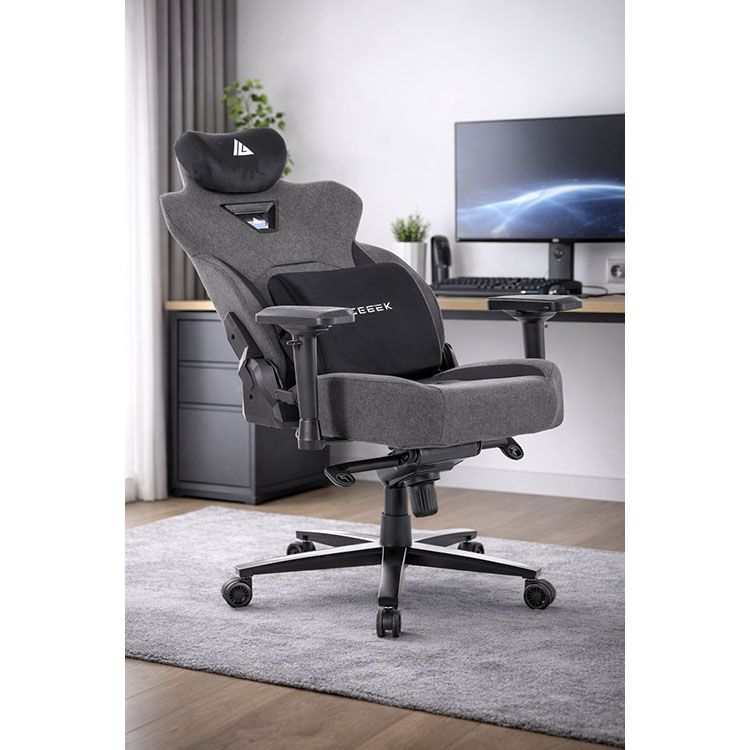
Das ist der entscheidende Punkt. Legen Sie das Lendenkissen in den unteren Rücken, lehnen Sie sich normal zurück, atmen Sie einmal tief durch und stellen Sie sich folgende Frage: Passt sich der Stuhl der natürlichen Krümmung an oder drückt er Sie aus der Position? Fühlt es sich an wie ein Faustschlag in den Nieren, ist er zu hoch; fühlt es sich an wie ein Keil unter dem Becken, ist er zu niedrig; verschwindet der Druck, aber Ihr unterer Rücken bleibt auf dem Stuhl, sind Sie nah dran.
Lehnen Sie sich etwas weiter zurück, als es Ihnen Ihr Instinkt vorgibt.
Viele Menschen sitzen zu aufrecht. Laut OSHA sollte die Rückenlehne mindestens 15 Grad Neigung von der Vertikalen ermöglichen. Eine PubMed-Studie aus dem Jahr 2010 ergab, dass die Kombination aus Lendenwirbelstütze und einem Rückenlehnenwinkel von 110° die Kopf-Nacken-Ausrichtung stärker verbessert als das Sitzen ohne Lendenwirbelstütze. Das heißt nicht, dass jeder mit 110° sitzen sollte, aber es bedeutet, dass die starre 90°-Haltung, an der viele Arbeitnehmer festhalten, nicht der vermeintliche Idealzustand ist.
Zum Schluss die Armlehnen, denn schlechte Armlehnen ruinieren alles.
Armlehnen ruinieren mehr Sitzpositionen als Lendenwirbelstützen. Die OSHA warnt davor, dass zu hoch eingestellte Armlehnen die Schultern anheben, zu niedrig eingestellte Armlehnen eine Vorwärtsneigung verursachen und zu breite Armlehnen die Ellbogen vom Körper wegziehen. Deshalb sage ich, dass die Höhenverstellung der Lendenwirbelstütze nur die halbe Miete ist – die andere Hälfte ist die optimale Anpassung des Arbeitsplatzes. Wundert es Sie, dass Ihr Nacken immer noch schmerzt, nachdem Sie Ihre Rückenprobleme „korrigiert“ haben?
Wie sich eine gute Einstellung der Lendenwirbelstütze anfühlt
Warnsignale sind wichtig. Ich vertraue Symptomen mehr als der Werbung, denn Ihr Körper signalisiert Ihnen schneller als jede Produktseite, ob die Lendenwirbelstütze Ihres Bürostuhls hilft oder nur einen weiteren Druckpunkt schafft. Worauf sollten Sie also achten?
Was Sie nach 10–20 Minuten spüren – Was es normalerweise bedeutet – Was Sie zuerst ändern sollten – Warum es wichtig ist: Druck im Bereich des Gürtels oder des oberen Beckenbereichs: Die Lendenwirbelstütze ist zu niedrig. Lendenwirbelstütze um 10–20 mm anheben. Eine zu niedrige Position drückt das Becken nach unten, anstatt die natürliche Krümmung des unteren Rückens auszufüllen. Druck im Bereich der unteren Rippen: Die Lendenwirbelstütze ist zu hoch. Lendenwirbelstütze um 10–20 mm absenken. Eine zu hohe Position kann zu einer Auswölbung des Brustkorbs und einem Anheben des Brustkorbs führen. Sie rutschen ständig nach vorne: Sitz zu hoch, Sitz zu tief oder Lendenwirbelstütze zu stark eingestellt. Sitzhöhe verringern, Sitztiefe reduzieren, Lendenwirbelstütze weicher einstellen. Durch das Rutschen wird der Kontakt zum Rücken unterbrochen und die Unterstützung beeinträchtigt. Schultern ziehen sich nach oben: Armlehnen zu hoch. Armlehnen absenken, bis die Schultern entspannt sind. Schulterverspannungen verdecken oft das eigentliche Passformproblem. Nacken nach vorne geneigt: Rückenlehne zu steil oder Monitor zu hoch. Lehnen Sie sich leicht zurück und überprüfen Sie dann die Bildschirmhöhe. Die Kopf- und Nackenhaltung verbessert sich oft, wenn die Rückenstütze verbessert wird.
Diese Tabelle ist keine Theorie um der Theorie willen. Sie stimmt mit den OSHA-Richtlinien für Stühle hinsichtlich Rückenlehnenpassform, Sitzhöhe, Armlehnen und ungünstigen Körperhaltungen überein und deckt sich auch mit Forschungsergebnissen, die zeigen, dass Rückenlehnenwinkel und Position der Lendenwirbelstütze die Körperhaltung beeinflussen.
Warum „ergonomische Stuhl-Lendenwirbelstützen“ in der realen Welt immer noch versagen
Marketing lügt oft. Die Stuhlindustrie tut so, als ob ein einziges verstellbares Kissen alle Probleme lösen würde. Doch eine in PubMed gelistete biomechanische Studie hat gezeigt, dass eine verbesserte Lendenwirbelstütze in Kombination mit einer reduzierten Belastung der Sitzbeinhöcker die Aktivität der Lendenmuskulatur verringert und die Belastung der Lendenwirbelsäule beim Sitzen reduziert. Das zeigt mir, dass die Lösung nicht allein in einer „mehr Lendenwirbelstütze“ liegt, sondern in der richtigen Kombination aus Lendenwirbelstütze, Sitzmechanik und Sitzhaltung. Warum verkaufen Marken immer nur ein einziges Merkmal, als ob der Rest des Stuhls keine Rolle spielte?
Deshalb verlinke ich dieses Thema auch gerne mit ACEGEEKs Leitfaden zu Haltbarkeit und Garantie ergonomischer Stühle . Er spricht einen wichtigen Punkt an, den die meisten Hersteller lieber verschweigen: Die versteckten Teile sind entscheidend, die Abwicklung von Garantieansprüchen ist wichtig, und „ergonomisch“ schützt nicht vor kurzer Lebensdauer. Auf der ACEGEEK-Website verlinkt die Gaming-Stuhl-Kollektion nahtlos zu Produktseiten wie dem ergonomischen Gaming-Stuhl Ergo , dem verstellbaren Gaming-Stuhl Onyx 4D und dem ergonomischen Gaming-Stuhl Evo Lth RGB . Alle drei Modelle werben mit Merkmalen wie Magnetkissen, Froschmechanik und Formschaum. Das sind zwar keine Zauberformeln, aber zumindest greifbare Komponenten, die man hinterfragen und vergleichen kann.
Die unpassende Schreibtischkonstruktion, die die Lendenwirbelstütze von Bürostühlen beeinträchtigt.
Die Höhe des Schreibtisches ist wichtiger, als man denkt. Die höhenverstellbaren Schreibtische Mars und Venus von ACEGEEK bieten beide einen Höhenverstellbereich von 720–1180 mm, einen Hub von 460 mm, eine maximale Traglast von 70 kg, eine Verstellgeschwindigkeit von 20 mm/s und zwei Speicherplätze für die Höhe. Das ist wichtig, denn ist der Schreibtisch zu hoch eingestellt, zieht man die Schultern hoch, entlastet die Rückenlehne und streckt sich nach vorne, anstatt sich bequem zurückzulehnen. Dann wird die Lendenwirbelstütze dafür verantwortlich gemacht. Verständlich.
Ich habe dazu eine klare Meinung. Ein Stuhl allein kann einen Arbeitsplatz nicht retten, der die Ellbogen ständig nach oben und den Oberkörper nach vorne zieht. Wenn Sie also verschiedene Einstellungen der Lendenwirbelstütze ausprobieren und nichts davon sich richtig anfühlt, überprüfen Sie die Schreibtischhöhe, bevor Sie sich erneut auf die Suche machen. Denn das Zusammenspiel von Stuhl und Schreibtisch ist meist der versteckte Grund, warum ein vermeintlich ergonomisch optimaler Stuhl nach dem Mittagessen nicht mehr passt.
Häufig gestellte Fragen
Woran erkenne ich, wo die Lendenwirbelstütze eines Bürostuhls angebracht sein sollte?
Eine korrekte Lendenwirbelstütze bedeutet, dass die nach außen gewölbte Rückenlehne des Stuhls im unteren Rückenbereich anliegt und die natürliche Krümmung der Wirbelsäule stützt, ohne das Becken nach vorne zu schieben, die Rippen abzuflachen oder ein Sitzen auf der Vorderkante zu erzwingen. Das ist die praktische Definition der richtigen Sitzposition für die meisten Bürostuhlnutzer. Ich verwende diesen Test, weil er aussagekräftiger ist als jede Marketinggrafik: Wenn Ihr Rücken aufliegt und die Unterstützung spürbar, aber nicht unangenehm ist, befinden Sie sich in der richtigen Position.
Wie fühlt sich eine zu hohe Lendenwirbelstütze an?
Eine zu hohe Lendenwirbelstütze äußert sich durch Druck oberhalb des unteren Rückens, meist in der Nähe der unteren Rippen, verbunden mit dem Gefühl, dass der Brustkorb nach oben gedrückt wird und sich Schultern oder Nacken nach 10 bis 20 Minuten Sitzen verspannen. Anders ausgedrückt: Die Lendenwirbelstütze fühlt sich nicht mehr wie eine Stütze an, sondern eher so, als ob der Stuhl die Haltung zwanghaft korrigieren möchte. Ich stelle die Lendenwirbelstütze daher immer zuerst tiefer ein, bevor ich andere Einstellungen ändere.
Welche Position mit optimaler Lendenwirbelstütze eignet sich am besten für ganztägiges Sitzen?
Die optimale Lendenwirbelstütze für langes Sitzen ist eine Einstellung, bei der der Rücken an der Rückenlehne anliegt, die Füße fest auf dem Boden stehen und die Schultern entspannt sind, während die Stütze die natürliche Krümmung des unteren Rückens ausfüllt, anstatt einen einzelnen Druckpunkt zu erzeugen. Ich kombiniere das meist mit einer leichten Neigung, nicht mit einer starren, aufrechten Haltung, da die wissenschaftlichen Erkenntnisse zum Einfluss des Rückenlehnenwinkels auf die Körperhaltung besser sind, als die meisten Käufer annehmen.
Kann eine Lendenwirbelstütze Schmerzen im unteren Rücken verursachen?
Ja, eine zu hohe oder zu harte Lendenwirbelstütze kann Rückenschmerzen verursachen, insbesondere wenn Sitztiefe und Schreibtischhöhe nicht optimal aufeinander abgestimmt sind. Das Problem liegt oft nicht an der Stütze selbst, sondern an der Diskrepanz zwischen der natürlichen Krümmung des Rückens, dem Becken und dem restlichen Arbeitsplatz. Deshalb betrachte ich die Einstellung der Lendenwirbelstütze als Teil eines Gesamtsystems, das Sitzhöhe, Armlehnen, Neigungsverstellung und Schreibtischhöhe umfasst, und nicht als isolierte Maßnahme.
Was ist, wenn mein Stuhl keine Lendenwirbelstütze hat?
Eine provisorische Lendenwirbelstütze kann ein zusammengerolltes Handtuch oder ein abnehmbares Rückenkissen sein, das den unteren Rückenbereich ausfüllt, ohne die Sitztiefe wesentlich zu verringern. Die OSHA (Arbeitsschutzbehörde der USA) bestätigt ausdrücklich, dass dies eine akzeptable Notlösung ist, wenn ein Stuhl keine integrierte Lendenwirbelstütze hat. Ich habe diesen Trick selbst schon angewendet und er funktioniert deutlich besser, als ohne Unterstützung zu sitzen und so zu tun, als sei der Stuhl in Ordnung.
Ihr nächster Schritt
Legen Sie noch heute los. Entdecken Sie die Gaming-Stuhl-Kollektion von ACEGEEK, vergleichen Sie den ergonomischen Gaming-Stuhl Ergo und den höhenverstellbaren Gaming-Stuhl Onyx 4D mit Ihren individuellen Bedürfnissen und prüfen Sie anschließend, ob Ihre Schreibtischhöhe die optimale Passform beeinträchtigt, indem Sie den höhenverstellbaren Schreibtisch Mars in Betracht ziehen. Wenn Ihnen Langlebigkeit wichtig ist, lesen Sie vor dem Kauf die Hinweise zur Haltbarkeit und Garantie ergonomischer Stühle. Nutzen Sie anschließend die Kontaktseite von ACEGEEK, um schriftliche Informationen zu Garantieumfang, Ersatzteilen und Service zu erhalten. Diese eine Nachricht sagt Ihnen mehr als zehn Hochglanzfotos.