Best Desk Setup for Long Gaming and Work Sessions
Most desk setups are built to impress your camera, not your body
Most setups lie.
I’ve spent enough time around PC brands, office-furniture marketing, and “pro streamer” room tours to know the dirty little secret: a lot of expensive desks, chairs, and dual-screen rigs are really mood boards with cables, because the actual test is not how they look at 8:03 p.m. under RGB, but how your shoulders, wrists, eyes, and lower back feel at 1:17 a.m. when the match runs long and the spreadsheet still is not done. Why are we still buying furniture like props?
The numbers are ugly. According to the U.S. Bureau of Labor Statistics, employers reported 248,180 days-away-from-work cases involving the exterior and musculoskeletal structures of the back in 2024, and Reuters reported on December 19, 2024 that Amazon agreed to safety measures tied to OSHA complaints, including adjustable-height workstations, ergonomic mats, and job rotations across U.S. facilities. That is not “wellness culture.” That is the market admitting the old setup logic was dumb and expensive.
So here is my position. A good gaming desk setup is not a vibe. It is a geometry problem with a budget attached.
The anatomy of a gaming desk setup that still works in hour eight
Geometry beats hype.
If your chair is too high, your feet hang; if your desk is too high, your shoulders climb; if your monitor is too high, your neck turns into a crane; if your mouse sits too far out, your upper trap does unpaid labor all night, which is why I judge every long-session setup by joint angles and reach distance before I care about RGB strips, cable sleeves, or whether the desktop has a faux-carbon sticker on it. Sound harsh?
Start with the chair, not the desk
Chair first. Always.
I would begin with seat height, seat depth, lumbar position, recline, and armrest adjustment, then I would move to aesthetics later, because the chair is the body anchor and the desk is the follower. AceGeek already has a clean internal path for this: how to match chair height and desk height for better posture, how to choose an ergonomic chair that fits your body, and the lumbar support tuning guide all line up with the same hard truth that most brands try to hide: bad fit hurts more than bad branding.
OSHA is not subtle here. The agency says feet should rest flat, the seat should be height-adjustable, the back of the knee should sit slightly higher than the seat, the seat pan should support most of the thigh without jamming the knee crease, and armrests that are too high can drive shoulder tension while armrests that are badly placed can force forward reaching. That is the boring math behind an ergonomic gaming desk setup, and boring math wins.
And here is another hard truth I wish more buyers understood: mechanism quality matters because chairs do fail in the real world. The U.S. Consumer Product Safety Commission recalled Tainoki swivel office chairs on March 19, 2026 because the base could bend, and the affected models were sold for about $180 to $200, which is exactly why I do not treat “ergonomic” as a synonym for “structurally sound.”
Then bring the desk to your elbows
Desk height rules.
The best desk setup for long sessions is not “whatever standard height the factory picked,” because OSHA’s workstation checklist still comes back to the same point: feet flat or on a stable footrest, elbows near the torso at roughly 90 to 100 degrees, input devices right next to the keyboard, and a monitor placed so you do not lean or twist into it. If your desk cannot get there, the desk is the problem, not your body.
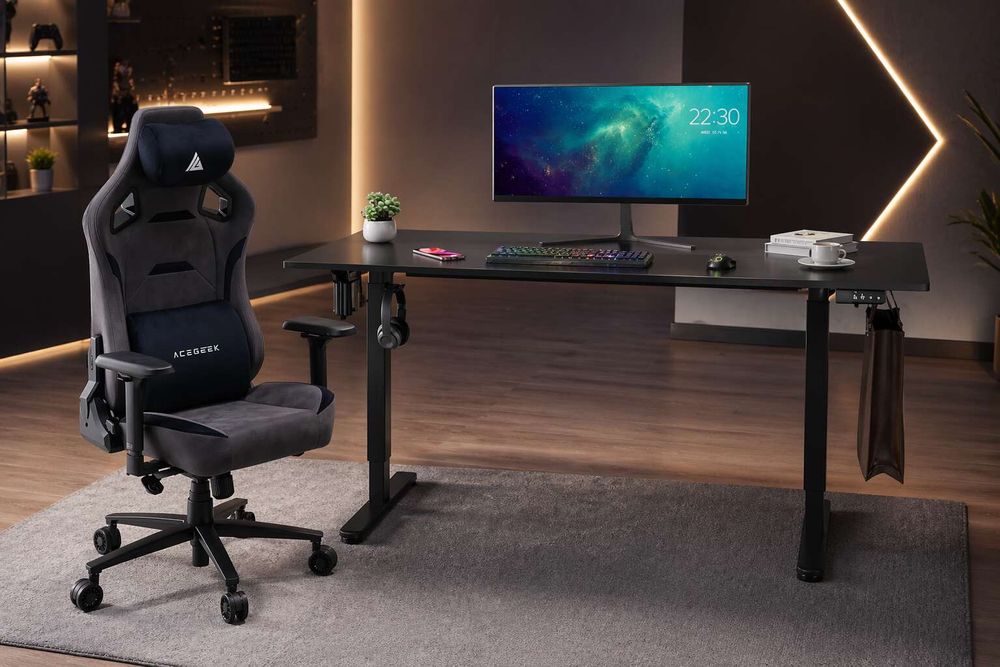
This is where AceGeek’s product architecture actually helps. The Mars adjustable height desk and Venus adjustable height desk both publish useful specs instead of mood-board nonsense: 1200 x 600 x 15 mm surface size, 720–1180 mm height range, 460 mm stroke length, 70 kg load capacity, 20 mm/s speed, and two memory-height slots. I like that because a standing desk gaming setup only earns its keep when it can hit your seated elbow height, your standing elbow height, and your monitor geometry without improvisation.
Here is the comparison I actually trust more than any glossy product shoot:
Setup layerWhat I want to seeWhy I careWhat goes wrong when it’s wrongChairFeet flat, seat depth that supports the thighs, adjustable arms, lumbar that lands in the small of the backStable base posture for 6–10 hour useShoulder shrugging, dangling feet, lower-back driftDeskSurface that hits elbow height in both seated and standing useKeeps wrists neutral and shoulders relaxedRaised traps, wrist extension, forward leanMonitorTop at or slightly below eye level, primary screen straight aheadCuts neck extension and rotationNeck fatigue, head jut, eye strainKeyboard and mouseSame level, mouse tight to keyboard, no long reachReduces forearm and shoulder loadingWrist ache, trap pain, elbow flareMovement patternSmall posture changes, short walks, task switchingLong sessions need variation, not heroicsOne static pose, then another static pose
The table is not glamorous. That is the point.
Dual monitors help, but only when they stop fighting your neck
Center matters more.
A dual monitor gaming and work setup works when the screen you use most sits directly in front of you, the second monitor stays immediately beside it, and both are placed to limit head rotation, because OSHA warns that prolonged side-turning loads neck muscles unevenly and recommends the top of the screen at or slightly below eye level, with a typical viewing distance around 18 to 20 inches. Why do so many “productivity” setups still look like swivel tests?
My rule is simple. If you game on one display and only park Discord, Slack, or a reference doc on the other, the gaming monitor goes dead center and the side monitor becomes a true secondary. But if your work split is close to 50/50, shove the displays together and center the seam, because the body does not care what your wallpaper looks like; it cares how often you twist.
Standing desk gaming setup? Yes, but stop treating standing like a religion
Standing helps. Static standing does not.
This is where the industry gets slippery, because it sells standing desks as if they erase every bad habit, when the evidence is much more specific: the desk helps if it lets you change position, reduce uninterrupted sitting, and keep input devices at elbow height, but it does not turn frozen standing into healthy movement and it definitely does not replace walking, breaks, or sensible monitor placement. Did anyone really think pain was that easy to buy away?
The best recent example came from Texas A&M University School of Public Health. In a workstation study covered in July 2024, 80% of office workers using a traditional desk and chair reported lower-back discomfort, while that figure dropped to just over 50% among workers using stand-biased desks; those users also logged a higher word count, though with more typos. That is useful. It says alternative workstations can reduce discomfort, not that standing turns you into a biomechanical saint.
Now the correction. West Virginia University reported in October 2024 that a sit-stand-desk intervention reduced sedentary behavior by more than an hour a day but did not improve blood pressure, and the researchers warned that too much standing during work may have negative effects on cardiovascular health. I agree with that framing. Use standing as a break tool, not as a personality.
OSHA says the same thing in plainer language: even with good posture, staying still too long is not healthy, and workers should make small chair adjustments, stretch, stand up, walk around, and perform some tasks in standing rather than freeze in one pose. That line alone should kill half the fake certainty in the standing-desk market.
Where I think most buyers waste money
Looks first. Pain later.
The desk-setup industry loves to sell three things in the wrong order: aesthetics before fit, chair branding before mechanism quality, and standing features before basic monitor and keyboard placement, which is why so many people end up with an expensive work and gaming desk setup that still leaves them rubbing their neck halfway through a normal Tuesday. Why pay premium money for amateur geometry?
If you are building this on AceGeek, I would not start on a random product page and hope for wisdom. I would start with the educational layer, then move to hardware. Read how to match chair height and desk height for better posture, then how to choose an ergonomic chair that fits your body, then the lumbar support tuning guide. After that, compare the Mars adjustable height desk and Venus adjustable height desk, and only then move into the gaming chair collection. That is a cleaner internal-link path because it follows buyer intent from symptom, to fit, to adjustment, to product.
AceGeek’s category page also gives you useful product entities instead of meaningless adjectives: Evo Lth RGB, Evo Fab, Ergo, Onyx 4D, Enlight V1, and Enlight V2 are all already grouped under gaming chairs, which means the site has the bones for a strong commercial cluster around chair fit and long-session comfort. I like that structure more than the usual “one product page and a prayer” approach.
My opinion is blunt. The best gaming desk setup ideas are usually less cinematic than people want. A slightly reclined chair with the right seat depth, an adjustable desk that actually hits your numbers, one center display positioned correctly, a second panel used honestly, and cables routed so your mouse hand has room will beat the flashy setup nine times out of ten.
FAQs
What is the best desk setup for long gaming and work sessions?
The best desk setup for long gaming and work sessions is a workstation arranged so your chair supports your spine, your desk meets elbow height, your monitor sits at or slightly below eye level, and your keyboard, mouse, lighting, and cable paths reduce strain across six to ten hours. I would add one more rule: if the setup only feels good for 20 minutes, it is not a good setup.
Is a standing desk gaming setup actually better?
A standing desk gaming setup is better when it lets you alternate between sitting and standing, keep your elbows level with the work surface, and avoid long static periods in either posture, but it is not better merely because the desk moves or because the seller calls it ergonomic. I think the sweet spot is controlled variation, not standing all day to prove a point.
How should I arrange a dual monitor gaming and work setup?
A dual monitor gaming and work setup should place the primary monitor directly in front of your body, keep the secondary monitor immediately beside it, and set both screens at a height and distance that avoid neck twisting, forward head posture, and constant refocusing during long sessions. If one monitor clearly does more work, give it the center and stop pretending both screens are equal.
What matters more in an ergonomic gaming desk setup: the chair or the desk?
The chair matters first in an ergonomic gaming desk setup because it establishes foot support, thigh support, back contact, and arm position, while the desk matters second because it must meet that body position instead of forcing the body to adapt to a fixed surface. But I would not separate them too much; a good chair can still be sabotaged by a bad desk in under an hour.
How often should I change posture during long sessions?
You should change posture during long sessions often enough to prevent any single seated or standing position from becoming continuous strain, which usually means small adjustments, brief standing intervals, short walks, and task changes spread through the session rather than one dramatic stretch break at the end. I do not worship timers, but I do trust movement more than willpower.
Your Next Move
Measure tonight.
Sit all the way back in your chair, plant your feet, relax your shoulders, and check where your elbows actually land relative to your keyboard, because that one measurement will tell you more about your current gaming desk setup than another week of watching room-tour videos ever will. Why keep guessing?
Then act like a buyer, not a fan. Open AceGeek’s chair-and-desk content in the order that makes sense, not the order that looks fun: posture page first, chair-fit page second, lumbar page third, desk comparison fourth, chair shortlist fifth. If your current setup fails the math, fix the math before you buy another glowing accessory.