Cyberpunk PC Build Theme Guide
The Cyberpunk PC Build Problem Nobody Wants to Admit
Most cyberpunk PC builds look cheap because builders confuse “cyberpunk” with “random RGB.”
Style lies first.
The hard truth is that a convincing cyberpunk PC build needs the same discipline as a film set: controlled lighting, visible mechanical tension, thermal logic, and a limited visual language that feels intentional instead of looking like a discount LED strip exploded behind tempered glass. So why do so many builds still look like toy vending machines?
I blame three things: overlit cases, weak cable discipline, and the fantasy that purple plus blue automatically equals Night City. It does not. A cyberpunk themed PC build should feel like a machine from a wet alley behind a megacorp clinic: functional, hostile, slightly illegal.
There is also a performance reason to take this seriously. CD PROJEKT RED’s official Cyberpunk 2077 PC requirements put Ray Tracing: Overdrive at 2160p/60 FPS around a Core i9-12900 or Ryzen 9 7900X, GeForce RTX 4080, 16 GB VRAM, 24 GB RAM, and 70 GB NVMe storage, with DLSS Frame Generation switched on. Translation: this visual theme is tied to one of the most demanding PC gaming showcases on the market.
And the market is not shrinking into irrelevance. Reuters reported that Newzoo expected the global gamer community to reach 3.42 billion people in 2024, while PC gaming revenue was forecast to grow 4%, outpacing mobile and console for that year according to Reuters’ Newzoo market report. PC is not dead. It is just more expensive, more selective, and less forgiving of bad taste.
That is good news for builders who care.
Start With the Case, Not the GPU
The case is the body. The GPU is just the loud organ inside it.
For a cyberpunk PC build, I would start with a case that gives you open visibility, strong airflow, and enough internal volume to avoid the “stuffed aquarium” look. This is where many first-time builders go wrong. They buy the biggest graphics card they can afford, then try to force a theme around it. Bad order. Bad result.
Acegeek’s PC case collection is the logical internal-link hub here because the build theme depends on geometry before it depends on lighting. A case with angled surfaces, side visibility, and fan flexibility gives you a better cyberpunk foundation than a plain black box with six rainbow fans.
For a more aggressive custom cyberpunk PC case direction, the Nebula Pro LED and adjustable fan angle case fits the theme because it supports ATX, M-ATX, and ITX motherboards, offers 420 mm max GPU clearance, supports a 360 mm top AIO, and uses a Type-C front I/O layout. Those numbers matter. A high-end Cyberpunk 2077 PC build with a long RTX 4080-class card or next-gen equivalent needs space, not vibes.
The Mercury R425X RGB seaview case is another strong internal candidate for a neon RGB PC build because it supports ATX/M-ATX/ITX boards, 410 mm GPU clearance, top and side 360 mm radiator support, and a glass-heavy layout that makes lighting readable from multiple angles. Seaview cases are easy to ruin, though. Use them like a display case, not a carnival ride.
What the Case Must Do
A serious cyberpunk gaming PC setup needs three case traits:
Build PriorityWhat It MeansWhy It Matters for a Cyberpunk PC BuildGPU clearance330 mm to 420 mm depending on classModern high-end graphics cards are physically huge, and cramped installs kill both airflow and aestheticsRadiator support240 mm minimum, 360 mm preferredCyberpunk 2077 path tracing and heavy GPU loads punish weak coolingGlass visibilitySide or dual-side visibilityThe theme depends on layered lighting, coolant tubes, fans, cable runs, and component depthCable hidingBack-channel routing or clean PSU shroudCyberpunk is messy in fiction, but your PC wiring should not beFront I/OUSB-C preferredA modern build should not feel old the first time someone plugs in a portable SSD
The insider rule is simple: if the case cannot hide mistakes, it will expose them.
Lighting: Neon Is a Weapon, Not Wallpaper
A cyberpunk PC build guide has to talk about color restraint. I know that sounds boring. It is not.
You want two dominant colors and one accent. That is it. Purple and cyan with amber warning accents works. Red and ice-blue with white status lighting works. Acid green with magenta can work, but it gets ugly fast unless the rest of the build is brutally dark.
The worst choice is full-spectrum rainbow. I said it. Rainbow RGB is the sweatpants of PC lighting: comfortable, common, and usually wrong for the occasion.
NVIDIA’s DLSS 3.5 Ray Reconstruction announcement is useful here for a reason most theme guides ignore. Cyberpunk 2077’s visual identity is built around ray-traced reflections, global illumination, neon spill, wet pavement, signage, and shadow depth. If the game’s own visual language is controlled light interacting with dark surfaces, your PC should copy that logic.
But light has physics. Cheap translucent plastic diffuses poorly. Better-looking builds often use frosted acrylic or PMMA, chemically represented as (C5O2H8)n, because it softens LED hotspots. Polycarbonate, often represented as (C16H14O3)n, can also appear in panels and lighting accessories, though scratch resistance and finish vary by product. This is the nerdy stuff people skip, then wonder why their “premium” build looks like a gas station sign.
For internal linking, Acegeek’s Cooling Fan category belongs in this section because cyberpunk lighting should be integrated into airflow, not pasted on after the fact. Fans are not decoration. They are moving light sources that also decide whether your CPU boosts or throttles.
Cyberpunk 2077 PC Build Specs: Stop Buying for Screenshots
Here is where I get blunt: many “best cyberpunk PC build ideas” online are built for Instagram, not frame pacing.
A real Cyberpunk 2077 PC build should be planned around resolution first. Not brand. Not color. Not the cooler LCD animation. Resolution.
Steam’s May 2026 Hardware & Software Survey showed 16 GB as the most common system RAM tier at 41.14%, while 32 GB sat at 36.87%. That tells me the enthusiast market is in a weird middle zone: 16 GB is still common, but modern AAA, Discord, browser tabs, capture software, and modded games are pushing serious builders toward 32 GB.
For Cyberpunk 2077 specifically, CD PROJEKT RED lists 24 GB RAM for Ray Tracing: Overdrive at 4K/60 FPS with DLSS Frame Generation. That does not mean 24 GB is the ideal buying target. It means 32 GB is the cleaner real-world choice.
Practical Spec Targets
Build TierCPU TargetGPU TargetRAMStorageBest Use CaseStreet-Level NeonRyzen 5 7600 / Core i5-14400 classRTX 4060 Ti / RX 7700 XT class32 GB DDR51 TB NVMe1080p high settings, strong theme build, controlled costCorpo BlackoutRyzen 7 7800X3D / Core i7 classRTX 4070 Ti Super / RX 7900 XT class32 GB DDR52 TB NVMe1440p ultra, ray tracing experiments, quiet daily gamingNight City OverdriveRyzen 9 7900X / Core i9-12900 class or betterRTX 4080-class or better32–64 GB DDR52 TB+ NVMe4K, path tracing, content creation, heavy multitaskingShowpiece Mod RigHigh-core Ryzen 9 / Core Ultra 9 classFlagship GPU64 GB DDR54 TB NVMeWater cooling, vertical GPU, video production, exhibition builds
Do not overbuild the CPU and underbuy the GPU. For this theme, that mistake is everywhere. Cyberpunk 2077 with ray tracing is GPU-bound in the way a brick is gravity-bound. You can pretend otherwise, but the benchmark will not care.
Cooling Is the Difference Between Cyberpunk and Space Heater
A cyberpunk PC build should look hot. It should not run hot.
That distinction matters because glass-heavy cases and aggressive RGB setups can become thermal traps if you ignore intake, exhaust, radiator position, and fan curve behavior. I have no patience for builds that look clean for photos and then scream at 1,900 RPM after fifteen minutes of gameplay.
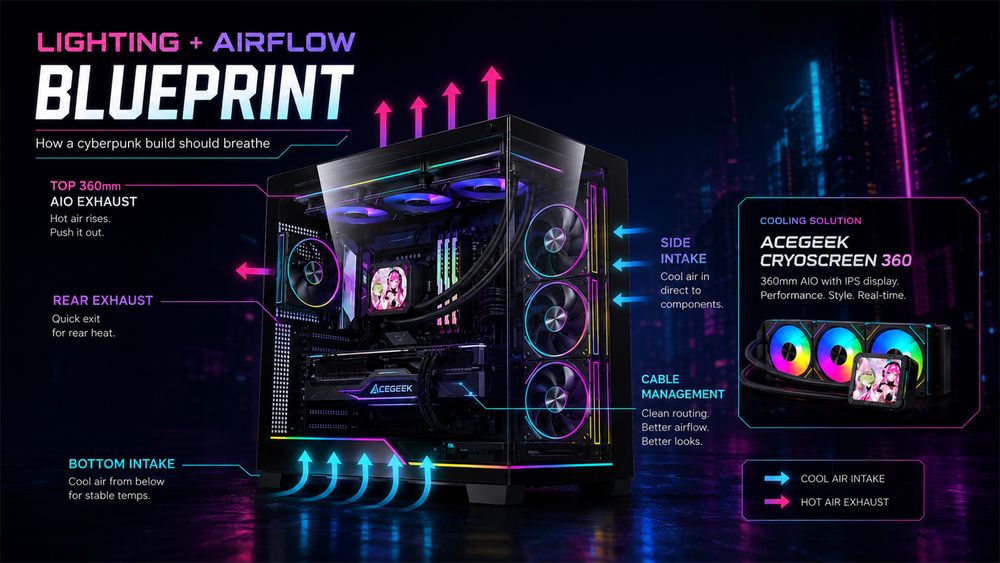
For an AIO-based build, the Cryoscreen 360 water cooling unit makes contextual sense because a 360 mm liquid cooler fits the visual language: display surface, tubing, symmetry, and a colder industrial look. It also supports the kind of themed interface that works in a cyberpunk gaming PC setup. Think fake diagnostic readouts, not dancing cartoons.
A basic airflow map should look like this:
ZoneRecommended DirectionCyberpunk Build NoteBottom fansIntakeCreates underglow and feeds GPU fresh airSide fansIntakeGood for seaview cases and visible ARGB effectsTop radiatorExhaustKeeps CPU heat moving out without fighting natural riseRear fanExhaustStabilizes pressure and prevents heat pocketsCable chamberHidden airflow pathDo not pack unused cables against vented panels
Positive pressure is usually the safer bet: slightly more intake than exhaust, with dust filters maintained. That means fewer dust leaks and cleaner glass over time. If you want a grimy dystopian look, add texture through lighting and decals, not actual dust choking the radiator.
The Visual System: Make It Look Like a Machine With a Past
A custom cyberpunk PC case needs story. I do not mean lore paragraphs taped to the side panel. I mean visual evidence.
Use asymmetry. Add a warning-label accent. Put one lighting zone behind the GPU, one under the case, and one near the radiator or pump head. Then stop. Restraint looks expensive.
Good cyberpunk PC build details include:
Matte black or gunmetal base color
Cyan, violet, red, or amber lighting
Black cable extensions with one accent stripe
Vertical GPU only if airflow remains sane
Frosted diffuser strips instead of exposed LED dots
Small decals, serial numbers, caution marks, or barcode labels
Dark desk surface with one bright peripheral accent
This is also where the room matters. A PC on a bad desk is like a supercar parked behind a dumpster. Acegeek’s Gaming Desk category fits naturally because the desk becomes part of the cyberpunk gaming PC setup: cable routing, monitor height, underglow visibility, and the way the case is framed in the room.
And yes, I would rather have a midrange GPU in a coherent setup than a flagship GPU sitting in a lazy rainbow box. Performance wins benchmarks. Taste wins memory.
How to Build a Cyberpunk PC Without Wasting Money
The best cyberpunk PC build ideas usually come from constraints. Pick the case. Pick the palette. Pick the performance target. Then buy parts.
Do it in this order:
1. Choose the Resolution
1080p, 1440p, or 4K decides the GPU. Everything else follows.
For 1080p, do not pretend you need the most expensive card on the shelf. Spend more on the case, cooling, and storage. For 1440p, target a strong mid-high GPU and 32 GB RAM. For 4K path tracing, accept that the GPU budget will dominate the build.
2. Lock the Case and Cooling Layout
If you want a glass-heavy build, map the airflow before you buy the fans. Bottom intake plus side intake plus top exhaust is a reliable starting point for many modern display cases.
3. Pick a Two-Color Lighting Rule
My rule: one “city glow” color, one “system warning” color, and darkness everywhere else.
Example palettes:
Theme NameMain ColorAccent ColorBest Case FinishNight City ClinicCyanSurgical whiteWhite or silverMaelstrom AlleyRedIce blueMatte blackArasaka BlacksiteDeep redGold/amberBlack glassNeon RainVioletCyanBlack or gunmetalToxic MarketAcid greenMagentaBlack with minimal RGB
4. Use Storage Like a Professional
A 70 GB game install is not large anymore. It is normal. Use at least a 1 TB NVMe SSD, but 2 TB is the better comfort point for Cyberpunk 2077, Phantom Liberty, capture files, mods, Steam cache, and Windows updates. Nothing kills the mood like uninstalling games every Friday night.
5. Do Not Cheap Out on the PSU
A cyberpunk PC build does not forgive unstable power. Use a reputable 80 PLUS Gold unit with enough headroom for GPU spikes. For high-end cards, 850 W is often the sane floor; for flagship builds, 1000 W may be cleaner depending on the GPU and CPU.
FAQs
What is a cyberpunk PC build?
A cyberpunk PC build is a gaming computer designed around dystopian sci-fi aesthetics, controlled neon lighting, exposed high-performance hardware, dark industrial materials, and strong cooling, usually inspired by Cyberpunk 2077, Blade Runner-style city visuals, and high-tech urban design rather than random RGB decoration.
In practical terms, it combines a glass or display-focused PC case, ARGB cooling fans, dark cable management, a strong GPU, NVMe storage, and a limited color palette such as cyan/violet, red/blue, or amber/black.
How do I build a cyberpunk PC?
To build a cyberpunk PC, choose your target resolution first, then select a case with strong visibility and airflow, install performance parts that match your gaming goals, control the RGB palette to two main colors, and finish the build with clean cables, themed lighting, and thermal testing.
Start with the case and cooling layout before buying cosmetic extras. A good cyberpunk PC build guide should always treat airflow, GPU clearance, radiator support, and cable hiding as part of the theme.
What case is best for a cyberpunk themed PC build?
The best case for a cyberpunk themed PC build is a glass-forward ATX or M-ATX case with strong airflow, clean cable routing, long GPU clearance, radiator support, and enough visible interior space to show lighting depth without making the build look overcrowded.
Cases such as Acegeek’s Nebula Pro or Mercury R425X RGB work well because they support large GPUs, visible lighting zones, and liquid-cooling layouts that suit a neon RGB PC build.
Is Cyberpunk 2077 a good benchmark for a gaming PC setup?
Cyberpunk 2077 is a strong benchmark for a gaming PC setup because its ray tracing, path tracing, dense city scenes, DLSS support, large asset streaming demands, and heavy GPU workload expose weak graphics cards, poor airflow, insufficient VRAM, and unstable frame pacing quickly.
It is not the only benchmark you should use, but it is one of the most useful real-world stress tests for a Cyberpunk PC build because the game’s visual identity matches the build theme.
How much RAM do I need for a Cyberpunk 2077 PC build?
A Cyberpunk 2077 PC build should use 32 GB RAM for a modern gaming setup, even though lower settings can run with less, because ray tracing, background apps, Windows overhead, game updates, mods, browsers, Discord, and capture tools make 16 GB feel increasingly tight.
CD PROJEKT RED lists 24 GB RAM for Ray Tracing: Overdrive at 4K/60 FPS, so 32 GB is the cleaner and more common real-world buying choice.
Final Thoughts: Build the Machine, Not the Mood Board
A cyberpunk PC build should feel engineered, not decorated.
Start with a real performance target. Choose a case that supports the parts instead of fighting them. Use lighting like a cinematographer, not a teenager with a remote control. Keep the palette tight. Keep the airflow honest. And before buying the next RGB accessory, ask one ugly question: does this make the machine look more dangerous, or just more expensive?
Ready to build? Start by choosing your case, cooling path, and two-color lighting rule, then map your parts around the Cyberpunk 2077 performance tier you actually want to play.