How to Measure AIO Clearance Before Ordering a PC Case
A case page that says "supports 360mm radiator" tells you where an AIO cooler's mounting holes are. It does not tell you whether the radiator, its fans, the tubes, the memory and the graphics card can occupy the chassis at the same time. For anyone ordering cases, whether for a single build, an office rollout or stock for resale, a wrong assumption means a return, a rebuild or a batch of cases that cannot take the intended cooler. Measuring AIO clearance comes down to three checks: the radiator's footprint in its mount position, the stack depth it adds above the motherboard or in front of the GPU, and the room the tubes and pump need. This guide explains which numbers to collect, how to calculate margins, and what to ask the case maker when a figure is missing.
What Does AIO Clearance Include?
AIO clearance is the total usable space a case gives an all-in-one liquid cooler once the radiator, fans, fittings, tubes and the neighbouring components are all installed. It is not one number. It combines the radiator's length, width and thickness against the mount's limits, the stack depth against whatever sits beside it, and the tube and pump geometry.
Support is also stated per position. NZXT's radiator mounting guide lists several of its cases that take a larger radiator in the front than in the top, so a listing that reads "420mm supported" may apply to one location only. Before measuring anything, write down the exact mount position you intend to use. If you want a broader checklist alongside this measurement method, ACEGEEK's guide to AIO radiator compatibility and case fit covers the same ground at a higher level.
Step 1: Compare the Radiator's Real Dimensions With the Mount Limits
Use the cooler maker's dimensional specification, never the nominal size. The "360mm" label comes from three 120mm fan positions, and the radiator body is longer because of its end tanks. NZXT's Kraken Elite specification page lists the Kraken Elite 360 radiator at 401 × 120 × 27 mm. ACEGEEK's explanation of why an AIO radiator is longer than 360mm compares several published models in the 394–401mm range.
Then find the case's limit for the same position, in all three dimensions. Fractal Design's Summit radiator support page, modified on 2 September 2026, is a useful example because it publishes length, width and thickness for each position. For a top-mounted 360mm radiator it lists a 404mm maximum length, 135mm maximum width and 63mm maximum thickness including fans.
Run the Kraken Elite 360 against those limits:
Length: 404 − 401 = 3mm spare.
Width: 135 − 120 = 15mm spare.
Thickness: 63 − (27 + 26) = 10mm spare, using the 26mm thickness NZXT lists for the included F120P fans.
On the single-radiator limits, it fits. The same Fractal page then shows why one position can have several sets of limits. It lists a maximum simultaneous combination of a 360mm radiator in the top, a 360mm in the front and a 120mm in the rear, and gives recommended top maximums of 398mm length, 122mm width and 30mm thickness for that combination. Against the 398mm figure, the 401mm radiator is 3mm over. The page does not say whether that 30mm figure includes fans, so a buyer planning that layout would need to ask. Front-mount limits on the same page also change depending on whether the lower air guide is fitted, from 40mm maximum thickness with the guide to 65mm without it.
The lesson for ordering: the limit that applies is the limit for your configuration, not the headline number.
Step 2: Calculate Radiator and Fan Stack Depth
Stack depth is the distance the cooling assembly extends from its mounting surface into the chassis. A working formula:
Stack depth = radiator thickness + fan thickness + hardware allowance + service margin
Fan thickness varies, so use the exact fan model. The Kraken Elite example above is 27mm plus 26mm, or 53mm, not the 52mm you get by assuming 25mm fans. A 38mm radiator with 25mm fans reaches 63mm, which would match the Summit's top limit exactly and leave nothing for screw heads, pads or tube bends. That 63mm figure is an illustration of the arithmetic, not a statement about a specific cooler. ACEGEEK's article on how radiator thickness breaks otherwise compatible builds tabulates more combinations, including push-pull, where a second fan layer adds its full thickness again.
A thicker radiator is not automatically the better purchase. Extra thickness can add fin depth and coolant volume, but it also adds airflow restriction, installed depth and routing difficulty. NZXT's mounting guide makes a related point: radiator size and fan setup affect cooling more than mount position, and a 360mm radiator in the front outperforms a 240mm in the top. For a tight case, a larger, slimmer radiator in a clear position is often the safer choice than a thicker one wedged against memory. That is a conditional judgment. A thick radiator with strong static-pressure fans in a roomy case with generous top offset can still be right, and none of the sources reviewed for this article included a controlled thick-versus-slim test.
Step 3: Measure the Space Above the Motherboard for Top Mounts
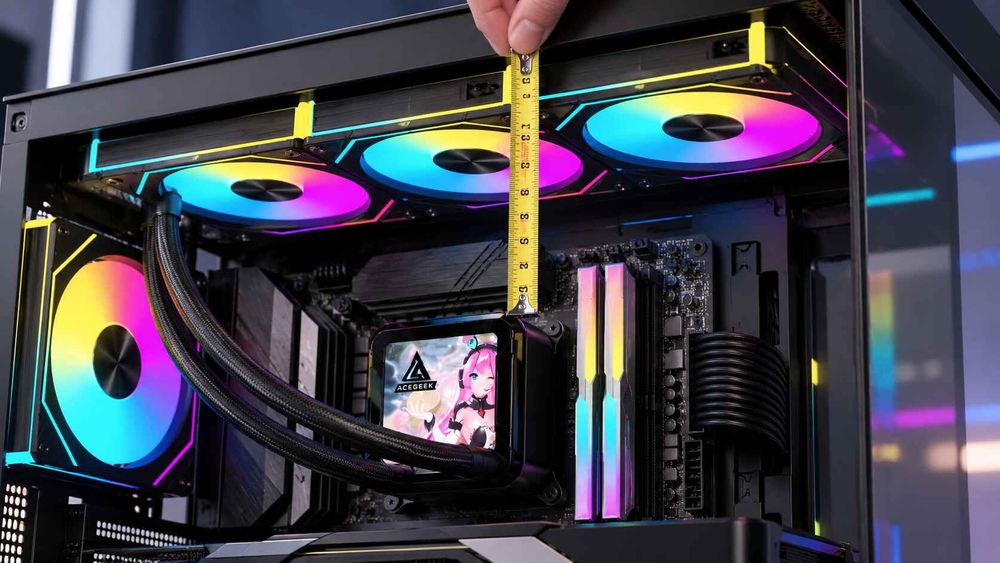
A top-mounted radiator usually fails in the band above the motherboard, where memory, VRM heatsinks, EPS power connectors and fan headers share the space. Stack depth alone does not decide the outcome. The case's mounting offset, meaning how far the roof rails sit from the board, determines whether the fan frame hangs over the DIMM slots or beside them.
If you own a sample case with the motherboard installed, measure from the surface where the fan frame will sit down to the top of the tallest part beneath it, then compare that gap with your stack depth. If you are ordering blind, you need three published or requested figures: the top offset, the exact memory module height, and the board's top-edge heatsink height. ACEGEEK's top-radiator clearance guide describes RGB memory kits reaching roughly 42–45mm, against about 31–35mm for low-profile modules, so memory choice can change the result as much as radiator thickness does.
If a top radiator collides, the options run from least to most disruptive: an offset bracket or alternate position from the case maker, shorter memory, a slimmer radiator or slim fans (which change airflow and noise), or moving the radiator to the front and re-checking the GPU.
Step 4: Subtract Only What Enters the GPU's Path
A front radiator takes space from the graphics card's length axis. A top radiator usually does not. The formula, as set out in ACEGEEK's GPU and radiator clearance math for tight cases, is:
Usable GPU length = published case clearance − radiator − fans − bracket − reserve margin
In that guide's illustrative example, a 340mm case with a 30mm radiator, 25mm fans, a 5mm bracket and a 10mm reserve leaves 270mm. If the fans sit outside the card chamber, the same case leaves 295mm.
The common error is double-counting. ACEGEEK's piece on the GPU clearance measurement buyers miss with a front radiator shows the effect with a hypothetical 400mm published clearance. If that figure assumed an empty front mount, installing a 27mm radiator with 25mm fans removes 52mm. If the figure already included 25mm front fans, the radiator adds only 27mm. Always ask under what conditions the case maker measured its GPU number. Also use the exact GPU model, because board-partner cards often differ in length and thickness from reference designs, and leave room on the width axis for the power cable.
Step 5: Check Tubes, Pump Height and Serviceability
Tubes need room to leave the end tank without a tight bend, and the pump determines which positions are valid at all. NZXT's guidance is that the highest point of the radiator should sit above the pump cap, because air collects at the highest point in the loop, and it does not recommend bottom-mounting an AIO radiator. A mount that clears every component but puts the radiator below the pump fails the check regardless of millimetres.
Finally, simulate service. Can you remove memory without detaching the radiator? Can the GPU latch be reached? Can fans be replaced without disturbing the loop? These are fit questions, not afterthoughts.
Clearance Worksheet: What to Measure for Each Mount Position
Mount positionPrimary limiting zoneFigures to collectTypical mistakeTopMemory, VRM heatsinks, EPS cable, fan headersRadiator thickness, fan thickness, top offset, RAM height, board top-edge heatsink heightChecking length only and ignoring depth over the DIMM slotsFrontGPU length axis, power-cable spacePublished GPU clearance and its test conditions, radiator and fan depth, bracket intrusion, exact GPU lengthSubtracting the full stack twice, or not at allSideTube bend, panel clearance, card width, intake volumeChamber depth, radiator position limits, tube exit directionAssuming preserved GPU length means preserved airflowRearSmall radiators onlyLength, width and thickness limit for that positionExpecting more than a 120mm or 140mm radiator to fitBottomPump position, floor and GPU clearancePump-versus-radiator heightMounting an AIO below the pump because it physically fits
This table is a qualitative planning aid. The figures for each cell must come from the case and component makers, not from the table.
Does a Positive Margin Mean It Will Fit?
Not necessarily. A margin calculated from published numbers is a paper margin. It excludes sheet-metal tolerance, fitting protrusion, cable bend and the hand room needed to install and later service parts.
ACEGEEK's guides apply practical rules rather than standards. Its radiator guides prefer 5–10mm of spare space where the radiator sits near memory, heatsinks or cables, and its GPU worksheet treats 20mm or more as comfortable, 5–9mm as risky and 1–4mm as paper compatibility only. These are planning preferences, not industry requirements, and some builds work with less. Treat them as a way to decide which combinations to confirm with the manufacturer before ordering.
The axis with the smallest margin decides the outcome. A radiator with 15mm of width margin and 3mm of length margin has 3mm of margin.
What to Specify and Ask Before Ordering
For a single build, the parts list is enough: case model and mount position, radiator dimensions and fan thickness, exact RAM model, motherboard model and exact GPU model. For batches, integrators and distributors, add three habits.
Check against the worst-case part. If your bill of materials allows more than one memory kit, motherboard or GPU, measure against the tallest, longest and thickest option, not the most common one.
Rank the evidence. A dimensional drawing or manual for your configuration is stronger than a spec table, and a spec table is stronger than product photos.
Dry-fit a sample before the volume order. One unit with real parts installed settles top offset, tube reach and service access in minutes.
When a case maker does not publish a figure, send the exact part numbers and ask for the figure in your configuration: top offset, the GPU limit with the intended radiator and fans installed, and whether published limits include fans. A specific question usually gets a more useful answer than "will it fit?"
What Should You Verify Before Placing the Order?
Confirm four things. The case lists support for your radiator size at your chosen position. The radiator's real length, width and thickness fit that position's limits in your configuration. Stack depth clears your memory and motherboard hardware. The GPU still enters and leaves without removing the radiator, and the radiator sits above the pump. If any axis has under a few millimetres of margin, treat it as unconfirmed and get it checked.
Frequently Asked Questions
What is AIO radiator clearance?
AIO radiator clearance is the usable space for the radiator, fans, fittings and tubes after nearby components are installed. It includes radiator length, width and thickness against the mount limit, plus space above the motherboard, in front of the GPU, and for tube routing.
How do I check whether an AIO fits a case I have not bought?
Collect the radiator's dimensions and fan thickness from the cooler maker, the case's limits for your exact mount position, and the dimensions of your RAM, motherboard and GPU. Calculate margins on each axis, then ask the case maker to confirm any tight combination.
How much clearance margin should I leave?
There is no industry standard. Builder guides commonly suggest 5–10mm near memory and heatsinks, and more along the GPU axis. Treat any combination within a few millimetres on one axis as unconfirmed and verify it with the manufacturer before ordering.
Does a front radiator always reduce GPU clearance?
Only when the radiator or fans enter the card's length path. Some cases place fans outside the main compartment, and some published GPU limits already include front fans. Subtract only the additional intrusion, plus bracket and reserve margin, not the full stack by default.
Why does one 360mm AIO fit one case but not another?
The "360mm" label describes the fan layout. Cases differ in length, width and thickness limits per mount position, in top offset and in internal accessories. The same cooler can pass one case's limits and exceed another's, even when both advertise 360mm support.
Can I mount an AIO radiator at the bottom of the case if it fits?
NZXT does not recommend it. Bottom mounting places the radiator below the pump, so air can collect in the pump housing, causing noise, weaker cooling and a shorter pump life. Physical fit does not override the pump-height rule.