Top-Radiator Clearance Explained: RAM, Tubes, and Motherboard Space
The Spec Sheet Lie Builders Keep Paying For
Clearance is math.
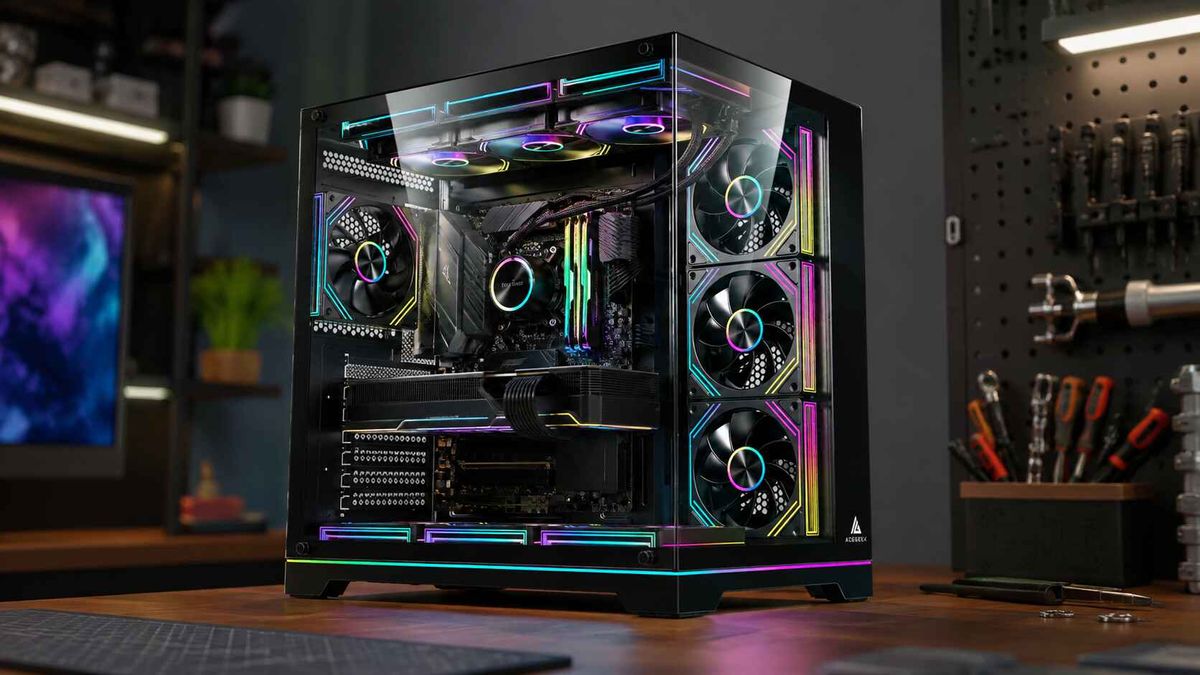
A case can claim “top 360mm radiator support” and still become a mechanical argument between the radiator, 25mm fans, tall DDR5 heat spreaders, EPS power cables, VRM heatsinks, fan screws, and AIO tube exits once the motherboard is actually installed. So why do we keep treating one line on a product page as permission?
I have seen this mistake too many times in build planning: someone buys the case first, buys the AIO second, then discovers the radiator technically fits but the fans press into the RAM latches, the tubes kink against the rear exhaust fan, or the motherboard’s top heatsink sits exactly where the radiator tank wants to live.
That is not bad luck. That is bad reading.
AIO radiator clearance is the real vertical and lateral space available between the top fan/radiator mounting rail and the tallest parts on the motherboard side of the build. It includes the radiator, fans, screw heads, tube fittings, EPS cable bend, RAM height, and motherboard heatsink height. The keyword is available, not advertised.
Acegeek’s own PC case buying guide gets one thing right that many product pages bury: case size, cooling support, fan support, and compatibility all have to be read together. A radiator mount is not a guarantee. It is an invitation to measure.
Why Top-Mounted AIOs Fail: RAM, Tubes, and Board Furniture
Top-mounted radiator clearance usually fails in three places: RAM, tube routing, and motherboard heatsinks. Not the radiator length. Not the fan screw pattern. The failure happens in the ugly three-dimensional space that marketing photos avoid.
RAM Height Is the First Collision Point
Standard bare or low-profile DDR5 modules often sit near the 31–35mm range, while RGB memory kits can climb into the 42–45mm zone. That difference sounds tiny until a 52mm radiator-plus-fan stack is hanging above the DIMM slots.
Here is the hard truth: radiator RAM clearance is not just about whether the RAM physically touches the fan. It is about whether you can install, remove, and service the memory without tearing half the cooling system apart.
Noctua’s public clearance documentation for air coolers is useful because it exposes the same geometry problem PC builders face with top radiators. The company states that the NH-D15 allows 32mm RAM clearance in default dual-fan mode, and moving the fan up by 5mm allows 37mm RAM but also requires 5mm more case clearance, according to Noctua’s RAM clearance FAQ. Different cooler type, same lesson: every millimeter you “gain” somewhere gets charged somewhere else.
Tube Routing Is Where Neat Builds Become Dumb Builds
AIO tube routing gets treated like a style choice. It is not.
If the tube fittings exit near the rear of the top radiator, they may crash into the rear exhaust fan, the EPS 8-pin cable, or the upper-left VRM heatsink. If the fittings exit toward the front, the tubes may sweep across tall RAM or fight the front-panel cable bundle. And if the tubes are too tight, the pump block can rotate into an awkward orientation that makes the whole build look like it lost a wrestling match.
I will be blunt: a clean tube curve matters more than a perfectly symmetrical radiator photo. A mild loop is good. A forced bend is a warning. A kink is a failed build.
Motherboard Heatsinks Are Getting Taller Because CPUs Are Getting Hungrier
Modern motherboards are not flat boards anymore. They are heat-spreader cities.
VRM heatsinks, I/O shrouds, M.2 shields, debug displays, and reinforced PCIe hardware all create local height conflicts. High-end Z790, X670E, X870E, and B850 boards often bring larger heatsinks because power delivery is no longer a boring background detail.
Why? Look at the CPU numbers. Intel lists the Core i9-14900K at 125W Processor Base Power and 253W Maximum Turbo Power on its official Core i9-14900K specification page. AMD lists the Ryzen 9 7950X at 170W default TDP, 95°C Tjmax, and says a liquid cooler is recommended for optimal performance on its Ryzen 9 7950X product page. That heat does not disappear because the case has tempered glass and RGB.
Acegeek’s Understanding TDP guide is a useful internal read here because TDP is not just a CPU shopping number. It affects cooler choice, case pressure, motherboard behavior, fan curves, and whether a top radiator gets enough room to actually work.
The Clearance Stack: Stop Measuring Only the Radiator
Most builders ask, “Will a 360mm AIO fit?”
Wrong question.
The better question is: “Will my full cooling stack fit above this exact motherboard and RAM kit with enough room for cables and tube movement?”
Here is the field math I use before approving a top-mounted AIO plan.
Part of the StackTypical Number to CheckWhy It MattersMy Blunt RuleRadiator thickness27mm, 30mm, 38mm, or thickerAdds directly to top clearance demandThick radiators punish compact casesFan thicknessUsually 25mm, sometimes 30mmFans often collide before the radiator doesNever ignore fan depthScrew head / washer space1–3mmSmall, but realCount it when clearance is tightRAM height31mm standard, 40mm+ RGBTall RAM is the classic top-radiator trapLow-profile RAM saves buildsVRM / I/O heatsink heightBoard-specificOften conflicts with radiator tanks or tubesCheck photos and dimensionsEPS cable bend10–20mm practical spaceThe 8-pin cable needs room to curveDo not crush power cables for aestheticsService gap5–10mm minimum preferredLets you remove RAM, clean fans, and avoid vibrationZero-gap builds age badly
The industry loves to advertise length: 240mm, 280mm, 360mm, 420mm. Length sells. But top mounted radiator clearance is usually lost in depth and offset, not length.
That is why I like product pages that publish several compatibility values, not just one. Acegeek’s Photon, for example, lists E-ATX/ATX/M-ATX/ITX motherboard support, 185mm max CPU cooler clearance, top 120mm ×3 / 140mm ×2 fan support, and top 360mm AIO support. That gives a builder more context than a lonely “360mm supported” badge.
The LunarisFlow goes further with top 420mm/360mm AIO support, 180mm CPU cooler clearance, and top/side/bottom fan support. I am not saying every build needs that much case. I am saying serious thermal builds benefit from options.
Case Support Does Not Mean Motherboard Support
This is where buyers get tricked.
A PC case can support a top 360mm radiator in the chassis frame while your specific motherboard blocks the practical installation. The case manufacturer may have tested with a thinner board layout, lower RAM, or different tube position. Your build may not match that test condition.
The motherboard matters because the top edge of the board is crowded. EPS connectors sit there. VRM heatsinks sit there. Fan headers sit there. RGB headers sit there. And on some boards, the I/O cover rises like a wall exactly where the radiator tank wants to sit.
So yes, motherboard heatsink clearance is part of AIO cooler clearance.
And no, “ATX compatible” does not answer the question.
Acegeek’s motherboard buying guide is a useful supporting read because it separates entry, mid-range, and high-end board expectations. The hidden clearance lesson is simple: the more aggressive the motherboard tier, the more likely it is to bring larger heatsinks and shrouds near the top radiator zone.

The Industry Already Knows Heat Density Is the Problem
Desktop PC builders act like clearance problems are hobby drama. The infrastructure world treats them as economics.
Reuters reported in March 2026 that Ecolab agreed to buy CoolIT Systems for about $4.75 billion, citing demand for liquid cooling in AI data centers and higher chip densities, in its report on the CoolIT acquisition. That is not a gaming forum argument. That is capital moving toward thermal control.
The U.S. National Renewable Energy Laboratory explains that Power Usage Effectiveness, or PUE, measures total data center power divided by IT equipment power, and notes that typical average PUE can sit around 1.8 while efficient facilities often target 1.2 or less in its data center efficiency explainer. Cooling is not decorative at that scale. It is the bill.
Now shrink the problem.
A desktop case is a tiny thermal facility with worse instrumentation, worse airflow modeling, more glass, more dust, and an owner who may have chosen parts because the lighting matched. Is it any surprise that “PC case radiator clearance” keeps turning into a support-ticket topic?
How to Measure Radiator Clearance Before You Buy
Do this before checkout. Not after delivery.
Step 1: Add the Radiator and Fan Thickness
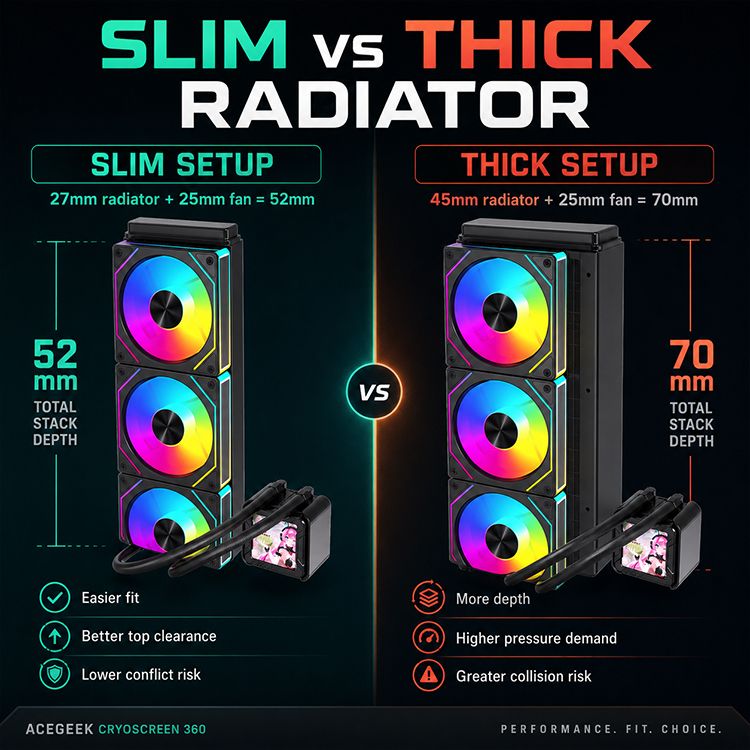
Take the radiator thickness and add fan thickness. A common setup is 27mm radiator + 25mm fan = 52mm. A thicker radiator or performance fan can push that toward 60mm or more.
Then add a few millimeters for screw heads, vibration pads, manufacturing tolerance, and sanity.
Step 2: Check the Case’s Top Offset
Top offset is the distance between the radiator/fan mounting position and the motherboard plane. This is the number many case pages do not publish clearly. When it is missing, study build photos, installation manuals, and user images.
If the top mount sits directly above the DIMM slots with little lateral offset, tall RAM becomes dangerous. If the radiator is offset toward the side panel, you get more breathing room.
Step 3: Measure RAM Height
Search the exact RAM kit model. Not the brand family. Not “Vengeance DDR5” in general. The exact SKU.
If your kit is 42mm tall and your case has a tight top mount, assume conflict until proven otherwise. Low-profile RAM is boring. Boring works.
Step 4: Inspect the Motherboard’s Top Edge
Look at the VRM heatsink near the CPU socket, the rear I/O shroud, the EPS cable location, and any top-edge headers. Big heatsinks are not bad. But they must be accounted for.
Step 5: Plan Tube Direction Before Installation
Do not wait until the radiator is screwed in to think about tube routing. Decide whether the tubes should exit front or rear, then check whether that path fights RAM, rear exhaust, EPS cables, or the pump block orientation.
For compact cases, Acegeek’s small-case thermal analysis makes the right broader point: density, cable paths, and airflow routing are not minor details when watts are packed into a smaller enclosure.
Top Radiator vs Front Radiator: The Practical Trade-Off
Top mounting is popular because it usually exhausts CPU heat directly out of the case and keeps the pump below the highest point of the loop. Front mounting often gives the radiator cooler intake air but may dump CPU heat into the GPU zone and reduce GPU clearance.
There is no universal winner. There are only trade-offs.
Mount PositionBest Use CaseMain RiskClearance ProblemTop radiatorBalanced gaming/workstation buildsRAM, VRM, EPS cable conflictVertical stack over motherboardFront radiatorCPU-heavy workloads needing cooler intake airWarmer GPU intake airGPU length and tube reachSide radiatorShowcase or dual-chamber casesTube bend and panel airflowWidth and cable chamber spaceBottom radiatorRarely ideal for AIOsPump orientation and air migration riskGPU and floor clearance
This is why the Acegeek Darkfate Mini Mesh is interesting from a planning angle: it lists top 240/280mm AIO support and front 360mm AIO support. That tells a builder the case is not pretending every radiator belongs in the roof. Sometimes the smarter AIO path is front-mounted, especially in M-ATX and ITX territory.
But I still prefer top exhaust when the clearance is honest. It keeps the CPU heat path predictable and avoids feeding radiator-warmed air into a hungry graphics card. Predictable beats pretty.
My Rule of Thumb: Leave a Finger, Not a Prayer
I do not trust zero-clearance builds.
If the fan frame kisses the RAM heatsink, the build is not “tight.” It is compromised. If the EPS cable must be flattened to close the side panel, the build is not clean. It is forced. If the tubes press against a heatsink, the build is waiting for vibration, wear, or a future maintenance headache.
AIO radiator clearance should include a usable service gap. I want enough space to remove RAM, route the EPS cable without stress, and avoid fan vibration against nearby parts. In real builds, 5–10mm of breathing room can separate a nice installation from a cursed one.
And yes, I know some builders make tighter systems work.
Some people also drive with the fuel light on for 30 miles. That does not make it a strategy.
FAQs
What is AIO radiator clearance?
AIO radiator clearance is the total usable space a PC case provides for the radiator, fans, screws, tubes, RAM height, motherboard heatsinks, and cable bends without physical conflict. It is not only radiator length; it is the real three-dimensional installation room around the top, front, or side radiator mount.
For top-mounted AIOs, the key danger zone is above the motherboard. The radiator stack may fit the roof, but the fans can still collide with tall RAM, VRM heatsinks, or the EPS cable near the CPU socket.
How do I measure top mounted radiator clearance?
Top mounted radiator clearance is measured by adding radiator thickness, fan thickness, screw allowance, RAM height, motherboard heatsink height, and cable-bend space, then comparing that stack against the case’s real top-mount offset. The safest method is to verify both the case specifications and real build photos using your exact motherboard and memory class.
Do not rely on “top 360mm support” alone. A 360mm radiator length tells you fan pattern compatibility; it does not prove vertical clearance over the DIMM slots or lateral clearance beside the rear I/O shroud.
Will a top radiator fit with tall RAM?
A top radiator may fit with tall RAM only when the case has enough vertical clearance, enough side offset from the motherboard, and enough room for the fan frame to avoid the DIMM heat spreaders. RGB RAM above roughly 40mm should be treated as a clearance risk in compact or narrow cases.
The safer move is to use low-profile RAM when planning a top-mounted AIO. Tall memory can work, but it reduces margin and makes future service more annoying.
Does motherboard heatsink clearance matter for AIO coolers?
Motherboard heatsink clearance matters for AIO coolers because top radiators and fan frames sit directly above the motherboard’s upper edge, where VRM heatsinks, rear I/O shrouds, EPS connectors, and fan headers often live. A case may support the radiator length while a tall heatsink blocks the actual installation.
High-end motherboards are more likely to have large heatsinks. That does not make them bad boards, but it means builders must check physical spacing before buying the case and cooler.
Is a 360mm AIO always better than a 240mm AIO?
A 360mm AIO is not always better than a 240mm AIO because radiator size only helps when the case has enough clearance, airflow, fan control, and tube routing space to use it properly. A cramped 360mm top mount can be louder, harder to service, and more awkward than a clean 240mm or 280mm installation.
For many gaming systems, a well-fed 240mm or 280mm AIO in a sensible airflow path beats a forced 360mm installation with bad clearance. Bigger is not automatically smarter.
What is the safest AIO tube routing?
The safest AIO tube routing is a smooth, unforced curve that avoids sharp bends, RAM contact, rear fan interference, EPS cable pressure, and pump-block strain. The tubes should reach naturally without twisting the pump housing or pressing against motherboard heatsinks, fan blades, glass panels, or sharp metal edges.
Plan tube direction before screwing the radiator down. If the tubes look stressed during a dry fit, change the orientation or radiator position before final assembly.
Final Thoughts: Measure First, Then Build
Do the clearance audit before buying the case, cooler, RAM, or motherboard.
Write down your radiator thickness, fan thickness, RAM height, motherboard model, top-mount support, tube exit direction, and EPS cable path. Then compare those numbers against real case dimensions and real build photos. Start with Acegeek’s PC case buying guide, cross-check thermal demand with the TDP explainer, and only then choose between a compact option, a mesh-first layout, or a larger case like the LunarisFlow.
My advice is simple: stop asking whether the radiator fits. Ask whether the whole cooling system fits without lying to yourself.