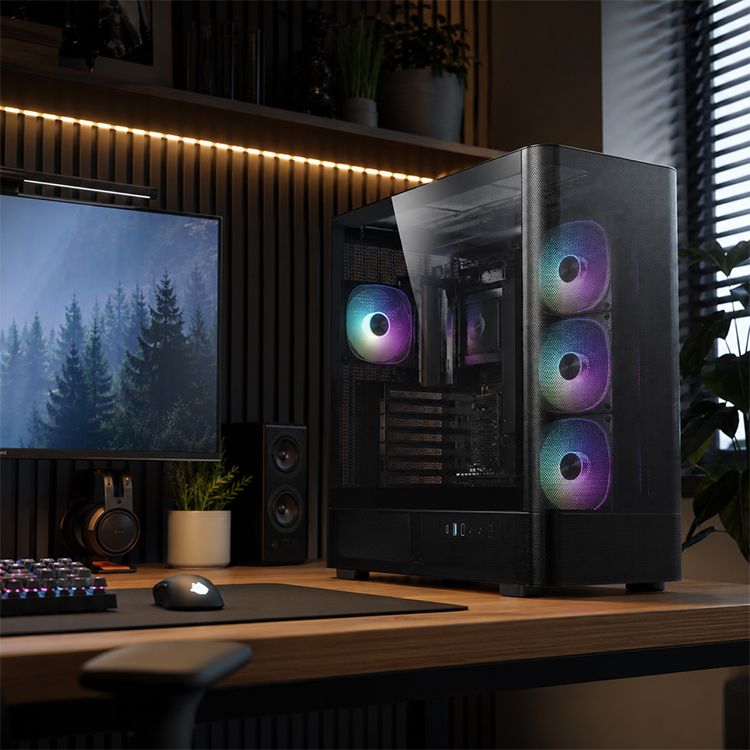
How to Measure CPU Air Cooler Clearance for Your Case
The 10 mm Mistake That Turns a Clean Build Into a Parts Return
Specs lie softly.
I have watched builders spend three nights comparing fan curves, RGB headers, copper heat pipes, nickel-plated cold plates, aluminum fin stacks, LGA1700 brackets, AM5 offset mounts, and “250 W TDP” claims, then lose the entire build because nobody checked whether a 158 mm tower cooler had enough room behind a slightly bowed tempered-glass side panel. Why is the boring measurement always the one that gets skipped?
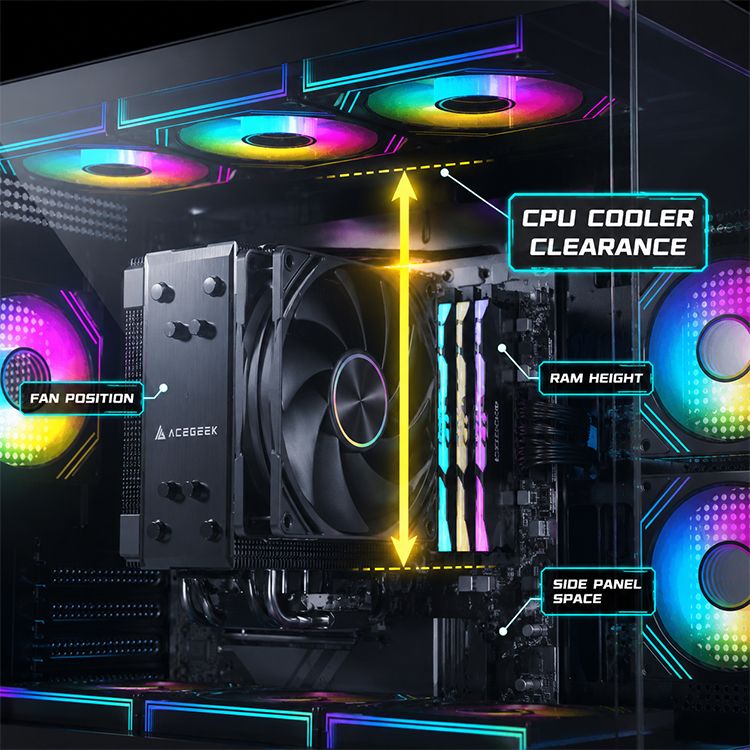
CPU cooler clearance is the maximum usable height your PC case gives an air cooler, measured from the top of the CPU package area to the inside of the closed side panel. The keyword is usable. Not advertised. Not guessed. Not “probably fine.”
And yes, I’m going to be blunt: a build that clears by 1 mm is not a successful fit. It is a future rattle, a side-panel scrape, or a fan-height compromise waiting to happen.
Before you buy, open the Acegeek PC case collection and compare the case’s listed “Max CPU Cooler Clearance” against the real cooler height from the Acegeek CPU cooler lineup or the cooler maker’s product page. Then subtract a safety margin. That last part is where amateurs and careful builders separate.
What CPU Cooler Clearance Really Means
CPU cooler clearance is not the same as CPU socket compatibility. A cooler can support Intel LGA1700, Intel LGA1851, AMD AM4, or AMD AM5 and still fail inside your case because the tower is too tall, the front fan sits too high over RAM, or the side panel does not close without pressure.
The industry loves one-line compatibility claims because they sell parts faster.
I don’t trust them.
Intel’s own explanation of Thermal Design Power makes clear that TDP is a design target for the thermal solution, not a magical guarantee that every cooler behaves the same in every chassis. That matters because CPU air cooler clearance is a physical limit, while CPU temperature is a system result. They are related, but they are not the same thing.
Here is the hard truth: a good air cooler that barely fits can perform worse than a slightly smaller cooler with cleaner intake, better exhaust, and a fan that does not have to be shoved upward to dodge tall DDR5 memory.
A cooler is not floating in a lab. It is trapped inside a pressure box with a GPU, cables, filters, glass, dust, and heat.
The Measurement You Actually Need
Do not measure from the motherboard tray. Do not measure from the case floor. Do not measure from the outside of the side panel. Those numbers make people feel productive while telling them almost nothing.
Measure from the top of the CPU’s integrated heat spreader area to the inner surface of the closed side panel path. If the motherboard is already installed, you can use the installed CPU or socket area as the reference. If the build is not assembled yet, use the case manufacturer’s maximum CPU cooler height as the starting number, then sanity-check it against the cooler’s published height.
Simple rule.
If the case says 165 mm max CPU cooler clearance and the cooler is 165 mm tall, I would not buy that pairing unless I had builder photos proving it closes cleanly. A side panel needs space. A fan frame can sit proud. Rubber pads add thickness. Manufacturing tolerance exists. Tempered glass does not care about your spreadsheet.
My Working Formula
Use this:
Safe CPU air cooler height = case max CPU cooler clearance - RAM/fan height increase - side-panel tolerance - 3 to 5 mm service margin
That sounds conservative because it is. Conservative fitment prevents ugly rebuilds.
Noctua’s RAM clearance FAQ is one of the better public examples of why this math matters. The NH-D15 allows 32 mm RAM clearance in its default dual-fan setup, and raising the front fan can improve RAM clearance, but Noctua warns that this also increases total cooler height. Remove the front fan and cooling capacity can drop by 1–3°C depending on the build.
That is the entire clearance problem in one manufacturer note: gain space in one direction, pay for it somewhere else.
Clearance Math: What to Write Down Before Buying
Here is the checklist I use before calling a CPU cooler case compatibility match “safe.”
Measurement PointWhat to CheckWhy It MattersMy Minimum Comfort ZoneCase max CPU cooler clearanceExample: 155 mm, 160 mm, 165 mm, 170 mmSets the hard vertical limitCooler should be 3–5 mm shorterCooler listed heightExample: Noctua NH-D15 at 165 mm class, many dual towers near 155–165 mmIncludes heatsink and default fan positionMust include fan, not heatsink onlyRAM heightLow-profile DDR5 often near 31–35 mm; RGB kits often 40–45 mmTall RAM can force front fan upwardCheck fan-over-RAM clearanceSide panel typeSteel panel, acrylic, flat glass, bowed glassInterior panel shape changes real roomAvoid pressure contactMotherboard socket areaVRM heatsinks, I/O shroud, first DIMM slotLarge board furniture can block towersCheck motherboard compatibility tooService margin3–5 mmNeeded for dust, vibration, tolerances, panel flexMore is better
A 160 mm cooler inside a 165 mm case sounds safe. Usually, it is. But a 165 mm cooler inside a 165 mm case is not “perfect.” It is a bet.
And I do not like betting with tempered glass.
The Five-Step Field Method for Measuring CPU Air Cooler Clearance
Step 1: Find the Case’s Listed Maximum CPU Cooler Height
Start with the case page. Look for “Max CPU Cooler Clearance,” “CPU cooler height,” or “CPU air cooler clearance.”
Acegeek case pages list clearance in millimeters on product spec sections, and the broader PC case buying guide correctly treats CPU cooler clearance as part of case selection, not as a footnote. That is how it should be. A PC case is not just a shell with lighting. It is the geometry that decides whether the cooler gets to exist.
Step 2: Confirm the Cooler’s Total Height With Fan Installed
Cooler height must include the mounted fan. This matters most on dual-tower coolers such as the Noctua NH-D15, DeepCool AK620, Thermalright Peerless Assassin 120 SE, be quiet! Dark Rock Pro 5, and similar 120 mm or 140 mm tower designs.
Do not trust photos. Product images hide fan offset beautifully.
If the maker lists “height with fan,” use that number. If it only lists heatsink dimensions, keep looking. A missing fan-height number is not a small detail. It is the detail.
Step 3: Check RAM Clearance Before You Celebrate
Tall DDR5 is the quiet troublemaker.
Low-profile memory is usually easy to live with. RGB memory can turn an otherwise clean tower cooler fit into a forced fan lift. The fan rises 5 mm to clear the heat spreader, and suddenly your 160 mm cooler is effectively 165 mm. That can kill a build in a 165 mm case.
This is why the full PC part compatibility checklist is worth reading before buying parts separately. Compatibility is not a green checkmark. It is a chain.
Step 4: Account for the Side Panel, Not Just the Spec Sheet
Side panels are not all equal. Steel can flex. Acrylic scratches. Tempered glass can sit closer than expected depending on the frame, gasket, hinge, latch, and panel contour.
I have seen builders say, “It fits,” when what they mean is, “The glass closes if I push it.” That is not fitment. That is stress.
If the cooler cap or fan clip touches the side panel, you may get vibration noise, pressure on the motherboard, or a panel that closes today and rattles after six months of heat cycles.
Step 5: Leave a Service Margin
Leave 3–5 mm when possible. More if the case is cheap, the side panel is glass, the cooler uses raised fan clips, or the RAM is tall.
This is not luxury space. It is working space.
A build you cannot clean, reseat, service, or close without force is a bad build even if it boots.
Air Cooler vs AIO Clearance: Stop Mixing the Two
CPU air cooler clearance is mostly vertical height from the socket area to the side panel. AIO clearance is a different monster: radiator length, radiator thickness, fan thickness, tube exit direction, motherboard heatsink height, RAM height, EPS cable routing, and top/front/side mount offset.
Different problem. Same laziness.
If you are comparing air cooling against liquid cooling, read the top-radiator clearance guide before assuming a 240 mm or 360 mm AIO is automatically easier. A tower air cooler may need 155–170 mm of vertical space, while a top-mounted AIO may need 52–65 mm of radiator-plus-fan stack depth above the motherboard. Neither option is free.
My opinion: air cooling is more honest for many builders because the clearance problem is visible. AIO clearance problems hide in tube routing, motherboard heatsinks, and fan screws until you are already irritated.
Why Cooler Height Alone Still Does Not Predict Real Cooling
Cooler height tells you whether the cooler can fit. It does not tell you whether the CPU will run cool, quiet, or stable.
That is where marketing starts getting slippery.
A tower cooler with six 6 mm heat pipes, two 120 mm fans, and a dense fin stack may look stronger than a smaller model, but inside a weak airflow case it can recycle warm GPU exhaust and lose the advantage. A giant cooler inside a sealed glass box is often just expensive metal moving stale air.
The cooler spec sheet reality check makes the right point: cooler performance is a system problem. CPU die heat, IHS contact, thermal paste, heat pipes, fin density, fan curve, case intake, exhaust path, room temperature, and motherboard power settings all matter.
Noise matters too. The CDC’s NIOSH guidance says the recommended exposure limit for occupational noise is 85 dBA averaged over an eight-hour workday in its noise-induced hearing loss guidance. Your PC is not a factory floor, obviously. But the lesson still lands: cooling that solves temperature by screaming is not elegant engineering. It is panic with LEDs.
The Practical Buying Rules I Actually Trust
If you want the clean version, here it is:
Buy the case first if you are unsure. Then pick the cooler.
That is backward from how many people shop, but it works. Case width and CPU cooler clearance decide your air-cooling ceiling. A narrow case with 155 mm clearance rules out many large dual-tower coolers. A case with 165 mm clearance opens more options. A case with 170 mm or more gives you room to handle taller fans, RAM offset, and less-than-perfect tolerances.
For mainstream Ryzen 5, Ryzen 7, Core i5, and non-insane Core i7 builds, you often do not need the largest tower that physically fits. For Intel Core i9-14900K, Core Ultra 9 285K, Ryzen 9 7950X, or Ryzen 9 9950X under sustained Blender, HandBrake, Unreal Engine shader compilation, or 4K export workloads, clearance is only the first question. The second question is whether the case can feed the cooler clean air for 20 minutes, not 20 seconds.
That is where buyers get fooled.
They compare maximum CPU cooler height, ignore airflow, and then wonder why the same cooler behaves differently in two cases.
A Realistic Clearance Example
Let’s say your case lists 165 mm maximum CPU cooler clearance.
You are considering a dual-tower cooler listed at 160 mm height. Your DDR5 kit is 44 mm tall because the RGB light bar looked nice on the store page. The cooler’s front fan needs to move up 4 mm to clear the RAM.
Now your effective cooler height is around 164 mm.
Technically, it may fit. Practically, I would not love it. You have roughly 1 mm left before panel contact, manufacturing tolerance, fan pad thickness, or a slightly imperfect install ruins your day.
A better choice would be a cooler around 155–158 mm, lower-profile RAM, or a case with 170 mm clearance. Boring answer. Correct answer.
FAQs
What is CPU cooler clearance?
CPU cooler clearance is the usable vertical space inside a PC case for an air cooler, measured from the CPU socket area to the inside of the closed side panel, including the heatsink, mounted fan, fan clips, RAM-related fan offset, and a small safety margin for tolerance and vibration.
In normal buying terms, compare the case’s maximum CPU cooler height against the cooler’s total height with fans installed. If the case lists 165 mm and the cooler is 160 mm, you likely have a workable fit. If both are 165 mm, I would treat it as risky.
How do I measure CPU air cooler clearance?
To measure CPU air cooler clearance, measure from the top of the installed CPU heat spreader area to the inner surface of the side panel path, then subtract any fan lift caused by tall RAM and leave 3–5 mm for safety, panel tolerance, vibration, and future service access.
If the system is not built yet, use the case manufacturer’s maximum CPU cooler clearance as the first number. Then verify the cooler’s total height, RAM height, and motherboard layout before buying.
How much extra CPU cooler clearance should I leave?
A safe CPU cooler clearance margin is usually 3–5 mm beyond the cooler’s listed total height, because fan pads, raised fan position, side-panel shape, manufacturing tolerance, and minor installation differences can turn a technically compatible cooler into a tight, noisy, or panel-contacting build.
For example, I like a 160 mm cooler in a 165 mm case far more than a 165 mm cooler in a 165 mm case. The first pairing gives breathing room. The second pairing asks the side panel to be perfect.
Will a 165 mm CPU cooler fit in a case with 165 mm clearance?
A 165 mm CPU cooler may fit in a case with 165 mm listed clearance, but it is not a safe fit unless the cooler height includes the exact fan position, the side panel has no inward contour, RAM does not raise the fan, and verified builder photos confirm clean closure.
My advice is simple: do not buy a zero-margin fit unless you enjoy returns. Pick a shorter cooler, lower-profile RAM, or a wider case.
Does RAM height affect CPU cooler clearance?
RAM height affects CPU cooler clearance when the cooler’s front fan overhangs the DIMM slots, because tall memory can force the fan upward, increasing the cooler’s total installed height and potentially causing side-panel contact even when the heatsink itself appears to fit the case specification.
This is common with large dual-tower coolers and RGB DDR5. Low-profile memory can save a build. Tall light-bar memory can quietly steal the last 5–10 mm you thought you had.
Is CPU cooler case compatibility only about height?
CPU cooler case compatibility is not only about height; it also includes socket bracket support, motherboard VRM heatsinks, RAM height, fan position, PCIe slot spacing, airflow direction, rear exhaust alignment, side-panel clearance, and whether the case can remove CPU heat without forcing loud fan speeds.
Height is the first gate. Airflow is the second. Serviceability is the third.
Final Thoughts: Measure First, Then Spend
Here is my blunt closing advice: never buy a CPU air cooler because the internet said it is “the best” without checking your case clearance first.
Open the case spec page. Find maximum CPU cooler height. Open the cooler spec page. Find total height with fan installed. Check RAM height. Subtract fan lift. Leave 3–5 mm. Then decide.
If you are building with Acegeek hardware, start with the case and cooler categories, cross-check the PC case guide, and use the compatibility checklist before you commit money. Do the boring measurement now, because the expensive mistake is never dramatic at checkout. It becomes dramatic when the side panel will not close.
Measure twice. Buy once.