The Real Impact of Case Size on Cooling Performance
The Uncomfortable Truth: Size Is Not Airflow
Size lies often.
I’ve seen oversized towers with terrible computer case airflow lose to compact mATX builds simply because the smaller case had direct intake, cleaner cable routing, and fans that pushed air where the GPU actually needed it instead of where the product photo looked impressive. So why does the industry still sell “bigger equals cooler” like it is a law of physics?
Here is the hard truth: PC case cooling performance is not controlled by volume alone. It is controlled by pressure, restriction, heat density, fan placement, panel design, and whether hot air gets trapped near the graphics card. A full tower with a glass front and weak side vents can cook hardware. A compact case with bottom intake and a short GPU air path can punch far above its size.
Intel has been blunt about this for years. In its Thermally Advantaged Chassis Design Guide, Intel targeted a processor cooling inlet temperature of 40°C, a 5°C or lower rise from external ambient, and emphasized vent placement, rear exhaust, and airflow balancing rather than raw case volume.
That is the part most buyers miss. The box size gives you opportunity. It does not give you cooling.
If you are still choosing a chassis, start with AceGeek’s PC case collection and then read the PC case size and compatibility guide. The useful question is not “full tower or mid tower?” It is “where does the GPU get its first clean air?”
Bigger Cases Win Only When They Use the Space Properly
A bigger PC case usually gives you more margin: more fan mounts, more radiator support, more GPU clearance, more cable-management room, and less ugly component crowding. That matters. But margin is not performance until the layout uses it.
Take the modern heat problem. Intel lists the Core i9-14900K at 125 W Processor Base Power and 253 W Maximum Turbo Power, with a 100°C Tjunction. NVIDIA lists the GeForce RTX 5090 Founders Edition at 575 W Total Graphics Power, 90°C maximum GPU temperature, and a 1000 W required system power guideline. Put parts like that in a case with poor intake geometry and you are not building a gaming PC. You are building a countertop oven with RGB.
The best PC case size for cooling is usually the smallest size that can still provide:
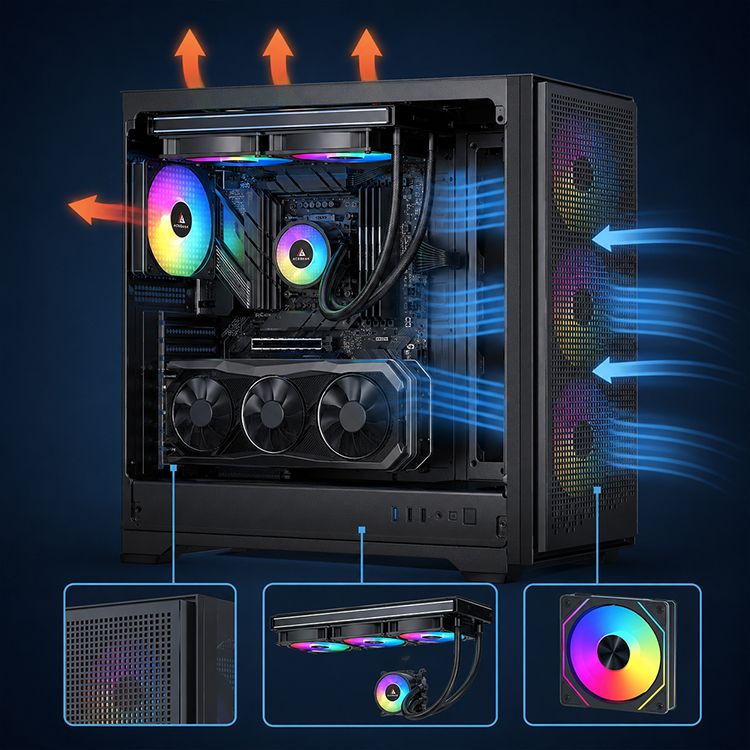
Direct intake to the GPU
Enough CPU cooler or radiator clearance
A clean exhaust path
No cable wall in front of intake fans
Fan mounts that match the heat source, not just the spec sheet
Dust filters that do not choke airflow after three weeks
But here is where I get opinionated: mid tower vs full tower cooling is over-discussed. A good mid tower beats a lazy full tower every day. Full towers are useful for E-ATX boards, 420 mm radiators, custom loops, multi-drive workstations, and giant GPUs. For most gaming builds, a strong airflow ATX mid tower is the sweet spot.
AceGeek’s CPU cooler lineup and cooling fan category matter here because the case is only one part of the stack. A badly matched cooler inside a roomy case still loses. A fan with weak control inside a tight case gets loud fast.
Case Size vs Cooling: The Real Comparison
Case TypeCooling AdvantageCooling RiskBest FitMy Blunt TakeITX / Small Form FactorShort airflow path, compact desk footprint, direct panel-fed GPU designs can work wellHigh heat density, fewer fan mounts, cable clutter can block intake fastPortable builds, efficient CPUs, carefully chosen GPUsBrilliant when engineered, miserable when improvisedMicro-ATXBetter balance of compact size and airflow roomBottom intake may be blocked by PSU shrouds or bad desk placementGaming builds with one GPU and 240 mm / 280 mm coolingUnderrated. Often the smartest practical sizeATX Mid TowerStrong fan support, easier cable routing, broad cooler compatibilityGlass-heavy models can waste the size advantageMost gaming and creator PCsThe default recommendation for serious coolingFull Tower / E-ATXMaximum radiator space, multi-GPU or workstation flexibility, easier maintenanceMore volume does not fix bad intake; can become noisy and expensiveCustom loops, workstation builds, oversized GPUsBuy it for hardware needs, not ego
The industry sells volume because volume is easy to photograph. Air path is harder. You cannot flex pressure balance in a lifestyle render.
The Small Form Factor Trap: Heat Density Punishes Laziness
Small form factor PC cooling is not bad by default. Lazy small form factor cooling is bad.
A compact ITX case can cool well when the GPU sits near a ventilated panel, the CPU cooler has a short exhaust route, and the PSU does not dump heat into the same lane. But once you stuff a 300 W-plus GPU, a hot CPU, a riser cable, tight bends, dust filters, and decorative cable extensions into a low-volume box, every mistake gets amplified.
That is why AceGeek’s article on why small cases struggle with high-TDP hardware fits naturally into this topic. The issue is not “small equals hot.” The issue is “small gives you fewer chances to recover from bad airflow decisions.”
A June 2025 CFD study on gaming desktops tested 14 fan layouts in an ATX case and reported that a three-fan setup could keep the processor and graphics card below 55°C and 82°C respectively, while validating results with 3DMark and HWMonitor. Translation: layout can beat fan-count theater. More fans are not always more cooling.
That matches what I trust in real builds: clean intake first, exhaust second, fan count third.
The GPU Is Usually the Real Cooling Boss
Most airflow advice still treats the CPU like the king of the case. That made sense when CPUs were the obvious furnace and GPUs were smaller. Not anymore.
In gaming workloads, the graphics card often dumps the largest sustained heat load into the chassis. Open-air GPUs do not politely send heat out the back. They throw it into the case, where it mixes with CPU exhaust, motherboard VRM heat, SSD heat, and PSU warmth. Then users wonder why the GPU hotspot climbs while the CPU temperature looks “fine.”
This is where AceGeek’s CPU cooling and GPU airflow guide gets the right framing: CPU and GPU cooling are not the same job. The CPU cooler needs a predictable escape path. The GPU needs first access to fresh intake air.
Noctua’s airflow guide makes the same basic physics plain: low temperatures require a continuous stream of cool air supplied to components while warm air exits at nearly the same rate; it also notes the noise trade-off as airflow and RPM rise.
So stop asking only, “How many fans does this case support?” Ask the uglier question: “Will those fans feed the GPU or just decorate the panel?”
The Panel Problem: Mesh, Glass, and Marketing Smoke
Heat wins first.
I know glass cases sell because people buy with their eyes, but front-panel restriction is one of the fastest ways to ruin PC case cooling performance, especially when the build uses a high-power GPU and a radiator that already warms intake air. Isn’t it strange how many “premium” cases hide the most important thermal weakness behind beauty shots?
Front mesh is usually the safer bet for high-TDP gaming PCs. Tempered glass can work, but only when the case has serious side intake, bottom intake, or oversized fan support. Otherwise, the builder pays twice: first for the pretty case, then for extra fans to compensate for the pretty case.
AceGeek’s front mesh vs tempered glass case design breakdown is worth placing near this section in the article because it catches the trade-off buyers actually face: appearance versus intake resistance.
And yes, 4-pin PWM control matters more in restrictive cases. AceGeek’s 3-pin vs 4-pin fan guide explains why PWM fans offer more precise temperature-based control. In a roomy airflow case, that is nice. In a compact case, it is survival.
My Rule for Choosing the Best PC Case Size for Cooling
Here is my buying rule, stripped of politeness: choose the case size that gives your GPU clean air, your CPU a clean exit, and your cables somewhere to disappear.
For a gaming PC, I would rather run a well-vented ATX mid tower with three strong intakes and one clean exhaust path than a full tower with a sealed front panel and six confused fans. For a workstation with long rendering loads, heavy storage, and a 360 mm or 420 mm radiator, I move larger. For small form factor, I only trust layouts that prove where the GPU breathes.
Intel’s own overheating support page lists symptoms like lower-than-expected CPU frequency, throttling evidence, excessive fan noise, and system shutdowns. That is the end of the airflow chain. First the case fails quietly. Then the fans get loud. Then clocks drop. Then the owner blames the cooler.
Texas Instruments’ processor lifetime paper is not about gaming desktops, but the reliability lesson transfers: junction temperature drives semiconductor wear mechanisms, and the paper notes the rough electronics rule that every 10°C rise can approximately halve capacitor lifetime, with semiconductors showing a similar pattern at high temperatures. It also projects a 2x useful-lifetime increase when effective processor temperature is managed at 90°C instead of 105°C.
That is why “technically safe” temperatures do not impress me. A system can be safe, loud, dusty, throttling under long loads, and badly designed all at the same time.
FAQs
Does PC case size affect cooling performance?
PC case size affects cooling performance by changing available airflow paths, fan placement, radiator support, component clearance, and internal heat density, but size alone does not guarantee lower temperatures because intake restriction, pressure balance, cable obstruction, and GPU access to fresh air usually matter more than raw chassis volume.
A larger case gives you more options. It does not automatically create better computer case airflow. A compact case with clean intake can outperform a large case with blocked panels.
Is a full tower better than a mid tower for cooling?
A full tower is better than a mid tower for cooling only when the build uses its extra space for larger radiators, cleaner cable routing, more direct intake, or workstation-grade component clearance; otherwise, a well-designed ATX mid tower can deliver equal or better PC case cooling performance with less cost and noise.
For most gaming PCs, I would start with a high-airflow mid tower. I move to full tower only for E-ATX boards, custom water loops, huge GPUs, or heavy storage.
Do small form factor PCs always run hotter?
Small form factor PCs do not always run hotter, but they have less thermal margin because high heat density, tight cables, fewer fan mounts, and limited cooler clearance make every airflow mistake more severe than it would be inside a larger ATX or E-ATX case.
The best SFF builds are not lucky. They are planned around GPU intake, PSU orientation, cooler height, cable routing, and realistic wattage limits.
How does case size affect GPU cooling?
Case size affects GPU cooling by controlling how much fresh air reaches the graphics card, how much clearance exists around the cooler, and how quickly GPU exhaust leaves the chassis, but panel ventilation and bottom or side intake usually matter more than whether the case is technically small, medium, or large.
For gaming, I treat the GPU as the primary heat source. If the graphics card breathes recycled warm air, the whole build gets louder.
What is the best PC case size for cooling?
The best PC case size for cooling is usually an airflow-focused ATX mid tower because it offers enough fan mounts, radiator support, GPU clearance, and cable room for modern gaming hardware without the unnecessary size, cost, and acoustic problems that can come with oversized full towers.
That answer changes for custom loops, 420 mm radiators, E-ATX motherboards, or compact desk builds. But for most people, good ATX airflow wins.
Final Thoughts: Build Around Air, Not Around Ego
Stop shopping by size category first.
Start with heat load. Check CPU wattage, GPU power, radiator position, fan control, panel restriction, and cable routing before you fall in love with a case photo. Then choose the smallest case that gives those parts a clean thermal path.
If you are planning a new build, compare AceGeek’s PC case options, match the chassis against your cooler from the CPU cooler range, and use the cooling fan lineup to tune the airflow instead of blindly filling every mount.
Your next step is simple: map the GPU intake path before you buy the case. If you cannot explain where the graphics card gets cool air and where that heat exits, you are not choosing a case. You are gambling with thermals.