What Causes PC Case Panels to Rattle?
PC case panels rattle when a panel, or a part touching it, moves or loses contact intermittently while the system runs. The usual triggers are a loose or uneven fastening point, an internal component or cable pressing against the panel, or vibration from fans, pumps, and drives that excites a large flat panel at a particular speed. For professional buyers, the cause matters because a spec line such as steel thickness rarely explains a rattle on its own. Rattle shows up later as returns, negative reviews, and support tickets. This article explains the mechanisms behind panel rattle, how to isolate the source, which fixes work and which ones backfire, and what to specify and test before approving a case design or placing an order.
What Does "Rattle" Actually Mean in a PC Case?
A rattle is a repeated impact or contact between two parts that should be held firmly together. In practice, buyers and builders use the word for four different sounds, and separating them saves time.
Rattle: irregular, sometimes intermittent knocking. It usually means a loose or poorly seated part, or a part touching the panel.
Buzz: a continuous, harsh tone that appears at certain fan speeds and disappears at others. This often points to resonance or chattering contact along a panel edge.
Hum or drone: a low-frequency sound that changes little with fan speed. Mechanical hard drives and pumps are common sources, and the panel may only amplify them.
Tick or click: a short, rhythmic noise. It can come from a fan blade clipping a cable or from a failing drive, and it is not a panel problem. StudbudPC's noise troubleshooting guide treats repetitive clicking from a 3.5-inch hard drive as a reason to back up data immediately.
Each sound has a different fix. Knocking is usually a contact problem, while a buzz in a narrow speed range is a vibration problem. Treating one as the other is a common reason a fix fails.
Why Do Panels Rattle at Certain Fan Speeds?
A panel buzzes at certain fan speeds because the fan's vibration frequency approaches the panel's natural frequency, which is set by the panel's mass and stiffness. Near that frequency, the panel moves far more than it does at lower or higher speeds, and damping becomes the main limit on the movement.
Penn State's forced-response animation of a damped mass-spring system describes three regions. At low driving frequencies, the response is stiffness-controlled. At very high frequencies, inertia limits motion and the response is mass-controlled. Near the natural frequency, displacement depends strongly on how much damping is present. A PC case panel is far more complex than a single mass on a spring, so treat this as a conceptual model rather than a prediction tool. It still explains the three levers available to a designer or builder: change stiffness, change mass, or add damping.
An illustrative calculation shows why fan speed matters. A fan with seven blades turning at 1,200 RPM has a blade-pass frequency of 140 Hz (1,200 ÷ 60 × 7). Blade counts vary by model, and the panel's natural frequencies depend on its size, folds, and mounting, so a real diagnosis needs a speed sweep rather than a formula. If the noise appears only between two RPM values, resonance is a more likely explanation than a loose screw.
Seven Common Causes of PC Case Panel Rattle
1. Uneven Panel Contact and Loose Retention
A removable panel touches the frame at a limited number of points: thumbscrews, latches, hinges, rails, or clips. If one of those points does not load the panel, the panel can move at that location. Tolerance stack-up between the panel, the frame, and the retention hardware often explains why two cases of the same model behave differently.
Users report workarounds that reflect this. One Hardforum thread on Lian Li aluminum case rattle describes pre-tensioning a panel by pressing the top and bottom fully in while pulling the middle out, claiming a difference of under a millimeter removed the buzz. That is one user's experience on one product family, but it illustrates a principle: a slightly preloaded panel is less likely to chatter than one that sits loosely.
2. Large Flat Panels With Thin or Poorly Formed Steel
Thickness is the most-quoted specification, but geometry decides how a panel behaves. For an ideal flat plate, bending rigidity rises with the cube of thickness. ACEGEEK's article on SPCC steel in PC cases calculates that 0.8 mm sheet has roughly 4.1 times the theoretical plate-bending rigidity of 0.5 mm sheet, then cautions that this does not make a complete chassis four times stronger, because folds, stamping, rivets, panel size, and mounting geometry change the real result.
A flat panel with a long unsupported span is the weakest design for rattle. Folded edges, stamped ribs, and shorter spans raise stiffness without adding much mass. ACEGEEK's guide to how steel thickness affects structure, noise, and feel makes the same point: a 0.6 mm panel with rolled edges can feel stronger than a flat, unsupported 0.7 mm sheet. Raising stiffness also raises the natural frequency, which can move a resonance outside the speed range a fan actually uses.
3. Internal Parts Touching or Pressing Against the Panel
A common source of knocking is not the panel at all. Tall CPU coolers, fan clips, tubing, GPU power cables, and cable bundles can sit against the inside of a panel. Level1Techs forum members responding to a rattling side panel suggested exactly this: a wire or coolant tube touching the panel, an unbalanced fan, or hard drive vibration amplified by the case. The original poster also noticed the noise stopped when the panel was removed, which is a useful clue that the panel is either the source or the amplifier.
Clearance is the preventable part. ACEGEEK's guide on how to measure CPU air cooler clearance for your case recommends leaving a 3 to 5 mm service margin, and it warns that a panel that only closes when pushed is under stress, which can later show up as vibration noise. Tall memory that forces a cooler fan upward can consume that margin without the builder noticing.
4. Glass Panel Hardware, Washers, and Over-Tightening
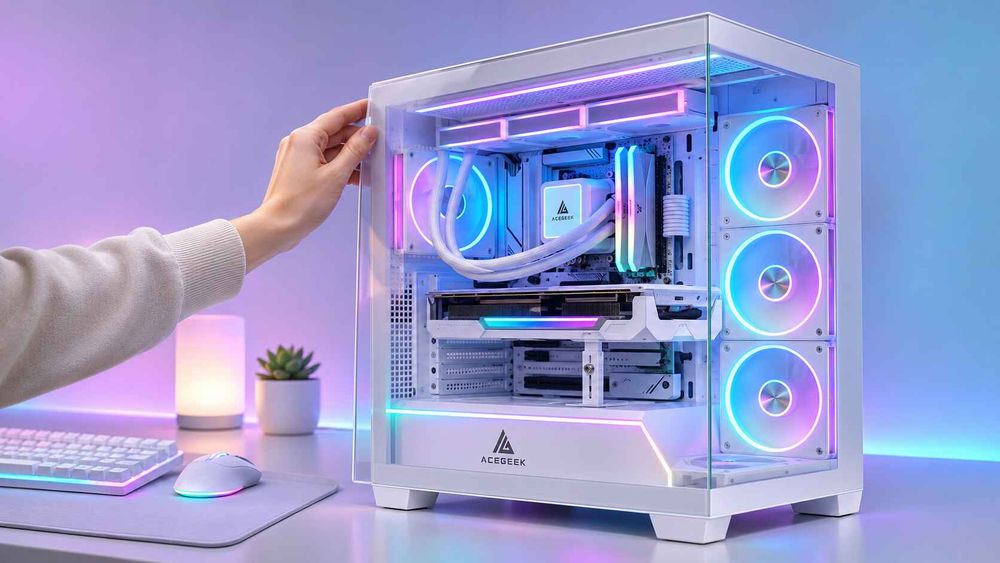
Tempered glass panels rely on washers, pads, brackets, and hinges to separate glass from metal. Missing or compressed isolators let the glass contact the frame. ACEGEEK's tempered glass PC case safety guide advises using the manufacturer's washers and hardware and warns against solving a rattle by tightening screws further, since overtightening can introduce stress around mounting holes. Some general troubleshooting guides recommend tightening panel screws as a first step, so the safe approach is to check alignment and hardware first, then follow the case manual.
The same guide notes that neither 3 mm nor 4 mm glass is universally safer, because mounting design and edge quality matter. For rattle, the practical question is whether the glass is supported evenly and isolated from the metal.
5. Wear and Misalignment in Quick-Release Mechanisms
Tool-free designs trade fastening points for convenience. ACEGEEK's article on the benefits of quick-release PC case panels notes that a loosely attached panel may vibrate at certain fan speeds, that retention hardware can wear or bend, and that missing rubber pads or damaged clips can contribute to rattle. Magnetic retention varies in holding force, and push-pin systems depend on pins staying aligned.
For a buyer, this is a lifecycle question. A panel that is quiet on first assembly may loosen after repeated removals, so retention design and replacement-part availability belong in the specification discussion.
6. Vibration From Fans, Pumps, and Drives
Fans inject vibration into whatever they are mounted to. Rubber fan pads can help, but they do not replace a stiff mounting surface. Pumps and mechanical hard drives add low-frequency energy that thin panels can amplify. A Level1Techs participant described a deep hum as likely hard drive vibration amplified by the case, with damping at the drive mounting point suggested as the remedy.
Airflow design plays an indirect role. ACEGEEK's explanation of how front panel design affects PC case cooling states that a restrictive panel can increase fan noise and raise component temperatures. Because fans on a temperature-based curve ramp up under restriction, a restrictive intake can push them into speed bands they would otherwise rarely reach. That is a reasoned inference, not a measured result, but it means a case with a marginal intake can reveal panel resonance that a better-ventilated case never triggers.
7. Frame Distortion, Coating, and Assembly Variation
Panels cannot sit flat against a bent frame. ACEGEEK's steel thickness article observes that thin rear frames can bend and front corners can deform during shipping, which also affects glass alignment. Paint or powder coating that is thick at a mating edge, burrs, missing foam strips, and inconsistent hardware counts can each prevent a panel from seating uniformly. The SPCC article makes a related point: SPCC is a material designation, not a durability certification, so the grade alone says little about flatness, coating, or assembly quality.
How to Find the Source of a Panel Rattle
Change one variable at a time. This is a practical method, not a standardized test procedure.
Power down and press by hand. With the system off, press and release the panel at several points and at the corners. Movement or a click identifies loose retention before fans add confusion.
Run with the panel removed. If the noise stops, the panel is the source or amplifier. If it continues, look at the fans, pump, drives, or cables.
Sweep fan speed. Set fans to fixed speeds and step through the range. A noise that appears only in a narrow band indicates resonance. A noise at every speed suggests a loose or touching part.
Add light, temporary contact. Press a finger on the panel's center or a suspect cable while the noise is present. If the sound changes or stops, you have located the zone.
Check internal clearance. Look for coolers, tubing, GPU cards, and cables within a few millimeters of the panel. Do not insert improvised objects near electrical parts while the system is powered.
Isolate sources. Briefly disconnect or slow one fan group at a time, or test with a drive removed from its tray if safe, to separate the source from the amplifier.
Test the environment. In the Level1Techs thread, the poster noted that shifting the case slightly on a wooden table sometimes stopped the rattle. Desk and floor contact can couple vibration into the chassis.
Which Fix Works Best: Removing Contact, Adding Damping, or Changing Stiffness?
Fixes fall into three families with different cost, risk, and durability.
Remove the contact. Re-route cables, restore the clearance margin, reseat the panel, and replace damaged clips or washers. This is the cheapest and most reliable approach when the problem is a touching or loose part. It requires that the case design leave sufficient room.
Add damping. Rubber washers, compliant pads, fan isolators, drive grommets, and edge gaskets absorb vibration energy and cut the amplitude near resonance. Damping works well for hum and buzz, but foam or rubber can compress with time, can be omitted during assembly, and adds a small cost to every unit.
Change stiffness or mass. Ribs, folded edges, shorter spans, additional fastening points, or thicker sheet move the natural frequency and reduce movement. This is the most durable solution, but it is a tooling-stage decision. It cannot be retrofitted by the end user, and it carries cost and weight trade-offs.
Thicker steel is the least reliable first move. It adds mass and stiffness, but it does not remove contact, replace a missing washer, or correct a bent frame. A thin panel with good geometry, correct isolators, and a controlled fit can outperform a heavier panel that rattles against a misaligned latch. Thickness is useful when the diagnosis points to a flexible span. It is not a universal remedy.
Why Panel Rattle Is a Specification and Quality-Control Problem
For a distributor, system integrator, or brand buyer, panel rattle is predictable if the specification and test process are designed for it. Most rattle complaints originate from a small set of controllable variables: fit between panel and frame, number and location of contact points, isolators, panel geometry, internal clearance, and shipping protection.
Four checks help reduce risk before volume production:
Test with the full build, not an empty shell. An empty case lacks the mass, cables, GPU, cooler, and radiator that change vibration behavior. Evaluate samples with representative components, including a tall cooler and a heavy GPU.
Run a fan-speed sweep with all panels installed. Idle noise tells you little about resonance bands. Test across the speeds the fan curve will actually use, and note any narrow-band buzz.
Re-test after transit and reassembly. Include a shipping test on packed samples, then reopen and close each panel repeatedly. Panel fit that changes after vibration or repeated removal is a field risk.
Inspect incoming parts. Check panel flatness, edge condition, coating build-up at mating surfaces, and hardware counts for washers, pads, and clips on a sample basis.
What Should Buyers Specify Before Requesting a Quote?
A quotation request that only lists steel thickness and glass type leaves the most important variables open. Include the following so suppliers can price a design that fits your noise and reliability targets.
Panel construction by part: sheet thickness for each panel and the frame, edge folds, ribs, and the unsupported span of the largest panels.
Retention method: thumbscrews, hinges, latches, magnets, or push-pins, with the number of contact points and whether any are preloaded.
Isolation hardware: washers, gaskets, pads, and fan or drive isolators, plus how many are included and how they are attached.
Glass details if applicable: thickness, edge treatment, mounting-hole positions, and bracket type, with a requirement that replacement panels are available for the exact model.
Internal clearance targets: CPU cooler height, GPU length, radiator thickness, and cable space, including a service margin.
Acceptance criteria: the test configuration, fan-speed range, and pass or fail definition for audible rattle, plus any agreed transit test.
Spare parts and support: clips, washers, hinges, and panels for after-sales service, along with order quantity, packaging protection, and delivery schedule.
Ribs and extra fastening points affect tooling and assembly time, while isolators add material and labor per unit. Thicker steel raises material cost and shipping weight. Specifying the target noise behavior up front lets the supplier propose the least expensive design that meets it.
Frequently Asked Questions
Why does my PC case rattle only at certain fan speeds?
A narrow-band rattle or buzz usually means a panel, bracket, or cable is resonating when fan vibration reaches its natural frequency. Changing fan speed, adding damping, restoring clearance, or stiffening the panel moves or reduces that response.
Can a thicker steel side panel stop rattling?
Sometimes, but not reliably. Thicker steel adds stiffness and mass, which can help a flexible panel. It does not fix loose retention, a bent frame, missing washers, or a cable touching the panel. Diagnose the contact and fit first.
Should I tighten the side panel screws more to stop the noise?
Not automatically. Check alignment, washers, and hardware first. Overtightening can stress glass mounting points and misalign the panel. Tighten only as far as the case manufacturer's instructions allow, and replace damaged or missing isolators.
Can a CPU cooler or cable make the panel rattle?
Yes. A cooler fan clip, cap, tubing, or cable bundle pressing near the inside of the panel can knock or buzz as fans and heat cycles change tolerances. A 3 to 5 mm clearance margin helps avoid contact.
Do rubber washers and anti-vibration pads help?
They help when vibration passes through metal-to-metal or glass-to-metal contact. Compliant washers, fan pads, and drive grommets add damping and reduce transmitted energy. They do not correct a bent panel, poor fit, or a part that is touching the case.
How can I tell whether the rattle comes from the panel or from a fan or drive?
Run the PC with the panel removed. If the sound stops, the panel is the source or amplifier. If it continues, test fan speeds, check cable contact, and isolate hard drives or pumps. A repetitive click from a drive needs a backup and inspection.