Why a GPU Can Fit on Paper but Fail During Installation
A graphics card can pass every number on the spec sheet and still fail on build day. The case lists 400 mm of GPU clearance, the card is 350 mm long, and the comparison looks settled. Then a front radiator takes space the listing never counted, the 16-pin power cable presses against the glass, or the cooler's fans end up a few millimeters from the PSU shroud. For system integrators, PC brands, distributors, and procurement teams, these failures mean rework, delayed shipments, and avoidable returns. This article explains why a paper fit and an installed fit are different tests, which measurements decide the outcome, and what to verify before approving a case for a specific GPU.
Why Does a GPU That Fits on Paper Fail During Installation?
A GPU fails during installation when the case's published maximum GPU length is treated as a complete compatibility test. That figure is one measurement, taken under a configuration the manufacturer defines. Installation also depends on card height toward the side panel, card thickness, other hardware sharing the same space, the path the card travels to reach its slot, and manufacturing tolerance.
NVIDIA's own guidance shows how much larger the real envelope can be than the headline length. Its GeForce RTX 5090 specifications page lists the Founders Edition as a 2-slot card, 304 mm long and 137 mm wide. The same page asks builders to provide room for a 3-slot (61 mm) card and to plan an additional 36 mm for power cables. It also states that card specifications vary by add-in-card manufacturer. A single length figure cannot carry that much information.
For a full set of measurements, ACEGEEK's guide to GPU clearance across length, height, and thickness is a useful companion. The sections below focus on the specific places where a paper fit breaks.
Six Places Where a Paper Fit Breaks
1. The Published Length Assumes a Configuration You May Not Use
Case makers do not all measure GPU length the same way. One figure may assume an empty front mounting area. Another may include factory-installed front fans. A third may change if a drive cage is removed. If the listing does not state its conditions, the number cannot be applied to your build without confirmation from the manual, a drawing, or the supplier.
2. Front Radiators and Fans Take Length, but Not Always All of It
A 360 mm AIO radiator is named for the fans it holds, not for its thickness. Radiator thickness varies between models, and fans add their own depth. The amount to subtract from the case's GPU length is the additional obstruction your configuration creates compared with the configuration behind the published figure. Subtracting the full radiator-and-fan stack when the fans were already counted double-counts them. Skipping the subtraction when the stack sits entirely in the GPU's path overstates clearance. ACEGEEK's article on GPU clearance with a front radiator covers the measurement in detail.
3. Width: The Side Panel and the Power Cable
Card height, the connector position, and cable bend room all sit on the axis between the motherboard and the side panel. Unused length at the front of the case cannot compensate for a connector that touches the glass. This is the most common reason a card that passes the length check still blocks the panel from closing. ACEGEEK's guide to GPU-to-side-panel clearance explains how to size that gap for horizontal and vertical layouts.
4. Thickness: Slots, Bottom Fans, and the PSU Shroud
Modern flagship coolers can occupy three or more slot positions. A thick cooler may press against bottom fans, a PSU shroud, a neighboring card, or an anti-sag bracket. NVIDIA's page says that reserving clearance equal to an unused expansion slot will typically improve airflow, which suggests that thickness has a cooling dimension as well as a mechanical one. For thick, long cards, ACEGEEK's article on choosing a PC case for large triple-fan GPUs lists the checks to run.
5. The Installation Path Is Not the Final Position
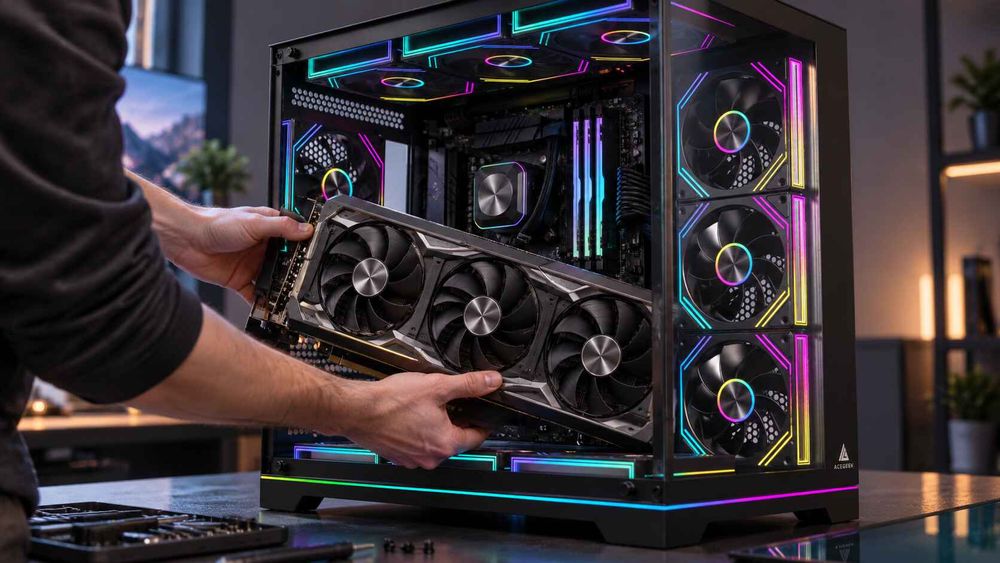
A card has to enter the case, tilt into the slot, and seat against the rear bracket. A frame lip, cable cover, fan rail, or radiator end tank can block that route even when the final position is clear. A gap of a millimeter or two may satisfy arithmetic and still leave no room to insert the card, release the PCIe latch, or remove the card later during service.
6. Orientation Changes the Thermal Result
Vertical mounting moves the cooler's intake face toward the side panel. GamersNexus tested this in a Cooler Master H500M: the GPU core was 44°C over ambient with the card horizontal and with CableMod's inward-offset vertical mount, and 50°C over ambient with the case's stock vertical mount. That is one case and one older card, so it shows direction, not a threshold. A "supports vertical GPU" line in a specification does not tell you where the card ends up relative to the glass. See ACEGEEK's piece on vertical GPU mounting and its thermal trade-offs for the case-selection angle.
Summary of Failure Modes
Failure modeWhat a spec sheet usually showsWhat it can missWhat to verifyLength conflictMaximum GPU lengthWhether the figure includes fans, brackets, or drive cagesMeasurement conditions in the manual or drawingFront radiator stack"Supports 360 mm radiator"Radiator thickness, fan depth, fittings, bracket positionOverlap between the installed stack and the GPU's length axisSide-panel and cable conflictRarely listedCard height, connector location, cable bend roomInternal slot-plane-to-panel distance and the card's exact heightThickness conflictNumber of expansion slotsCooler thickness against bottom fans and PSU shroudCooler thickness and intake gap for the exact cardInstallation pathNot listedFrame lips, rails, and end tanks along the insertion routeDry fit or CAD review on a production sampleOrientation and airflow"Vertical GPU support"Card-to-glass distance and intake pathPanel-on and panel-off thermal test
A Worked Example: One Card, One Case, Three Different Outcomes
The following numbers are hypothetical and chosen to show the arithmetic, not to describe any product. A case lists 380 mm of maximum GPU length. The card is 345 mm long. Compare the length margin under three front-cooling assumptions:
ScenarioAdditional intrusion into GPU lengthUsable GPU lengthMargin for a 345 mm cardA. Published figure assumes an empty front mount; a 27 mm radiator and 25 mm fans sit fully inside52 mm328 mm−17 mm (does not fit)B. Published figure already includes 25 mm fans; the radiator adds 27 mm27 mm353 mm8 mmC. Fans mount outside the main chamber; only 15 mm of the radiator intrudes15 mm365 mm20 mm
The same case and the same card produce a 37 mm swing. Which scenario applies depends entirely on how the case's number was measured and where the cooling parts physically sit. ACEGEEK's clearance math for tight chassis designs extends this approach to brackets and reserve margins.
Does More Length Margin Make the Installation Safe?
Only along one axis. A large length margin is useful, but it is not a general safety factor. Forty millimeters of spare length does not give a connector extra room at the side panel, and it does not widen the gap beneath a thick cooler.
Margin also has a cost. A chassis with more internal room is typically larger, and a larger carton affects freight volume and storage, so specifying more clearance than a product line needs is a commercial trade-off, not a free precaution. Published planning rules of thumb vary between sources, and none of them is an industry standard. The more defensible approach is to set an internal margin rule for assembly, service, and tolerance, then confirm it on a physical sample with the largest card the product line will support. That rule works for the product family it was tested on and should be re-checked when a new GPU generation changes the card envelope.
Cable Clearance Is a Safety Check, Not a Cosmetic One
Power-cable room belongs to the width axis and cannot be borrowed from length. NVIDIA's 36 mm figure applies to the RTX 5090 Founders Edition and is a vendor planning allowance, not a universal case specification. Follow the current instructions from the GPU, PSU, and cable manufacturers for the connector you are using.
Do not use an improvised adapter to solve a tight-panel problem. The U.S. Consumer Product Safety Commission's recall notice for CableMod angled GPU adapters covers about 25,300 units. The firm had received 272 reports of adapters becoming loose, overheating, and melting into the GPU, with at least $74,500 in property-damage claims in the United States and no reported injuries. The recall concerns that specific product, not every angled connector, and it does not show that tight panels caused those failures. It does show why a connector solution should be approved by the relevant vendors rather than discovered during assembly.
How to Verify a Fit Before You Order
Record the exact GPU model. Use the board partner's product page for length, height, thickness, slot count, and connector position. A GPU chip name is not a dimension set.
Read the case's measurement conditions. Find whether the published length assumes empty mounts, installed fans, or a specific drive-cage setup. If it is not stated, ask.
List everything sharing the GPU's space. Include the radiator, fans, brackets, fittings, tubing, drive cages, and any anti-sag support.
Calculate along each axis separately. Length, width, and thickness each need their own margin. Do not merge them into one subtraction.
Check the insertion path. A dry fit or CAD review should show the card can enter, seat, and be removed without disassembling unrelated parts.
Test the worst-case configuration. Run the longest, thickest, highest-power card you intend to support with the side panel closed, and log temperature, clocks, and noise.
What Should Buyers Specify Before Requesting a Quote?
When sourcing cases from a manufacturer or comparing OEM/ODM options, send the supplier a compatibility brief instead of a single GPU length. A complete request makes the answer verifiable.
Target GPU list: exact board models with length, height, thickness, slot count, and connector type.
Cooling configuration: radiator size and thickness, fan depth, mounting position, and whether push-pull is planned.
Panel and orientation requirements: horizontal, vertical, or both; glass, mesh, or solid panels; and the required distance from slot plane to panel.
Cable plan: PSU cable type, connector style, and bend-room requirements.
Support hardware: anti-sag brackets, riser cables, and vertical-mount kits.
Validation expectations: a production sample, internal drawings, and panel-on thermal testing with named GPUs.
Order and delivery details: quantity, target market, schedule, and packaging requirements.
Ask the supplier to confirm each figure on a production sample. Dimensions from renders or similar models should not be assumed to carry over.
Frequently Asked Questions
Why does my GPU fit by length but the side panel will not close?
Length and width are separate axes. The panel can be blocked by card height, connector position, or cable bend room. Extra length margin cannot compensate, so check slot-plane-to-panel distance against the exact card and cable.
Do front fans and radiators always reduce GPU clearance?
No. They reduce usable length only where they overlap the GPU's path beyond what the published figure already includes. Check whether the listing assumes empty mounts or installed fans, then subtract only the additional intrusion.
How much spare GPU length should I leave?
No industry standard exists. Published rules of thumb differ, and the right figure depends on tolerance, installation access, and service needs. Set an internal margin and confirm it on a physical sample with the largest card you plan to support.
Is the GPU model name enough to check compatibility?
No. Board partners build cards on the same GPU with different coolers, lengths, and thicknesses. NVIDIA notes that card specifications vary by add-in-card manufacturer. Use the exact product model's dimensions and connector position.
Can a GPU fit and still run too hot?
Yes. Mechanical fit does not guarantee airflow. A cooler close to glass, a shroud, or bottom fans may receive restricted intake. One GamersNexus test showed a vertical mount near glass running 6°C hotter than the other layouts.
What should an integrator ask a case supplier before ordering GPU-heavy builds?
Ask how GPU clearance was measured, what changes with a front radiator, what the side-panel distance is, and whether a production sample and internal drawings are available for testing with your target GPUs.