How to Choose a PC Case for Large Triple-Fan GPUs
Most builds lie.
I have watched too many people buy a huge graphics card, glance at a marketing photo, see a clearance number that looks generous, and still end up with a card that technically enters the chassis but cooks itself, crushes the 12V-2x6 cable, blocks bottom airflow, or hangs off the PCIe slot like a bent steel bridge.
And then they call that “compatible”?
Stop Trusting the Clearance Number Alone
A PC case for large GPUs is not just a longer box. In practice, it is a chassis with enough real room for the card body, the front fan or radiator stack, the power cable bend, the slot thickness, and one more thing that lazy spec sheets hide: breathing room.
Here is the number that should snap people awake. On its official page, NVIDIA lists the GeForce RTX 4090 Founders Edition at 304 mm long, 137 mm wide, 61 mm thick, with 450 W total graphics power. On the newer side of the market, NVIDIA’s RTX 5090 guidance still tells builders to reserve 304 mm x 137 mm x 61 mm class clearance and even recommends one additional slot of open space in front of the fans for better airflow. That is not a style note. That is the manufacturer telling you the cooler needs room to inhale.
So my rule is blunt. If your triple-fan card is around 300 to 340 mm, I do not believe a case is safe just because the product page says “340 mm GPU clearance.” I want margin. I want fan room. I want cable room. I want the card to live there, not merely squeeze there.
The Fit Test I Actually Use
I keep it simple.
First, I check the GPU’s published length, width, and thickness, not just length. Second, I look at the case’s max GPU clearance and ask whether that figure was measured with front fans only, or with a front radiator installed too. Third, I account for cable bend space, especially with modern high-power connectors. Fourth, I check how many slots the card really eats once the backplate, shroud, and anti-sag hardware are in play.
That is why a plain “PC case GPU compatibility” label tells me almost nothing by itself.
The Math the Box Usually Hides
I do not trust brochure language. I trust subtraction.
If a chassis advertises 360 mm of GPU clearance and you plan to install a front radiator and fans, that published number stops being the working number. It becomes the starting number. Front-mounted cooling hardware can steal dozens of millimeters, and that is before you factor in cable bend and any airflow gap you should leave around the intake side of the card.
Here is the decision table I use before I recommend any triple-fan GPU case to anyone.
What to verifyGood answerRed flagMax GPU length case numberAt least 30-50 mm more than your GPU length for high-end cardsCase clearance matches GPU length almost exactlyGPU thickness / slot useCase gives room for a true 3-slot or 3.5-slot card without crowding bottom fansSpec sheet only mentions “7 slots” with no usable spacing logicPower cable bendSide panel closes without pressing into the 12V-2x6 or adapterCable must fold sharply against glass or steelFront cooling hardwareClearance is confirmed with your planned radiator and fan stackClearance only works in the bare-case configurationAir path to GPU fansFront, side, or bottom intake can feed the card directlyDecorative glass dominates intake areaAnti-sag supportThere is physical room for a bracket or pillarBottom fan layout leaves no room to support the card
That table looks obvious. It is not. Most buyers skip half of it, then act shocked when a “best PC case for long graphics cards” shortlist turns into a thermal penalty box.
Airflow Kills Bad Choices Faster Than Length Does
Pretty cases fail.
That is my rude opinion, and I stand by it, because the moment you move into 450 W to 575 W-class graphics cards, the old habit of buying around glass, RGB, or vibes starts looking childish. AceGeek’s own PC case size and clearance guide gets the first principle right: the case is about motherboard fit, cooling support, and GPU clearance, not just external dimensions. Their ocean view vs fish tank case comparison also makes an uncomfortable point many brands would rather blur: dual-glass layouts can restrict airflow and often need more fan planning than buyers expect.
I will go further. If your card is long, thick, and expensive, you should favor an airflow case for large GPU builds over a visual-first chassis unless the visual-first chassis has unusually smart side or bottom intake. Why? Because once the GPU cooler starts recirculating its own waste heat, your card is no longer fighting only load. It is fighting the case.
And yes, enclosure mistakes can become more than an annoyance. The U.S. Consumer Product Safety Commission recall for NZXT’s H1 case documented 11 reports of circuit boards overheating or catching fire worldwide, including six in the U.S. I am not claiming every clearance mistake becomes a recall. I am saying the “the case is just a shell” argument has always been nonsense.
There is also a money angle, and it is not pretty. In February 2026, Reuters reported that NVIDIA expected a gaming-chip shortage to last until year-end, which is exactly the kind of supply pressure that makes bad buying decisions more expensive, not less. When GPUs are harder to replace, I have even less patience for sloppy case planning.
What AceGeek’s Current Lineup Tells Me About Real Headroom
Some cases talk. Some cases publish numbers.
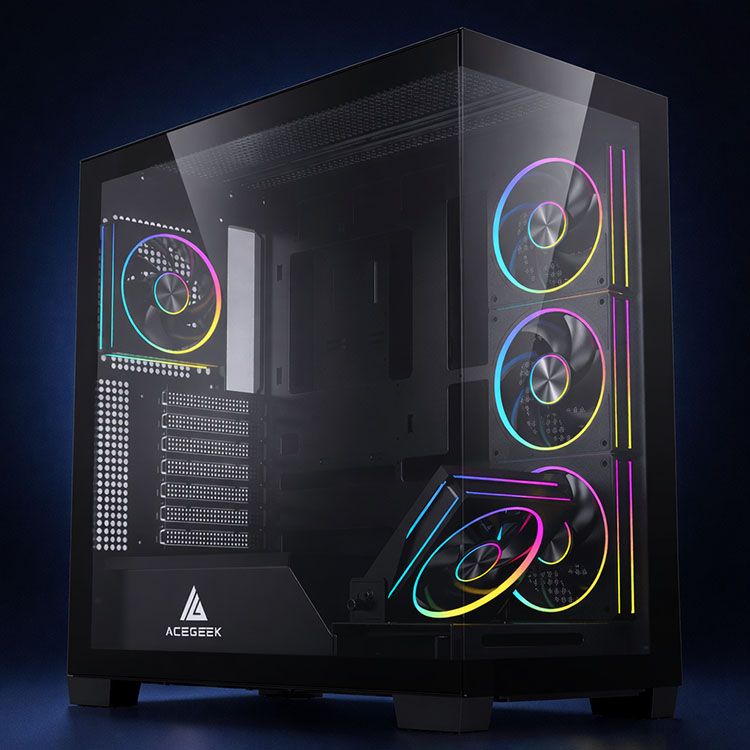
From AceGeek’s current product pages, the Photon E-ATX case lists 420 mm max GPU clearance, the Horizon lists 410 mm, the Echo lists 405 mm, and the smaller Vision M352 comes in at 340 mm. That spread tells you almost everything you need to know about who each chassis is really for.
Here is my read, and I am not going to sugarcoat it.
If You Run a Huge Triple-Fan Card, Buy Margin
The Photon E-ATX case is the kind of number I like for oversized boards because 420 mm gives you room to make mistakes without instantly paying for them. The Horizon at 410 mm is still comfortable for many long cards, especially if your cooling layout is sensible. The Echo at 405 mm stays in the safe zone for a lot of 304 mm-class boards too.
If You Build Small, Stop Pretending Every Card Will Fit
The Vision M352 lists 340 mm GPU clearance, and that number is not fake, but it is the kind of number I treat with suspicion for anyone using a very thick 3-slot or 3.5-slot card, front-mounted cooling hardware, or stiff power leads. On paper, a lot of large cards may sneak under that line. In a finished system, that is where builds start getting dumb.
Motherboard Size Still Matters More Than People Admit
A big GPU problem often starts as a board-planning problem. If you pick the motherboard badly, you can corner yourself into a smaller chassis class and then spend the rest of the build compensating for a decision that should have been solved first. That is why AceGeek’s motherboard form factor guide belongs in this conversation. Case buying begins with platform geometry, not aesthetics.
The Four Mistakes I See Every Week
Three-word truth: buyers guess.
They guess because the industry keeps selling the fantasy that a “max GPU length case” figure is a complete answer, when it is really one line in a larger fit equation that also includes slot thickness, intake path, cable bend behavior, PSU shroud layout, and support hardware geometry.
Why do we keep pretending otherwise?
1. They measure only the card body
A case for 3-slot graphics card has to account for more than the rectangular body. Backplates, shrouds, adapters, and side-panel pressure all matter. I have seen builds where the GPU body fit and the power connector did not. That is not compatibility. That is denial.
2. They forget the anti-sag plan
Heavy cards need support. Period.
AceGeek’s GPU support bracket guide says the quiet part out loud: the right bracket depends on case clearance, airflow lane, and contact point under the card. I agree. A bad bracket can block bottom fans or load the card in the wrong place, which means your “fix” becomes a second mistake.
3. They confuse “fits” with “runs well”
A GPU that sits 2 mm away from a fan frame or glass panel may fit. It may even boot. But under sustained gaming, rendering, or AI inference, that same build can become louder, hotter, and uglier than the buyer expected. I care less about whether the card enters the case than whether the cooler can breathe once it is inside.
4. They buy around photos, not airflow
Tempered glass is fine. Blind faith is not.
If the front or side intake path is decorative first and functional second, I want proof that the fan plan compensates for it. Otherwise, I keep moving.
What I Would Do Before Buying
I would slow down.
I would check the exact GPU model page, confirm length, width, thickness, and connector requirements, then compare that against the case’s published clearance and fan support. After that, I would read the site’s own PC case size and clearance guide, sanity-check any GPU support plan with the anti-sag bracket guide, and only then choose between a compact build and a forgiving one. That is boring advice. It also saves money.
If you want the blunt version, here it is: for modern high-end boards, I would rather buy slightly too much case than exactly enough. Extra clearance is cheap. Rebuilding a bad decision is not.
FAQs
How do I know if a GPU will fit in a case?
A GPU fits in a case only when the chassis provides enough measured room for the graphics card’s full dimensions, slot thickness, front-mounted cooling hardware, power-cable bend, and a usable airflow gap around the cooler, rather than merely matching the card’s advertised length on a spec sheet.
Start with the exact board model, not the GPU family name. An RTX 4090 from one vendor may be much longer or thicker than another. Then compare that model against the case’s published max GPU clearance and reduce your confidence if the system uses front radiators, thick fan stacks, or tight side panels.
What is GPU clearance in a PC case?
GPU clearance in a PC case is the maximum physical length the chassis can accept for a graphics card under a defined configuration, but in the real world it is only a baseline number because fans, radiators, cables, and support brackets can reduce the usable space dramatically.
That is why I never stop at the published figure. I treat clearance as the opening bid, then I subtract for the cooling layout and check whether the card still has air around it. If not, I move to a bigger chassis.
What is the best PC case for long graphics cards?
The best PC case for long graphics cards is the one that combines generous GPU clearance, direct intake airflow, workable cable routing, and room for anti-sag support, because length alone does not protect temperatures, connector health, or the mechanical load modern heavy boards put on the PCIe area.
On AceGeek’s current pages, the Photon at 420 mm, Horizon at 410 mm, and Echo at 405 mm look materially safer for oversized triple-fan cards than smaller 340 mm-class options when the buyer wants more margin.
Is a 3-slot graphics card harder to fit than a long GPU?
A 3-slot graphics card is harder to fit than many buyers expect because thickness affects bottom-fan access, side-panel pressure, neighboring slot use, and airflow around the cooler, which means a card can clear the front of the case and still be a poor fit once the rest of the system is assembled.
This is where “case for 3-slot graphics card” matters as a separate buying question, not a side note. Thickness changes the entire interior layout. I have seen thick cards ruin otherwise sensible builds more often than merely long ones.
Do glass-front cases work for large triple-fan GPUs?
Glass-front cases can work for large triple-fan GPUs only when the case still provides enough side, bottom, or alternate intake to feed the graphics card properly, because a visually open chamber is not the same thing as a thermally open chamber once the GPU starts dumping hundreds of watts into it.
That is why I tell readers to treat glass-heavy cases as airflow projects, not easy defaults. If the intake plan is vague, the case is wrong for a big card, no matter how good it looks on a desk.
Your Next Move
Do this tonight.
Pull up your exact GPU model page, write down the card’s length, width, thickness, and power connector needs, then compare those numbers against the case you want, not the case you hope will work. If you are shopping inside AceGeek’s catalog, start with the Photon, Horizon, or Echo for more forgiving headroom, and cross-check your plan with the site’s PC case size guide and GPU support bracket guide. I would rather see you buy one size smarter than spend next weekend rebuilding a bad idea.