How Much Space Should You Leave Between a GPU and the Side Panel?
No single gap figure applies to every build. The right clearance depends on which side of the card faces the panel and what has to fit in that space. On a conventionally mounted card, the side-panel gap is mostly a cable and connector problem. On a vertically mounted card, it becomes an intake problem. NVIDIA's own installation guidance for the GeForce RTX 5090 asks builders to plan 36 mm of additional space for power cables, which gives buyers a verified starting point for 16-pin cards. For intake gaps, no standard exists, so the answer has to come from case geometry and testing. This guide explains how to size each gap, where the trade-offs sit, and what system builders, integrators, and case buyers should confirm before committing to a chassis.
What Is the Right GPU-to-Side-Panel Gap?
Direct answer: For a horizontally mounted card with a 16-pin connector facing the panel, leave at least the connector-plus-cable allowance the card vendor specifies, and make sure the panel closes with no pressure on the cable. For a vertically mounted card whose fans face the glass, no published minimum exists. Treat a fan sitting nearly flush against a solid panel as a thermal and noise risk, then confirm the real gap by measuring temperatures with the panel on and off.
Three points shape the rest of this article:
The gap has two jobs. It holds the power cable, and it can feed or starve the cooler's intake.
Only the cable allowance has vendor guidance. The intake gap is a design judgment that varies by cooler, case, and fan layout.
Length clearance does not substitute for width clearance. A card with 40 mm of spare length can still fail if its connector presses into the glass. ACEGEEK's guide to GPU clearance across length, height, and thickness covers the full measurement set.
Cable Clearance: The Part With Actual Numbers
On most modern cards the power connector sits on the top edge, pointing at the side panel. That makes the gap between the card's top edge and the inside of the panel the cable-routing space.
NVIDIA's GeForce RTX 5090 specifications page lists the Founders Edition at 304 mm long and 137 mm wide. Its clearance note asks for room for a 3-slot card (61 mm) and adds a plan for 36 mm (1.4 in) of additional space for power cables. Adding 137 mm and 36 mm gives roughly 173 mm along that axis. That sum is a planning figure derived from NVIDIA's numbers, not a case specification, and it applies to that card. Partner cards are often larger.
The 36 mm figure lines up with connector-maker guidance. CableMod's 12VHPWR cable guide suggests a minimum of 35 mm from the connector before any bend, and warns that bending wires too close to the connector may loosen or misalign terminals. CableMod wrote that guide for the 12VHPWR connector. Check the current guidance from your PSU and cable vendor for the 12V-2x6 variant.
What to verify with the case supplier or in your own measurement:
The internal distance from the motherboard's PCIe slot plane to the inside face of the panel, including any glass standoffs or panel thickness.
The card's actual height as listed by the board partner for the exact model, not the GPU family.
Whether the cable is straight, right-angled, or an adapter, and how much bend room each needs.
Whether the connector can be unplugged without levering against the panel.
Higher-wattage cards make this more acute. ACEGEEK's article on choosing a PC case based on GPU power draw explains why a case with enough length can still be incompatible if the connector presses against the panel.
Intake Clearance: Where Thermals Are Decided
An axial GPU fan needs an unobstructed volume of air to draw from. Whether the side panel matters depends on where the fans face.
Horizontal Cards: The Panel Is Usually Not the Intake Surface
In a standard layout, the fans face the floor or the PSU shroud. The air supply comes from below, so the more relevant spaces are the gap between the fans and the bottom fan or shroud, and the case's overall intake path. Many open-air coolers also exhaust some heat from the heatsink's top edge toward the panel. The panel gap therefore affects how readily that warm air can move away, but the cable allowance normally sets the minimum.
Thick cards sit nearer to everything around them. For 3-slot and larger coolers, the spacing to bottom fans and shrouds often matters more than the panel gap. ACEGEEK's guide to choosing a PC case for large triple-fan GPUs walks through those thickness-related checks.
Vertical Cards: The Panel Becomes the Intake Surface
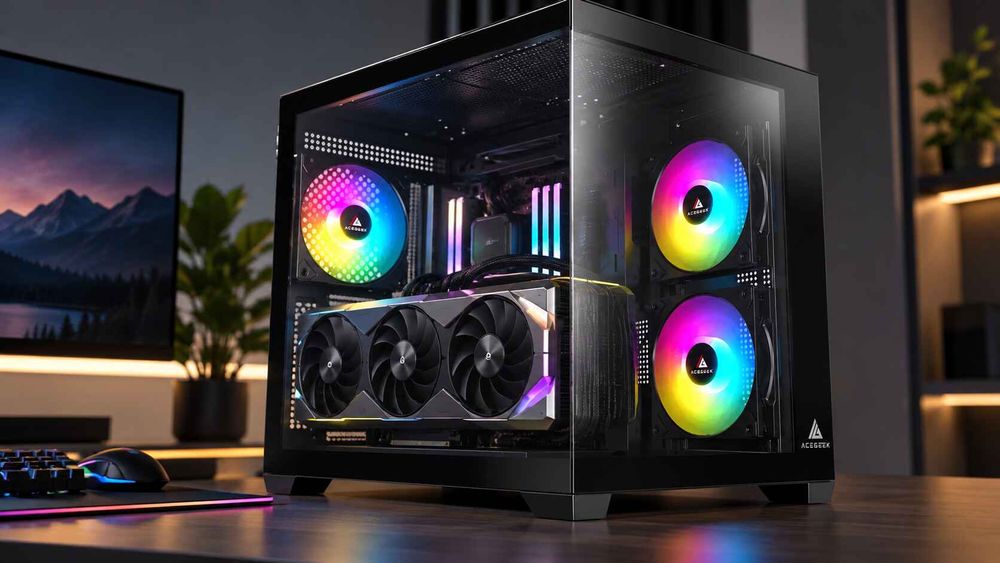
With a vertical mount, the fans face the side panel, so the fan-to-glass distance directly controls how easily air reaches the cooler. This is where gap size has measurable consequences.
GamersNexus tested this in 2018 using a Cooler Master H500M with an EVGA GTX 1080 Ti. The GPU core reached 44°C over ambient with the card mounted horizontally and with CableMod's bracket, which placed the card farther from the glass. The case's stock vertical mount, which keeps the card close to the glass, reached 50°C over ambient.
Read that result with its limits in mind. It is one case, one older card, and a fixed 55% fan speed. Modern cards draw far more power and use different coolers, and the test does not give a millimetre threshold. What it shows is directional: moving the same card away from the glass recovered the whole thermal penalty in that setup.
For buyers comparing vertical-capable cases, ACEGEEK's article on vertical GPU mounting and its thermal trade-offs frames the same decision from a case-selection angle. Treat any claim that a case "supports vertical GPUs" as incomplete until you know where the card ends up relative to the glass.
Gap Scenarios at a Glance
The table separates what is vendor-documented, what one test showed, and what is editorial judgment.
ScenarioWhat the gap controlsWhat to verifyRisk if too tightEvidence statusHorizontal card, 16-pin connector facing panelCable bend room and connector seatingVendor cable allowance; panel closes without pressureStressed connector, bent terminals, panel that will not closeNVIDIA and CableMod guidance (specific products)Horizontal card, 8-pin connectorsConnector access and cable routingRelease access and cable bend room for the specific PSU cablesDifficult servicing, crushed cableEditorial judgment; no figure givenHorizontal 3-slot or thicker cardSpace to shroud, bottom fans, and neighboursCooler thickness against floor and shroud layoutRestricted intake from below, noiseEditorial judgmentVertical mount, stock position near glassFan intake from the panel sideFan-to-glass distance; panel-on and panel-off temperaturesHigher temperatures, possible clock reductionOne test (GamersNexus, 2018): 50°C vs 44°C over ambientVertical mount, offset or inward bracketIntake plus room for adjacent hardwareBracket offset against radiators, fans, and riser cable lengthCollisions elsewhere in the chassisOne test showed recovery; broader applicability unverifiedGlass panel vs vented or mesh panelWhether the panel is a barrier or a pathPanel openness; extra intake fansHeat trapped near the coolerEditorial judgment
Why a Larger Gap Is Not Automatically Better
The common assumption is that more distance from the panel always means better cooling. It is directionally sensible, but it holds only when the extra distance does not cost something elsewhere and when air actually reaches the cooler.
Two conditions qualify it:
Space is shared across axes. Pushing a card inward or choosing an offset mount can consume room needed by front radiators, bottom fans, or the PSU shroud area. ACEGEEK's piece on GPU and radiator clearance math for tight chassis designs shows how length, width, and thickness budgets compete.
Gap volume is not the same as airflow. A generous gap inside a sealed glass chamber with no intake fan feeding it may behave worse than a smaller gap with a direct air path. This follows from basic airflow reasoning rather than a measured study, so verify it in the specific chassis.
Riser cables add another variable for vertical builds. Confirm the cable's rated PCIe generation matches the motherboard and card, and check what the manufacturer recommends for BIOS settings.
Does Case Airflow Design Change the Answer?
Yes. A card in a case with open intake paths tolerates a tighter panel gap better than the same card in a closed chamber. The panel material, the location of intake fans, and the exhaust route all interact with the gap.
ACEGEEK's discussion of GPU-focused airflow as a case design feature compares bottom, side, and front intake approaches. The practical conclusion is that panel gap should be assessed alongside the intake layout, not as a stand-alone number.
How to Test the Gap Before Committing to a Case or Layout
For integrators and procurement teams validating a case before a larger order, a repeatable A/B method is more reliable than a spec-sheet number.
Fix the variables. Use the same GPU, fan curve, room temperature, and sustained workload for every run.
Run a baseline with the panel off. Log GPU core, hotspot or memory temperature if exposed, clock speed, and fan noise.
Close the panel and repeat. The difference between panel-on and panel-off is your gap penalty.
Compare layouts. Repeat with the vertical kit or alternative bracket position. GamersNexus reported results as delta over ambient, which keeps room temperature from skewing comparisons.
Inspect the cable. After a thermal soak, check that the connector remains fully seated and the cable is not pinched.
Test the worst-case card. Use the largest and highest-power GPU you intend to support, not the smallest.
A hypothetical illustration: an integrator specifies a dual-glass case for a build that uses a 3.5-slot card with a 16-pin connector. The spec sheet lists adequate GPU length. Panel-on testing then shows the cable pressing on the glass and the card running hotter than expected with the panel closed. The length figure was never the limiting dimension. This is an illustrative example, not a reported incident.
What Should Buyers Specify Before Requesting a Quote?
When sourcing cases from a manufacturer or comparing OEM/ODM options, include these details to get answers you can use:
Target GPU list, with exact board models, lengths, heights, thicknesses, and connector types.
Required panel-side clearance, stated as the internal distance from slot plane to panel inner face, and whether glass is flush or offset.
Mounting orientation, horizontal only, vertical option, or both, plus the card-to-glass distance for the vertical position.
Intake and exhaust plan, including fan positions and panel perforation or filter details.
Radiator and fan configuration that will share the same chassis space.
Validation expectations, such as panel-on and panel-off thermal testing with named GPUs and a sample unit for your own tests.
Cable requirements, including PSU cable type and bend allowances.
Drawings or CAD dimensions for internal clearances, since marketing specifications often report only maximum GPU length.
Ask the supplier to confirm each figure on a production sample. Do not assume dimensions from a render or from a similar model carry over.
Frequently Asked Questions
How much space should be between a GPU and the side panel?
It depends on orientation. For 16-pin horizontal cards, plan the vendor's cable allowance, such as NVIDIA's 36 mm for the RTX 5090. For vertical mounts there is no published minimum, so measure temperatures with the panel on and off.
Is there an industry standard for GPU side-panel clearance?
No standard was found for the intake gap. Cable allowances come from GPU and connector vendors, and they apply to specific products. Case makers publish maximum GPU length more consistently than panel-side clearance, so request internal drawings.
Can a GPU touch the side panel?
Avoid it. Contact can cause rattling, restrict intake on a vertically mounted card, and stress the power cable. Do not force a panel closed against the connector or cable.
Does a vertical GPU mount always run hotter?
Not always. In GamersNexus's 2018 H500M test, a bracket that moved the card away from the glass matched the horizontal result, while the stock mount ran hotter. Outcomes vary by case, card, and airflow.
Why does my GPU fit by length but the side panel will not close?
Length and width are separate axes. The panel may be blocked by card height, connector position, or cable bend room. A larger length margin cannot make up for missing width clearance.
How much cable bend room does a 16-pin GPU connector need?
CableMod's guide suggests at least 35 mm from the connector before any bend, and NVIDIA's RTX 5090 guidance plans 36 mm for cables. Follow the current instructions from your GPU, PSU, and cable manufacturers.
Do glass side panels run GPUs hotter than mesh panels?
Glass blocks airflow that a vented panel could pass, so it removes one path for air. The effect depends on intake fans and whether the cooler faces the panel. Test the specific case rather than relying on panel type.