How to Choose a PC Case for Your GPU's Power and Cooling Needs
A graphics card can fit perfectly inside a PC case and still struggle to stay cool.
The problem is not always the GPU cooler itself. Sometimes, the case cannot deliver enough fresh air to the graphics card or remove the heat it produces efficiently.
This becomes especially important with high-performance graphics cards that consume several hundred watts during demanding workloads.
For example, NVIDIA lists the GeForce RTX 5090 at 575W Total Graphics Power (TGP), while AMD specifies 355W typical board power for the Radeon RX 7900 XTX.
Both can generate substantial heat, but that does not mean they require identical case designs.
Choosing a PC case based on GPU power draw means matching the chassis airflow, ventilation, and internal space to the graphics card's actual cooling requirements.
A well-ventilated mid-tower may handle a powerful GPU effectively, while a larger case with restrictive intake openings could deliver disappointing results.
This guide explains how GPU power consumption affects case selection, which airflow features matter most, and how to evaluate a PC case before purchasing.
Why Does GPU Power Draw Matter When Choosing a PC Case?
GPU power consumption provides a useful indication of how much heat the graphics card may produce.
Nearly all electrical energy consumed by a graphics card eventually becomes heat that must leave the system.
For example, a GPU consuming approximately 350W during a sustained workload introduces a substantial thermal load into its cooling environment.
A 500W-class graphics card can produce even more heat.
However, the case does not need to remove this heat through one specific fan or ventilation opening.
The objective is to provide the graphics card with sufficiently cool intake air while allowing heated air to escape efficiently.
Understanding TGP, TBP, and Actual GPU Power
Graphics card manufacturers use different terms to describe power consumption.
Total Graphics Power (TGP) is commonly used by NVIDIA to describe a graphics card power specification.
Total Board Power (TBP) or typical board power is commonly used in AMD specifications.
These values help estimate the cooling demands of a graphics card, but they do not necessarily represent constant power consumption during every workload.
Actual GPU power changes with:
Game resolution and graphics settings.
Frame rate limits.
GPU utilization.
Rendering and compute workloads.
Power limits.
Undervolting.
Ambient conditions and thermal behavior.
A GPU rated at 450W may consume significantly less during certain games.
The same card may operate closer to its power limit during sustained rendering or other demanding workloads.
For case selection, consider both the manufacturer's rated power and the workloads you actually expect to run.
GPU Power Is Different From PSU Wattage
A graphics card's rated power should not be confused with the recommended power supply capacity.
For example, NVIDIA lists the RTX 5090 with a 575W TGP and a 1000W recommended system power specification for its stated reference configuration.
The 1000W figure relates to the power supply requirements of the complete PC, not the GPU's continuous heat output.
The CPU, motherboard, storage, cooling hardware, and other components also consume electricity.
Use the GPU's power specification to help plan graphics-card cooling, while selecting the PSU according to the complete system's electrical requirements.
How Much GPU Power Can Different PC Cases Handle?
There is no universal GPU wattage limit for Mini-Tower, Mid-Tower, or Full-Tower PC cases.
Two cases with similar dimensions can have very different cooling performance because of their ventilation design, fan placement, and internal component clearance.
Nevertheless, GPU power consumption can help identify which case features deserve attention.
GPU Power Draw and PC Case Selection Guide
GPU Power ClassCase Features to PrioritizeCooling ConsiderationsUp to approximately 200WEffective basic intake and exhaustCompact cases may be suitable with adequate ventilationAround 200–300WOpen front or side intake, clear GPU airflow pathA conventional airflow-focused mid-tower is a useful starting pointAround 300–400WLow-restriction intake and effective exhaustPay closer attention to GPU intake conditions and sustained temperaturesAround 400–500WStrong ventilation, generous GPU clearance, flexible fan placementBottom or side intake may provide additional cooling optionsAbove 500WMultiple effective airflow paths and verified high-load performancePrioritize independent thermal testing, clear intake and exhaust, and full installation compatibility
These ranges are illustrative planning categories, not manufacturer-approved case ratings or universal cooling thresholds.
A well-designed compact case may handle a GPU from a higher power category.
Likewise, a poorly ventilated large tower may struggle with a graphics card from a lower category.
The useful question is not simply how many watts a case can support.
It is whether the chassis can maintain a suitable thermal environment for the exact graphics card under the intended workload.
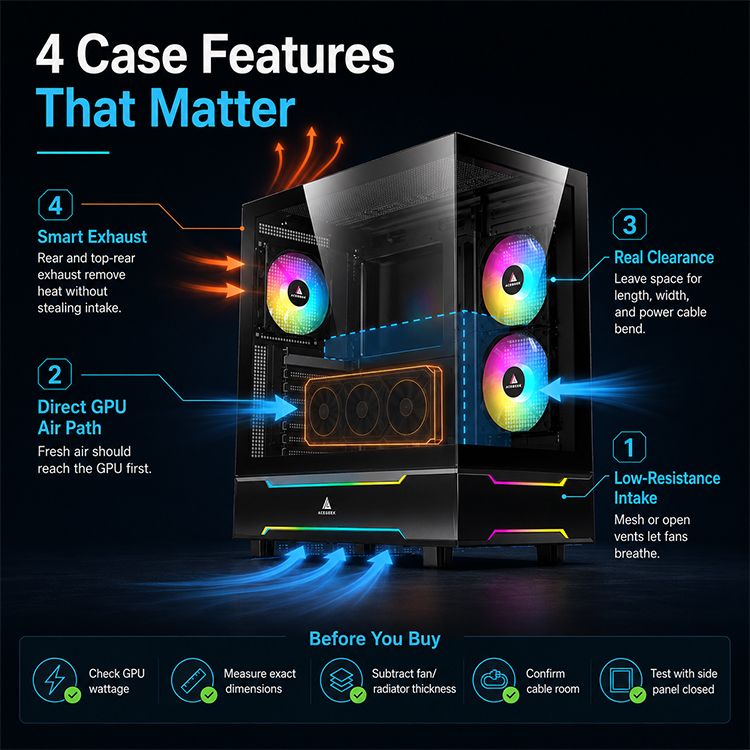
Four PC Case Features That Matter Most for GPU Cooling
GPU power draw is only the starting point.
Once you understand the approximate heat output of your graphics card, evaluate how the case supplies air, accommodates the GPU, and removes heat.
1. Low-Resistance Intake Ventilation
Every case fan operates against some degree of airflow resistance.
Mesh panels, dust filters, decorative covers, and internal structures can influence how much air enters the chassis.
A fan's advertised maximum airflow does not guarantee that it will move the same amount of air after installation.
For example, three intake fans behind a highly restrictive front panel may deliver less useful airflow than fewer fans behind a more open ventilation design.
For graphics cards with substantial power consumption, the quality of the intake path becomes particularly important.
Look for:
Large, functional ventilation openings.
Appropriate fan positioning.
Accessible dust filters.
Minimal obstruction between intake fans and the GPU.
Adequate space around the graphics card cooler.
A mesh-front case can provide a straightforward intake path, but glass-front designs can also work when they include effective side or bottom ventilation.
The presence of glass is not enough to determine cooling performance.
Our guide to how front panel design affects PC case cooling explains how ventilation restrictions influence airflow.
2. Fresh Air Delivery to the GPU
Many modern gaming graphics cards use open-air coolers.
Their fans draw air through the heatsink, and a substantial portion of the resulting heat enters the case interior.
If the same warm air repeatedly circulates back toward the graphics card, its cooling system becomes less effective.
This is why the location of intake fans matters.
Front Intake
A conventional mesh-front case can deliver room air toward both the CPU and GPU.
Lower front fans may help supply the graphics card directly.
Bottom Intake
Bottom fans can provide a relatively short airflow path toward the underside of a horizontally mounted GPU.
Their effectiveness depends on case-foot clearance, dust filters, and the GPU's position.
Side Intake
Side-mounted fans are particularly common in panoramic and dual-chamber cases.
They can supply outside air to the GPU and motherboard area even when the front panel is made of glass.
None of these configurations is universally superior.
The goal is to provide a clear path between an external intake opening and the graphics card cooler.
For a deeper explanation, read our guide to GPU-focused airflow in modern PC cases.
3. Adequate GPU Clearance
A graphics card requires more than sufficient length to fit inside the case.
Its complete installation includes:
Graphics card length.
Graphics card height.
Cooler thickness.
Expansion-slot occupancy.
Power connector space.
Cable routing.
Nearby case fans and radiators.
This becomes especially important for large graphics cards with multiple cooling fans.
For example, NVIDIA lists the RTX 5090 Founders Edition at 304mm long and 137mm wide.
However, the company's installation guidance also specifies additional clearance around the card and approximately 36mm of space for power cables.
Those measurements apply to the Founders Edition installation guidance. Board-partner models can have significantly different dimensions.
Source: NVIDIA RTX 5090 Official Specifications.
A case with sufficient GPU length may still be incompatible if the power connector presses against the side panel.
Similarly, a thick GPU positioned close to a solid panel may experience restricted intake airflow.
Verify all dimensions of the exact graphics card model.
4. Effective Exhaust Ventilation
Supplying fresh air is only half of the cooling process.
The heat generated by the GPU must eventually leave the chassis.
Rear and top exhaust openings can help remove warm air from the main component chamber.
However, additional exhaust fans do not automatically improve temperatures.
For example, a top-front exhaust fan positioned close to a front intake may remove incoming cool air before it reaches the CPU cooler or graphics card.
The result depends on internal case geometry and fan speed.
For many conventional towers, rear exhaust is a useful starting point, with additional top ventilation evaluated according to the cooling requirements.
A practical airflow configuration should create a coherent intake-to-exhaust path instead of relying on the maximum possible number of fans.
Does a Higher-Power GPU Need More Case Fans?
Not necessarily.
A more powerful GPU can increase the cooling demands placed on the chassis, but it does not establish an exact required fan count.
For example, a well-ventilated case with three effective intake fans and one rear exhaust fan may provide suitable cooling for a demanding graphics card.
Another case with six fans may perform worse if those fans operate behind restrictive panels or in ineffective positions.
What Independent Testing Shows
GamersNexus tested the Phanteks P400A, an airflow-oriented PC case with a mesh front panel.
In its GPU torture test, the case produced a GPU temperature of approximately 49.1°C above ambient.
Removing the front panel reduced the result to approximately 47.2°C above ambient.
The difference was approximately 1.9°C.
Source: GamersNexus — Phanteks P400A Airflow and Panel Testing.
These measurements apply to the tested case, components, and fan configuration.
However, they demonstrate an important principle.
A sufficiently open intake design can allow fans to perform effectively without requiring major modifications to the case.
When Are Additional Fans Worth Installing?
More fans may be useful when the existing system suffers from:
Insufficient intake airflow near the GPU.
Excessive GPU fan speed.
High internal case temperatures.
Restricted airflow around nearby components.
Sustained thermal throttling related to case airflow.
Before adding fans, check whether changing fan position or improving ventilation solves the problem.
Noctua's official airflow guide provides several starting configurations, including two front intake fans with one rear exhaust for simpler builds.
More demanding systems may benefit from additional intake or exhaust positions.
However, the appropriate configuration still depends on the actual chassis.
Source: Noctua — Airflow Guide: Setup Ideas.
How Does a Front-Mounted AIO Affect High-Power GPU Cooling?
CPU liquid cooling can change the airflow available to a graphics card.
A front-mounted AIO radiator configured as intake draws outside air through its radiator fins before delivering that air into the main compartment.
This often provides favorable inlet air conditions for CPU cooling.
However, the radiator warms the air as it transfers heat from the coolant.
A graphics card positioned behind the radiator may therefore receive warmer intake air.
Why This Matters for GPU-Heavy Workloads
A powerful graphics card already generates substantial heat.
If its intake air is warmed by a CPU radiator, the GPU cooler may need to operate at a higher fan speed to maintain suitable temperatures.
The actual effect depends on CPU power consumption, radiator airflow, and the case's other intake openings.
A chassis with separate bottom or side intake fans may reduce this problem by supplying the GPU with an alternative source of fresh air.
Is a Top-Mounted Radiator Better?
A top-mounted exhaust radiator removes CPU heat through the roof of the case.
This can preserve front or side intake airflow for the graphics card.
However, the radiator may receive air already warmed by internal components.
As a result, CPU cooling temperatures may be somewhat higher than with a front intake radiator.
Neither arrangement is universally superior.
The appropriate choice depends on whether CPU or GPU cooling is the greater priority.
Before installing a front radiator, verify its effect on physical GPU clearance as well.
For more detailed guidance, read our article on GPU clearance with a front-mounted radiator.
What Type of Case Should You Choose for Different GPU Workloads?
Two systems using the same graphics card may benefit from different case configurations.
This happens because workload, operating conditions, and noise preferences affect how much cooling is required.
Mainstream Gaming PC
For a gaming system with moderate GPU power consumption, a conventional airflow-focused tower is often a practical choice.
A mesh front panel, well-positioned intake fans, and a suitable rear exhaust can provide an effective cooling path.
A compact case may also be appropriate when it offers sufficient ventilation and GPU clearance.
There is no need to choose an oversized chassis solely because the computer is intended for gaming.
High-Performance 4K Gaming PC
Higher-resolution gaming can place sustained demand on the GPU.
A case with low-restriction intake ventilation becomes increasingly valuable.
For this type of build, prioritize:
Direct intake airflow toward the GPU.
Adequate GPU thickness and cable clearance.
Effective exhaust ventilation.
Accessible dust filters.
Suitable fan-control options.
Bottom or side intake fans may offer additional flexibility, particularly when the graphics card occupies a large portion of the lower chamber.
However, they should be evaluated based on actual cooling results.
GPU Rendering and Compute Workstation
A workstation running sustained rendering, simulation, or GPU compute workloads may maintain high graphics-card power consumption for extended periods.
In this situation, cooling stability is especially important.
The case should provide sufficient intake airflow throughout the workload rather than relying on brief bursts of higher fan speed.
Consider the operating environment as well.
A workstation located beneath a desk or inside a cabinet may receive warmer intake air if its exhaust cannot escape effectively.
For sustained workloads, evaluate both the case's internal airflow and the surrounding ventilation.
Compact High-Performance PC
A compact PC can use a powerful GPU when the hardware fits and the cooling system is designed appropriately.
However, tight internal spacing creates additional challenges.
Large graphics cards may sit close to ventilation panels, power supplies, or motherboard structures.
Cable routing and GPU orientation can also affect the available intake space.
Do not reject compact cases solely because of their size, but verify their cooling behavior through detailed specifications and independent testing.
Real PC Case Examples: ACEGEEK Tempest A370 and LunarisFlow
Two different case designs illustrate how GPU cooling priorities influence case selection.
ACEGEEK Tempest A370: Conventional Mesh-Front Airflow
The ACEGEEK Tempest A370 uses a mesh-front design with conventional front and rear fan positions.
Its official specifications include:
SpecificationACEGEEK Tempest A370Case dimensions370 × 210 × 435mmMaximum GPU clearance360mmCPU cooler clearance160mmFront fan support3 × 120mmRear fan support1 × 120mmTop fan support2 × 120mmFront radiator support360mm AIOMotherboard supportATX / M-ATX / ITX
The Tempest A370 offers a conventional front-intake layout.
Its mesh front provides an obvious ventilation path for supplying outside air to the main chamber.
This makes it a reasonable candidate for builders who prefer straightforward airflow and do not need extensive bottom or side fan mounting options.
However, the specifications alone do not establish how well it cools a particular graphics card.
A long or thick GPU may also require more detailed compatibility checks, especially when a front radiator is installed.
ACEGEEK LunarisFlow: More Intake Configuration Options
The ACEGEEK LunarisFlow uses a different approach, offering multiple side and bottom fan positions.
Its official specifications include:
SpecificationACEGEEK LunarisFlowCase dimensions483 × 238 × 490mmMaximum GPU clearance400mmCPU cooler clearance180mmSide fan support3 × 120mm or 3 × 140mmBottom fan support3 × 120mm or 3 × 140mmTop fan support3 × 120mm or 3 × 140mmRear fan support1 × 120mmTop radiator support420mm / 360mm AIOSide radiator support240mm AIOMotherboard supportATX / M-ATX / ITX
The LunarisFlow provides more available locations for configuring intake airflow around a large graphics card.
For example, side and bottom intake fans can potentially supply outside air toward the main component chamber.
Top ventilation can serve as an exhaust path or accommodate a compatible CPU radiator.
This flexibility may be attractive to builders planning a powerful GPU or a cooling configuration that requires several distinct airflow zones.
However, additional fan positions are not proof of superior cooling performance.
The actual result depends on installed fans, filters, GPU dimensions, component arrangement, and case ventilation resistance.
Which Case Makes More Sense?
These two products illustrate different chassis design priorities.
The Tempest A370 offers a relatively conventional mesh-front arrangement with 360mm maximum GPU length clearance.
The LunarisFlow provides 400mm published GPU length clearance and additional side and bottom fan mounting flexibility.
The better choice depends on the exact GPU, cooling hardware, available installation space, and intended workloads.
Neither case should be treated as independently validated for a specific 450W or 575W graphics card solely because its published specifications appear suitable.
How to Evaluate a PC Case Before Buying
A practical buying process should start with the graphics card you intend to install.
Then evaluate the case as a complete cooling environment.
Step 1: Identify Your GPU's Power Requirements
Find the manufacturer's official board power or TGP specification.
Consider whether your workloads are likely to keep the GPU near that power level for long periods.
A lightly loaded gaming system and a sustained GPU rendering workstation may need different cooling priorities.
Step 2: Record the Exact GPU Dimensions
Check the dimensions of the specific graphics card model.
Do not use the dimensions of a Founders Edition card to evaluate a substantially larger board-partner model.
Record length, height, thickness, expansion-slot requirements, and power connector position.
Step 3: Identify the GPU Intake Path
Determine where fresh air enters the case.
For example:
Mesh-Front Case
Does the lower front intake deliver outside air toward the graphics card?
Panoramic Case
Do the side or bottom fans have an effective airflow path into the main chamber?
Compact Case
Does the GPU sit close to a solid panel that could restrict its own cooling fans?
A useful case design should make these airflow paths relatively clear.
Step 4: Check Radiator and Component Conflicts
If you plan to use an AIO cooler, confirm whether the radiator affects GPU clearance or intake airflow.
Do not automatically subtract the full radiator-and-fan thickness from the published GPU clearance.
Only account for hardware that actually intrudes into the GPU installation area and is not already included in the manufacturer's clearance measurement.
Also verify GPU power cable space and the clearance needed for radiator tubing.
Step 5: Examine Exhaust and External Ventilation
Check whether heated air can leave through suitable rear or top openings.
Consider where the finished PC will be placed.
A case positioned close to a wall or inside a poorly ventilated cabinet may struggle to disperse heat efficiently.
Step 6: Review Independent Thermal Testing
Published specifications identify potential compatibility and cooling options.
Independent testing provides stronger evidence of actual thermal behavior.
When comparing reviews, look for tests that record:
GPU temperature above ambient.
GPU power consumption.
GPU fan speed.
Case fan configuration.
Noise-normalized cooling performance.
Side-panel and dust-filter conditions.
Comparisons are most useful when the hardware and testing methodology are consistent.
Step 7: Consider Future GPU Upgrades
Additional clearance and flexible intake positions may make a case easier to reuse.
However, no case can guarantee compatibility with every future graphics card.
Choose a chassis that suits your current hardware while providing reasonable flexibility for upgrades you are likely to make.
How to Check Whether Your New Case Can Cool the GPU Properly
After building the PC, verify that the case provides sufficient cooling under realistic conditions.
A graphics card that stays cool during idle may behave differently after an extended gaming or rendering session.
Establish a Baseline
Run a repeatable GPU-intensive workload with the PC fully assembled.
Keep side panels and dust filters installed.
Record the following measurements.
MeasurementWhat It Tells YouGPU core temperatureOverall graphics processor cooling behaviorGPU hotspot temperatureHighest reported GPU thermal region, where availableGPU board powerHeat-load contextGPU fan RPMCooling demand and fan responseGPU clock speedOperating performanceThermal-limiting indicatorsWhether cooling affects performanceCPU temperatureEffect on overall system coolingCase fan RPMIntake and exhaust operationRoom temperatureEnvironmental context
Continue testing until temperatures are reasonably stable.
The required duration depends on the cooling system and workload.
Test Whether Airflow Is Restricted
If GPU temperatures are higher than expected, inspect the intake openings, dust filters, fan directions, and surrounding component clearance.
A temporary diagnostic comparison with a removable panel opened or removed may help indicate whether the case ventilation is restrictive, provided it can be done safely.
However, that change alters the cooling environment and is not a substitute for normal closed-case operation.
Do not leave panels removed as a permanent cooling solution without considering dust, safety, noise, and physical protection.
Compare Cooling at Similar Power and Fan Speed
GPU temperatures alone are not enough to establish whether one configuration is better.
For example, a GPU may maintain the same temperature after an airflow improvement because its automatic fans operate more slowly.
That could still represent a useful acoustic benefit.
Similarly, a lower temperature caused by reduced GPU power does not necessarily indicate improved case cooling.
For meaningful comparisons, keep GPU power, ambient conditions, and fan settings as consistent as practical.
Know When Additional Cooling Is Needed
Consider improving case airflow when testing shows:
Unexpected sustained thermal throttling.
Excessively high GPU fan speeds.
A meaningful cooling improvement with less restricted intake.
Heat buildup caused by poor exhaust ventilation.
Inadequate fresh air around the graphics card.
If the system already maintains suitable temperatures, stable performance, and acceptable noise, additional case fans may provide limited practical value.
Frequently Asked Questions
1. Can a High-Power GPU Run Safely in a Compact PC Case?
Yes, provided the case supports the complete graphics card installation and offers sufficient cooling.
A compact chassis does not automatically make a high-power GPU unsuitable.
However, limited internal space can make intake airflow, cable routing, and exhaust ventilation more challenging.
Verify the exact graphics card dimensions, power cable requirements, and available airflow paths.
Independent thermal testing is especially valuable for compact cases using demanding GPUs.
2. Why Does My GPU Run Hot Even With Several Case Fans?
Having several case fans does not guarantee that enough fresh air reaches the graphics card.
Restrictive intake panels, clogged filters, poor fan positioning, and insufficient clearance around the GPU can all affect cooling.
The GPU may also be operating under unusually high power consumption.
Check GPU power, fan RPM, and sustained temperature behavior.
Then inspect the actual airflow path rather than assuming that adding more fans will solve the problem.
3. Will Undervolting My GPU Reduce Case Cooling Requirements?
Undervolting can reduce GPU power consumption and heat output when configured successfully.
Lower heat output may reduce the cooling demand placed on the graphics card and case.
However, the result depends on the GPU model, voltage-frequency settings, workload, and stability.
An undervolt does not eliminate the need for adequate airflow or safe power cable installation.
If you modify GPU voltage settings, test stability and sustained performance using appropriate supported tools.
Choose a case that can still provide reliable cooling for the system's intended operating conditions.
4. Do I Need Bottom Intake Fans for a 400W GPU?
Not necessarily.
Bottom intake fans can improve fresh-air delivery to some horizontally mounted graphics cards.
However, their effectiveness depends on the case's bottom ventilation, filter resistance, GPU position, and available clearance.
A well-designed mesh-front case may provide sufficient airflow without dedicated bottom fans.
For a high-power GPU, prioritize an effective intake path rather than assuming that a specific fan location is mandatory.
5. Does a Front-Mounted CPU Radiator Make GPU Cooling Worse?
It can, depending on the case and workload.
A front-mounted intake radiator transfers CPU heat into the air entering the main chamber.
If that warmer air reaches the graphics card, GPU temperatures or fan speeds may increase.
However, the effect depends on CPU power consumption, radiator design, fan settings, and other available intake paths.
A case with effective side or bottom intake may reduce the impact.
Monitor both CPU and GPU temperatures when comparing radiator configurations.
6. What Should I Check Before Moving a Powerful GPU Into a New Case?
Start with the exact graphics card dimensions and power requirements.
Then verify the case's usable GPU length, card thickness clearance, side-panel cable space, and expansion-slot compatibility.
Check whether front radiators or fans occupy part of the installation area.
Next, evaluate the fresh-air intake path and exhaust ventilation.
Finally, confirm that the case can accommodate the necessary power supply cables and cooling hardware without obstructing the graphics card.
A successful upgrade requires both safe mechanical installation and suitable thermal performance.
Choose a PC Case That Can Handle Your GPU's Heat
GPU power consumption is an important consideration when selecting a PC case, but it should not be used as the only buying criterion.
A higher-power graphics card generally places greater demands on the cooling environment.
However, those demands can be addressed through different case designs, including mesh-front towers, ventilated compact cases, and panoramic chassis with effective side or bottom intake.
The most important factors are the quality of the intake path, the graphics card's physical clearance, and the ability of the case to remove heated air.
Before purchasing, identify your GPU's rated power and exact dimensions.
Then evaluate the case's ventilation openings, fan positions, radiator compatibility, and exhaust layout.
Whenever possible, use independent thermal testing to verify that the chassis performs effectively under sustained load.
A larger case or a greater number of fans is not automatically an upgrade.
Choose a chassis that gives your graphics card enough space, a reliable supply of fresh air, and an effective path for removing heat during the workloads that matter most.