Positive vs Negative vs Neutral PC Case Pressure: Which Should You Use?
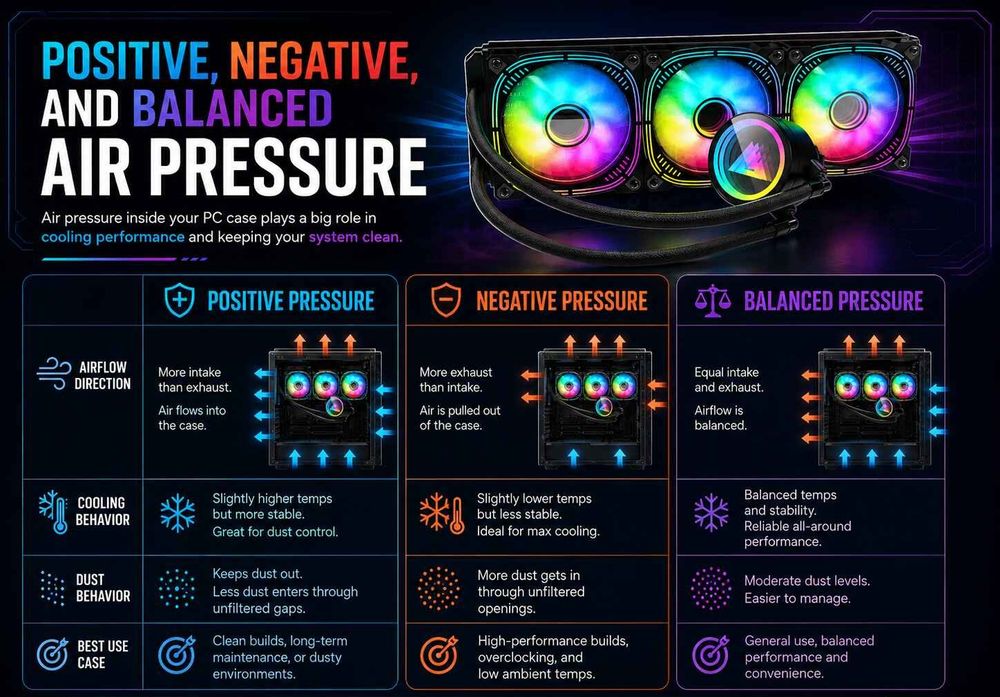
For most gaming PCs, slightly positive air pressure is a good starting point. It encourages air to enter through filtered intake fans rather than unfiltered gaps, helping reduce dust accumulation while supplying fresh air to your components.
But positive pressure is not automatically the best cooling configuration for every computer.
Some compact cases benefit from negative pressure, while others work well with a nearly neutral airflow arrangement. The right choice depends on case ventilation, fan placement, dust filters, and the heat generated by your hardware.
This guide explains how each pressure setup works, how to arrange your intake and exhaust fans, and how to check whether your configuration is actually effective.
What Is Positive, Negative, and Neutral PC Case Pressure?
PC case pressure describes the pressure inside your chassis relative to the surrounding room.
Intake fans bring fresh air into the case. Exhaust fans remove warmed air. Their performance, along with the resistance of vents and filters, determines the pressure difference that develops.
There are three common configurations.
Pressure TypeFan Airflow TendencyAir Movement Through Passive OpeningsMain ConsiderationPositive pressureIntake capacity exceeds exhaust capacityAir tends to flow outwardBetter control of unfiltered dust entryNegative pressureExhaust capacity exceeds intake capacityAir tends to flow inwardAdditional air enters through gaps and ventsNeutral pressureIntake and exhaust are closely matchedLittle overall pressure biasRequires careful airflow management
These descriptions refer to the pressure tendency created by the powered fans.
In a steady operating system, the total amount of air entering and leaving the case must ultimately balance. Passive vents and openings provide additional airflow paths when the powered intake and exhaust are not matched.
Why Fan Count Doesn't Determine Case Pressure
Three intake fans and two exhaust fans do not guarantee positive pressure.
A 140mm intake fan behind a restrictive dust filter may move less air than expected, while a 120mm exhaust fan attached to an open rear grille can operate with relatively little resistance.
Fan speed, size, blade design, radiator restriction, and case ventilation all affect the result.
For a deeper explanation of these relationships, read the ACEGEEK guide to fan P-Q curves and real airflow performance.
The important measurement is effective airflow under real operating conditions, not the number of installed fans.
Is Positive Air Pressure Better for Dust Control?
Slightly positive pressure is often beneficial for dust management, particularly when the case has filtered intake openings.
With positive pressure, air tends to escape through small unpowered gaps rather than being drawn inward through them.
This reduces the amount of unfiltered air entering through locations such as:
Expansion-slot openings
Side-panel seams
Unused fan mounts
Cable-routing openings
Gaps around rear I/O components
Instead, a larger proportion of incoming air can pass through the case's intended filtered intake paths.
Does Positive Pressure Prevent Dust Completely?
No.
Dust filters do not capture every particle, and dust can still enter when the system is off or through unfiltered openings during changing operating conditions.
Filter condition also matters.
As a filter collects dust, airflow resistance increases. An intake setup that initially produced slightly positive pressure may behave differently after months of use.
Keeping filters clean helps maintain the intended airflow arrangement.
Can Too Much Positive Pressure Hurt Cooling?
Potentially.
A strongly intake-biased setup is not automatically harmful, because air can still escape through passive ventilation openings.
However, if those exit paths are restrictive or poorly positioned, the case may develop inefficient airflow or regions where warm air recirculates.
A good positive-pressure setup needs both effective intake and a clear route for heated air to leave.
Aim for a modest intake bias, not the highest possible positive pressure.
Does Negative Pressure Improve PC Cooling?
Negative pressure occurs when powered exhaust airflow exceeds powered intake airflow, causing replacement air to enter through other available openings.
In some PC cases, this can be useful.
For example, a compact chassis may have ventilation openings immediately beside the graphics card but limited space for dedicated intake fans.
Strong exhaust fans can help draw room air through those openings and toward the GPU cooler.
Similarly, a case with a restrictive front panel might receive useful replacement air through side or bottom vents.
However, the cooling benefit depends on whether those openings supply air where it is needed.
What Are the Disadvantages of Negative Pressure?
The main concern is uncontrolled dust entry.
When air enters through unfiltered gaps, it can carry dust into areas that are difficult to clean.
Negative pressure can also create undesirable airflow shortcuts.
For instance, an exhaust fan may pull air through a nearby opening without directing enough fresh air toward the GPU or CPU cooler.
This can increase fan noise without meaningfully improving component temperatures.
Negative pressure is therefore not inherently better or worse for cooling.
It is a configuration worth considering when the case layout supports it and testing shows a benefit.
Is Neutral Air Pressure Worth Trying to Achieve?
Neutral pressure describes a condition with little pressure difference between the inside of the case and the surrounding environment.
In practice, maintaining exactly neutral pressure is difficult.
PC fan speeds change with temperature. Dust filters gradually accumulate particles, and CPU or GPU workloads can activate different fan curves.
For example, a PC with a top-mounted AIO may operate near neutral pressure during gaming but become exhaust-biased during a CPU-intensive workload if the radiator fans accelerate.
A nearly balanced configuration can still work very well.
The goal should not be to maintain a mathematically perfect pressure ratio at every moment.
Instead, focus on delivering enough fresh air to the CPU and GPU while removing heated air efficiently.
If your case has good cooling performance, manageable dust accumulation, and acceptable noise, there is little reason to adjust every fan merely to achieve a particular pressure label.
How Should You Arrange Intake and Exhaust Fans?
The most useful starting configuration depends on the case layout and cooling hardware.
PC ConfigurationSuggested IntakeSuggested ExhaustMain GoalConventional air-cooled towerTwo front fansOne rear fanSimple front-to-back airflowGaming tower with high-power GPUFront intake, optional bottom intakeRear and optional top-rear exhaustFresh air for GPU and CPUTop-mounted AIO systemFront, side, or bottom intakeTop radiator exhaust, optional rear exhaustSupply fresh air while exhausting radiator heatPanoramic glass caseBottom and side intakeTop and rear exhaustDirect airflow toward GPU and motherboardCompact ventilated caseAvailable side or bottom intake openingsCase-specific exhaust positionsUse short, unobstructed airflow paths
These are starting configurations, not guaranteed pressure results.
Air-Cooled Gaming PCs
A conventional tower can begin with two filtered front intake fans and one rear exhaust fan.
Position the CPU tower cooler so its airflow generally follows the front-to-rear direction.
This creates a simple cooling path without requiring every available fan mount to be populated.
Additional fans may help powerful systems, but their benefit should be verified through temperature and noise testing.
PCs With Top-Mounted AIO Coolers
A top-mounted radiator configured as exhaust can remove CPU-generated heat from the chassis.
However, the radiator and its fans also contribute to the overall exhaust airflow.
If the radiator fans operate aggressively while the intake fans remain slow, the system may develop negative pressure.
Adjust the intake and exhaust fan curves to maintain adequate airflow without compromising CPU cooling.
Panoramic PC Cases
Panoramic cases often rely on bottom and side intake rather than conventional front ventilation.
Bottom intake can supply fresh air toward the graphics card, while side intake helps feed the main chamber.
Top exhaust fans can remove heated air, particularly when a radiator is installed.
However, too much exhaust close to an intake opening can redirect fresh air before it reaches the intended components.
Our guide to balancing CPU cooling and GPU airflow explains how to plan cooling paths around both components.
How Can You Tell If Your PC Has Positive or Negative Pressure?
A PC's pressure condition cannot be reliably determined by counting its fans.
For a rough indication, you can observe airflow through unpowered gaps in the chassis.
Check Passive Airflow Openings
With the case fully assembled and running under normal conditions, observe an unused ventilation opening away from operating fan blades.
A very lightweight strip of material, held securely outside the case, may indicate local airflow direction.
If air moves outward through the opening, that location is acting as an exhaust path.
If air moves inward, it is acting as an intake path.
Keep any testing material clear of fans and electronics, and never release loose material near ventilation openings.
This is only a qualitative check. Local airflow direction can vary across different openings, and it does not measure the actual pressure difference inside the chassis.
Why Might Pressure Change During Gaming?
Fan control settings can change the airflow balance.
For example, a GPU-responsive intake curve may increase airflow during gaming, while a CPU-responsive top radiator curve may increase exhaust during rendering.
Therefore, a system can have different pressure tendencies at idle and under load.
Test the configuration during the workloads you actually use rather than relying exclusively on idle behavior.
How Do You Optimize PC Case Airflow Without Adding More Fans?
Before purchasing additional fans, establish how the existing system performs.
Step 1: Record Your Current Temperatures
Use a repeatable gaming session or thermal workload.
Record CPU temperature, GPU core and hotspot temperatures, ambient temperature, and fan speeds.
Where possible, also record component power consumption and clock speeds.
This creates a baseline for evaluating changes.
Step 2: Inspect Airflow Restrictions
Check whether dust filters are clogged or intake openings are obstructed.
Make sure the case has sufficient clearance from walls, carpeting, and other objects that might block ventilation.
Internal cables should not obstruct important fan or cooling paths.
If your case has a restrictive front panel, its design may limit airflow even when powerful fans are installed.
See the ACEGEEK guide to front-panel design and PC case cooling for a detailed explanation.
Step 3: Adjust One Fan Setting at a Time
Change one variable, such as front intake speed or top exhaust speed, and repeat the same workload.
If GPU temperatures improve with slightly faster front intake fans, the graphics card may have benefited from additional fresh air.
If increasing top exhaust speed makes little difference but adds noise, the extra airflow may not be necessary.
Avoid changing several fan curves simultaneously because doing so makes the results harder to interpret.
Step 4: Compare Cooling Relative to Ambient Temperature
When room temperature differs between tests, calculate the temperature rise above ambient.
Delta T = Component Temperature − Ambient Temperature
For example, a GPU operating at 70°C in a 25°C room has a 45°C temperature rise above ambient.
Ambient normalization makes comparisons more meaningful, although it does not replace control of workloads, power consumption, and fan speeds.
For more information, read our guide to ambient-normalized PC case temperature testing.
Step 5: Balance Temperature, Noise, and Dust
The configuration with the lowest CPU temperature is not always the best overall choice.
A more aggressive exhaust setup might improve CPU temperature slightly while increasing GPU temperature, system noise, or dust accumulation.
Choose the arrangement that provides stable performance under your normal workloads at an acceptable acoustic level.
If you are building on a budget, the ACEGEEK high-airflow PC building guide explains how to prioritize useful ventilation improvements without unnecessary fan purchases.
Frequently Asked Questions
Is positive pressure better for a gaming PC?
Slight positive pressure is a sensible starting point for many gaming PCs because it can reduce unfiltered dust entry while supplying fresh air through filtered intakes. However, actual cooling performance depends on the complete airflow layout.
Can negative pressure damage PC components?
Negative pressure does not directly damage components. However, it can increase dust entry through unfiltered openings, potentially requiring more frequent cleaning. Inadequate cooling remains a separate concern that should be assessed through temperatures and performance.
Does having more intake fans guarantee positive pressure?
No. Fan speed, size, airflow resistance, and radiator placement all affect the balance. Two unrestricted intake fans may deliver more airflow than three restricted exhaust fans, or the reverse may be true.
Should top case fans always be exhaust fans?
Not always. Top exhaust is common, especially with liquid-cooling radiators, but certain air-cooled configurations can benefit from a top intake position. Fan placement should be evaluated according to the case's airflow path and measured cooling performance.
How often should I check my PC case airflow?
Review temperatures and fan operation after major hardware changes, fan-curve adjustments, or noticeable dust buildup. Routine filter cleaning and occasional thermal checks are generally more useful than frequent pressure adjustments.
Build an Airflow Path That Works, Then Tune the Pressure
For most gaming PCs, slightly positive pressure is a practical starting point because it encourages filtered intake airflow and can reduce dust entering through unfiltered gaps.
Negative pressure can also be effective in cases where exhaust fans draw fresh air through useful nearby vents. Neutral pressure remains a reasonable operating condition when cooling, dust, and noise are well controlled.
However, no pressure category guarantees the best temperatures.
The most important factors are effective intake ventilation, a clear route for heated air to escape, and a fan configuration matched to the CPU and GPU.
Start with a straightforward airflow layout, measure the results, and adjust the fans according to actual cooling performance—not fan count or pressure labels alone.