Reverse-Blade Fans for Panoramic Cases: When They Make Sense
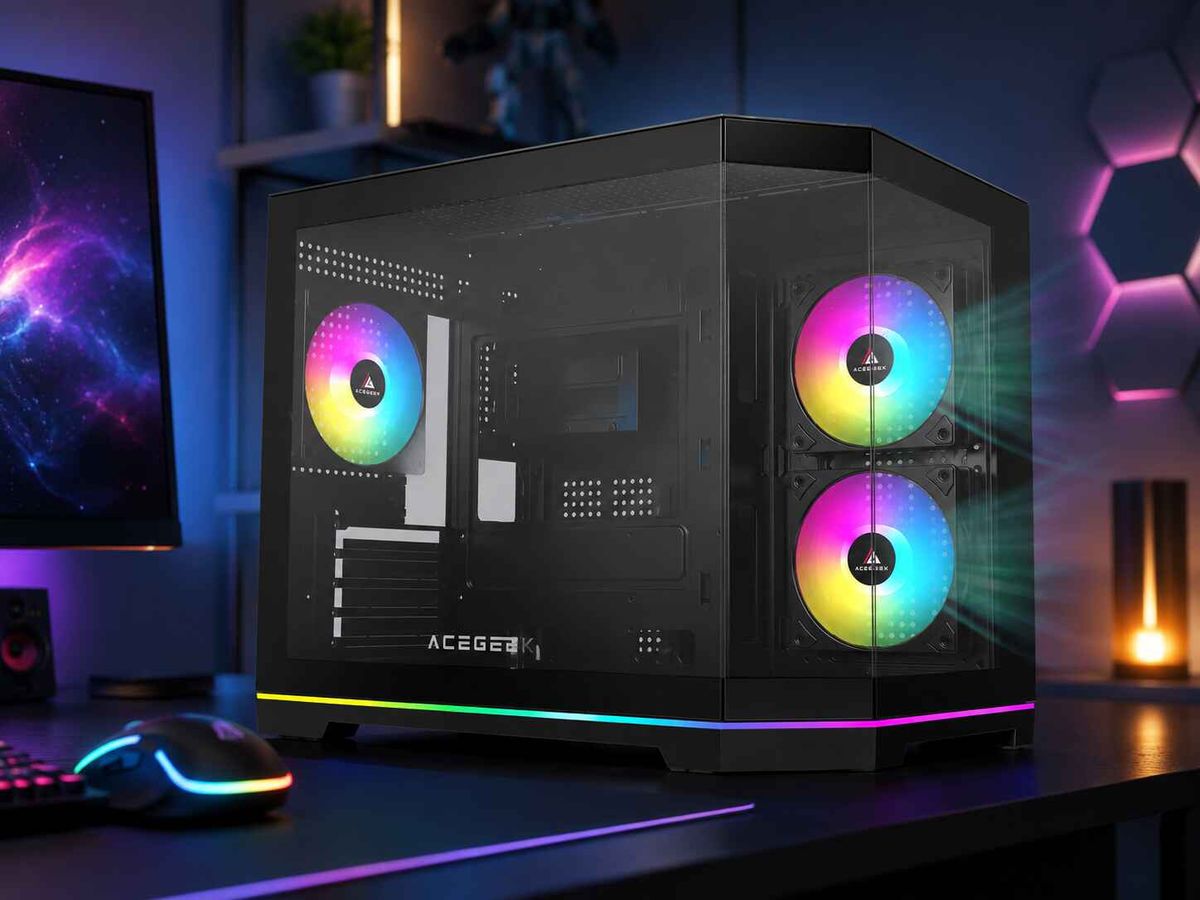
Reverse-blade fans make sense in a panoramic case when two conditions are met. The fan is an intake, and the face that points into the chamber should show the open blades instead of the motor hub and struts. They do not cool better than a standard fan, and they add nothing for rear or top exhaust. They change which face is visible. In a glass-front case, that can matter to a brand's product photography and to a builder's showcase.
For case brands, integrators and fan buyers, the real question is not whether a reverse blade is "better." It is whether the visual benefit justifies a different SKU, a mixed fan set, and a new orientation check on the assembly line. This article covers how reverse-blade fans work, where they fit, where they don't, and what to specify before requesting a quote.
What Is a Reverse-Blade Fan, and How Does It Differ from a Standard Fan?
A reverse-blade fan moves air in the opposite direction through the frame compared with a standard fan. Its blades are mirrored and pitched the other way.
The easiest way to tell them apart is the strut side. Watercooling UK's fan direction guide explains that on a normal fan, air blows toward the struts. The open blade face is the intake, and the strut side with the motor hub and sticker is the exhaust. On a reverse fan, air enters through the strut side and leaves through the open blade face.
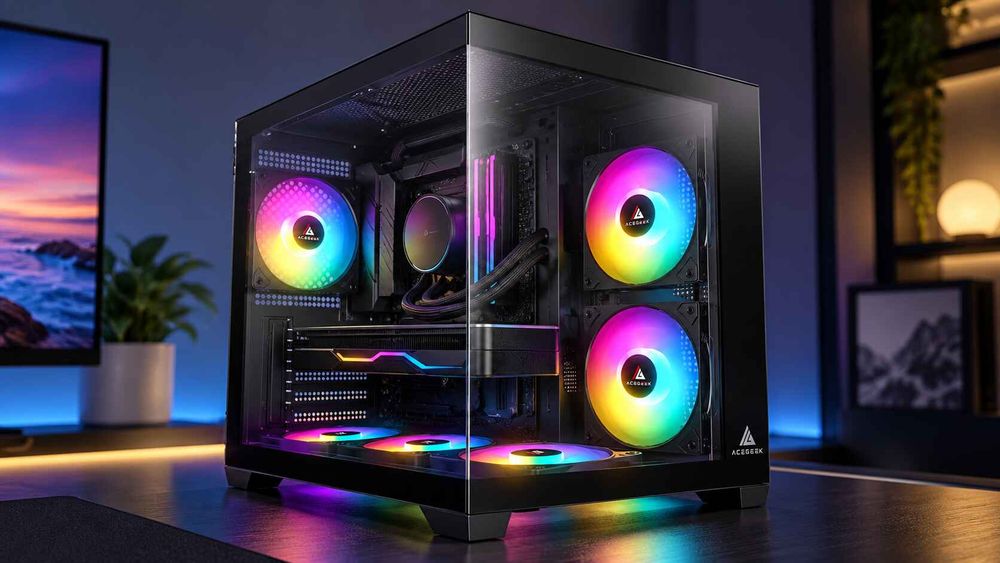
Compare this with a standard fan installed as a side intake. The hub and struts face into the case, which is the side the viewer sees through the glass. A reverse-blade fan mounted in the same position shows the open blades and any lighting on the blade face.
Three terms are often confused:
Reverse-blade fan: a model built so that airflow runs from the strut side to the blade side.
Reverse rotation: the motor spins the opposite way. This does not by itself say which side air exits.
Flipping a standard fan: a standard fan can be mounted either way to produce intake or exhaust. That is the alternative a reverse-blade fan competes against. A PCPartPicker discussion makes this point, noting that reverse-blade models mainly matter when you want the hub facing inward and care about the look.
Product pages and packaging do not always use these terms consistently. A specification should therefore describe the airflow direction relative to the frame, not just a name.
Why Panoramic Cases Make Fan Orientation a Design Issue
A conventional mesh-front tower pulls air through a front panel. Most fans there are hidden behind the mesh, so the visible face rarely matters. A panoramic case works differently. ACEGEEK's guide to side intake fans in a panoramic case notes that the front glass does not pass air, so many designs place their main intake fans beside the motherboard tray. Bottom intake fans are a common second path.
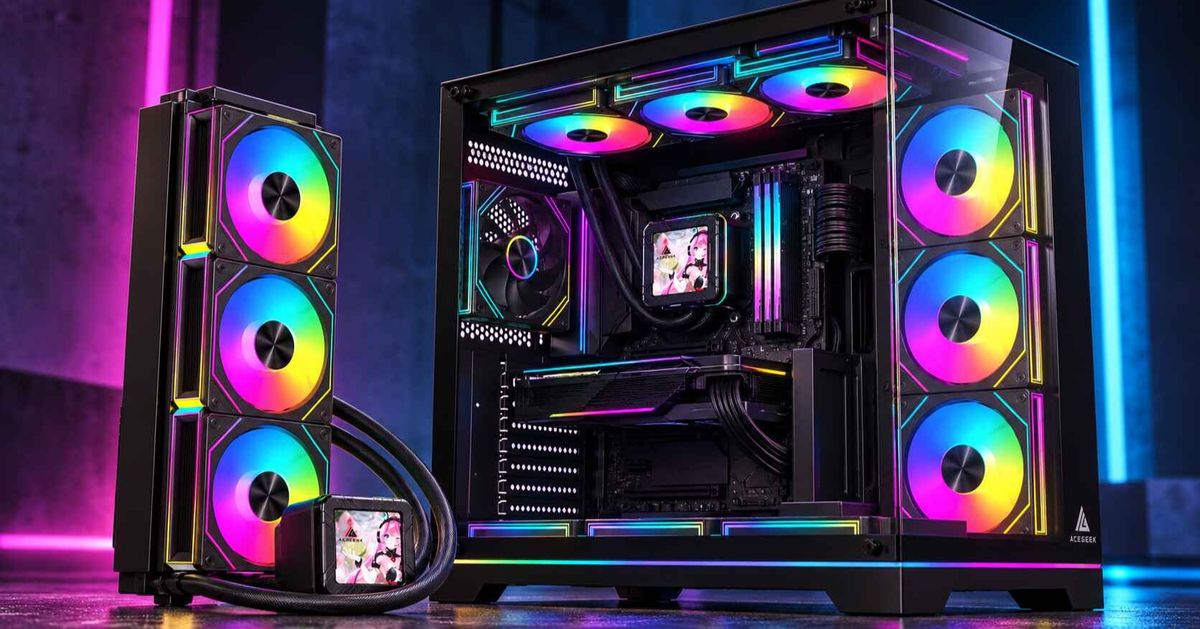
The result is a set of fans that sit in plain view and must still blow inward. Builders who run standard fans there see the motor hub and spokes. Case brands that photograph the interior for retail pages face the same view. Reverse-blade fans exist to fix this one visual problem.
Airflow still comes first. As ACEGEEK's panoramic-case build checklist points out, the position and openness of the vents matter more than the amount of visible glass. A reverse-blade fan placed behind a restrictive grille or filter will not perform better than a standard fan in the same spot. For readers weighing the enclosure itself, the comparison of mesh and panoramic glass cases for high-wattage GPUs covers how intake design affects GPU cooling.
Do Reverse-Blade Fans Cool Better or Worse Than Standard Fans?
A reverse-blade fan should not be expected to cool better. Whether it cools worse depends on the specific model, and the available evidence suggests the gap is small and varies by product line.
The clearest published comparison comes from Corsair, which compared its own iCUE LINK LX and LX-R lines. In Corsair's comparison of reverse-blade and standard fans, at the same rated speed, the LX-R reverse models had higher minimum airflow (about 15% more for 120mm). The standard LX models had slightly higher maximum airflow at 120mm (about 4.8%), higher maximum static pressure (about 10.6%), and lower noise at maximum speed. These are one manufacturer's rated minimum and maximum figures for one product family. They are not installed measurements, and they do not describe every brand.
The reverse design is also not inherently low-pressure. ASUS lists its TUF Gaming TR120 ARGB Reverse with a 28mm frame and a 2.75 mmH2O static pressure rating, and positions it for panoramic chassis or radiators. That is a manufacturer claim, but it shows that blade direction and pressure capability are separate design choices.
Community discussion tends to say reverse-blade fans cost more and may move slightly less air, as in the PCPartPicker thread above. That is anecdotal and should not be read as a general rule.
The practical takeaway: orientation is a styling decision, not a cooling upgrade
The conventional assumption is that a "reverse" fan is a specialised performance part. The better reading is that it is an orientation tool. Choosing it makes sense when the visible face is worth a different part number. Choosing it to fix temperatures does not.
Temperature depends on the fan's behavior against real resistance, which is why the comparison of airflow-oriented and static-pressure-oriented fans and the guide to which 120mm fan specifications matter are better starting points. Neither treats blade direction as a performance category.
One reasoning point is worth testing with any supplier. In a reverse-blade intake, the struts and hub sit on the inlet side, facing the vent. Whether that affects noise or airflow depends on the fan's design. This is an engineering inference, not a verified rule, so ask for noise measured at matched airflow instead of assuming parity.
Where Reverse-Blade Fans Make Sense
Match each fan position to its airflow direction and to which face the viewer sees.
Fan positionAirflow directionFace visible inside the chamberReverse-blade fan?What to verifySide intake beside the motherboard trayInto the caseStandard: hub and struts. Reverse: open bladesOften yes, if appearance mattersVent resistance, filter, airflow arrowBottom intake (e.g., below a horizontal GPU)Into the caseSame as above, from the chamber sideOften yes, if the position is visibleClearance below the case, filter resistanceSide-mounted radiator as intakeInto the case through the radiatorSame as abovePossibly, but check pressure performance firstPressure at the operating point, frame thicknessRear exhaustOut of the caseStandard: open blades face inwardNo. A standard fan already shows the bladesDirection matches the CPU cooler airflowTop exhaust or top radiator exhaustOut of the caseStandard: open blades face inwardNo, for the same reasonRadiator fit and fan thicknessHidden or filtered position with no viewEitherNot visibleRarely. Choose on performance and costPerformance curve, noise
The table follows from the direction rule above. A reverse fan used as an exhaust would show its hub toward the chamber, which defeats the purpose.
Side and bottom intake
These are the positions the product category was designed for. If the case brand's design shows these fans through the glass, a reverse-blade fan produces a cleaner view without changing the intake direction. The side intake position should still be judged on resistance. As the side intake guide explains, dense filters, narrow slots and tight grilles reduce what a fan can deliver, so a pressure-capable fan may be worth more than a visual feature.
Side radiators
A side-mounted radiator used as intake sends air through narrow fin spacing, so pressure performance matters. A reverse-blade model is workable only if its pressure curve suits the radiator, as the ASUS example suggests for at least one model. Ask for the pressure-versus-airflow curve at the target RPM before committing.
When Standard Fans Are the Better Choice
Standard fans are the better choice in several common cases:
Exhaust positions. A standard fan already presents the blade face inward at the rear and top.
Cost-sensitive bundles. Standard fans are the default product. Adding a reverse variant adds another part number to stock and track.
Hidden positions. If the fan is not visible, the reverse design offers no benefit.
Maximum pressure or minimum noise targets. If a single standard model scores better for your specific resistance and noise target, performance outweighs appearance.
Fan count driven by looks. Filling every slot with fans because they look good can backfire. ACEGEEK's article on why more fans can raise GPU temperature explains how extra fans can pull air away from the GPU or create colliding flows.
A mixed set is normal. A panoramic build might use reverse-blade fans on the visible intake positions and standard fans on the rear and top exhaust. All the fans can share the same lighting design, and each one can face the right way. The cost is a more complex bill of materials and a greater chance of a wrong-part mix-up.
A quick comparison
FactorStandard fanReverse-blade fanIntake face seen from the chamberHub and strutsOpen bladesBest use in a panoramic caseExhaust; any hidden positionVisible side or bottom intakePerformanceModel-dependentModel-dependent; may differ slightly in rated rangeStocking complexityLowerHigher: separate SKU, label and packagingInstallation riskBackwards install if arrow ignoredSame risk, plus confusion with standard fansEvidence baseBroadLimited independent testing found
Common Failure Modes in a Fan Layout With Reverse-Blade Parts
Most problems come from orientation errors, not from the fans themselves.
Intake fitted as exhaust. The ACEGEEK side intake guide warns that a fan can look correctly installed while pushing air out of the case. A reverse-blade fan makes that harder to catch by eye, because the visible face no longer tells you the airflow direction.
Opposing airflow. Noctua's airflow setup guide states that streams meeting head-on should be avoided because they hurt cooling and create audible noise. A single wrongly oriented side fan can fight the intake next to it.
Mixed SKUs on the line. Here is an illustrative scenario, not a real incident. An assembly line stocks both standard and reverse-blade 120mm fans in similar boxes. A shift fits standard fans in the visible side intake positions. The case looks correct under the glass cover, but the hub faces the viewer, and airflow direction is still correct, so the error is cosmetic. The opposite mix-up is worse: a reverse fan in an exhaust slot has its hub facing inward and may blow in the wrong direction relative to the plan. Either is a labeling and process problem.
Choosing on the wrong metric. Maximum CFM and maximum static pressure describe edge conditions, not installed airflow. This is why the 120mm guide recommends airflow comparisons at equal noise levels and a fan's performance against real resistance.
How to Verify Airflow Direction Before Approving a Build
Use three checks, in this order:
Read the frame arrow and the supplier's documentation. The manufacturer's airflow marking is the primary reference. Do not infer direction from lighting or fan appearance.
Check the strut side. Per the Watercooling UK guide cited earlier, a normal fan blows toward the struts and a reverse fan blows away from them. This works as a quick visual audit.
Run the tissue test on a powered sample. Watercooling UK describes holding a lightweight piece of tissue near one face. If it is pulled toward the fan, that side is the intake. Keep fingers and the tissue away from moving blades.
For production, put a direction check in the end-of-line procedure and sample units from each fan lot. Then confirm cooling with a repeatable workload, changing one variable at a time, as the side intake guide suggests. Record GPU and CPU temperatures, fan RPM and noise.
What Should Buyers Specify Before Requesting a Quote?
Reverse-blade fans are simple to describe if the RFQ is clear. Include:
Fan size and frame thickness. Specify 120mm or 140mm and the frame depth (for example 25mm or 28mm). Thickness affects fit, radiator stacking and performance.
A position map. List each fan location as intake or exhaust, and state which should present the open blade face to the chamber.
Airflow direction by drawing. Define direction relative to the frame and struts, and request the arrow marking. Do not rely on the term "reverse."
Performance data with test conditions. Ask for the pressure-versus-airflow curve at the working RPM and the test method. Ask whether the figures were measured in a standardized airway setup or simply quoted from a bench test. Do not accept maximum CFM alone.
Noise at matched conditions. Request dB(A) at the same RPM or airflow as the standard alternative.
Control and lighting interface. State PWM range, minimum RPM, connector type, daisy-chain limits and cable exit position.
Bundle and labeling rules. Specify pack counts for mixed sets, separate part numbers, and clear labels so standard and reverse fans cannot be confused.
QC requirements. Request airflow direction inspection, sampling plan and a plan for handling returns.
Target market and volumes. Provide expected quantities, delivery schedule and shipping method.
Ask the supplier to explain the difference in rated performance between their standard and reverse versions, if both exist. A vendor who can't provide curves for both has not yet shown the reverse fan fits your airflow plan.
Frequently Asked Questions
What is the difference between reverse-blade and normal fans?
A normal fan pulls air through its open blade side and exhausts it through the strut side. A reverse-blade fan draws air in through the strut side and exhausts through the blade side. Both can serve as intake or exhaust, depending on how they are mounted.
Do reverse-blade fans perform worse than standard fans?
Not necessarily. Corsair's published figures for one product line show small differences in minimum and maximum ratings, with neither type better across the board. Performance depends on the model, speed and resistance, so compare pressure-airflow curves and noise for your actual position.
Should I use reverse-blade fans for exhaust?
Usually not. At the rear and top, a standard fan already presents the open blade face toward the chamber. A reverse fan in an exhaust position would typically show its hub instead. Reserve reverse-blade fans for visible intake positions.
Can I flip a standard fan instead of buying reverse-blade fans?
Yes. A standard fan works as an intake when flipped, and airflow is unaffected. The difference is appearance, because the hub and struts then face the glass. Reverse-blade fans solve that visual issue.
Are reverse-blade fans better for radiators?
Not by default. Radiators need pressure performance at the operating point. Some reverse models are pressure-oriented, but that varies. Review the curve at your target RPM and check frame thickness and fit before choosing one.
How can I tell if a fan is a reverse-blade model?
Check the strut side. If air enters through the strut side and exits the open blade face, it is a reverse-blade model. Confirm with the frame arrow, the manufacturer's documentation, or a tissue test on a powered sample.