420mm AIO Case Buying Guide: Size, Fans, and Top Clearance
“Supports 420mm AIO.”
Four comforting words.
And four words that have probably caused more unnecessary case returns than most PC builders would admit, because a 420mm mounting label tells us only that the chassis was designed around three 140mm fan positions—it does not tell us whether a 458mm-long radiator, thick fan stack, tall DDR5 modules, oversized VRM heatsinks, EPS cable, rear exhaust fan, and radiator end tanks can all occupy the same space.
So what are we actually buying when we search for a 420mm AIO case?
Not a badge.
We are buying clearance.
That distinction matters because current 420mm coolers are not physically identical. Corsair's iCUE LINK TITAN 420 RX RGB uses a radiator measuring 457 × 140 × 27mm, while ARCTIC's Liquid Freezer III Pro 420 uses a substantially thicker 458 × 138 × 38mm radiator and explicitly states that the cooler requires at least 63mm of installation clearance. Corsair publishes the TITAN 420 specifications here, while ARCTIC provides its Liquid Freezer III Pro 420 dimensions here.
One millimeter here. Eleven millimeters there.
That is how “compatible” becomes “remove the motherboard and start again.”
What a 420mm AIO Actually Means
A 420mm AIO normally uses three 140mm radiator fans.
That sounds obvious, but it creates two dimensions builders routinely underestimate: width and total physical length.
A 360mm radiator uses three 120mm-class fans. A 420mm radiator uses three 140mm-class fans. If we compare only the nominal square face area occupied by the three fan frames:
3 × 120 × 120 = 43,200mm²
3 × 140 × 140 = 58,800mm²
That is roughly 36.1% more nominal fan-frame face area.
Do not misread that number. It does not mean a 420mm AIO automatically cools 36.1% better than a 360mm model. Pump design, cold plate, fin density, fan pressure, coolant flow, CPU heat density, fan RPM and case restriction still decide actual thermal performance.
But geometrically?
A 420 is big.
Really big.
And the radiator itself extends beyond the 420mm occupied by the three fan frames. Corsair's current TITAN example reaches 457mm. ARCTIC reaches 458mm. Add end tanks, tube exits and mounting tolerance, and a case with exactly 420mm of empty-looking roof space is nowhere near enough.
This is why I treat 420mm AIO compatibility as a three-dimensional measurement exercise rather than a checkbox.
420mm Radiator Case Dimensions That Actually Matter
When I evaluate a PC case with 420mm radiator support, I ignore the glamour shots first.
I want six numbers.
Not RGB.
Not glass curvature.
Numbers.
MeasurementReal ExampleWhy It MattersRadiator class420mmTells us the fan mounting familyActual radiator length457–458mm in Corsair/ARCTIC examplesDetermines whether end tanks physically fitRadiator width138–140mmDetermines motherboard and side-panel overlapRadiator thickness27mm Corsair / 38mm ARCTICChanges total roof stack depthFan thickness25mm Corsair exampleAdds directly to vertical clearance requirementComplete cooling stack~52mm conventional / ≥63mm ARCTIC Pro requirementDetermines RAM, VRM and EPS collision riskTop fan supportIdeally 3 × 140mmConfirms mounting patternRadiator mounting positionOffset or directly above motherboardDetermines whether RAM sits under the fans
Corsair's 27mm radiator paired with 25mm fans creates roughly a 52mm radiator-and-fan stack. ARCTIC's thicker design is a different physical problem altogether; the company tells buyers to allow at least 63mm of clearance.
Same search keyword.
Different installation.
That is exactly why “best PC case for 420mm radiator” lists become dangerous when they simply copy a manufacturer's radiator-support field.
The Top-Clearance Trap Nobody Should Ignore
Length gets attention.
Width causes trouble.
A 420mm radiator is built around 140mm-class fans, which means the assembly extends farther toward the motherboard than a 120mm-based radiator if the top rails are not strongly offset toward the side panel.
Now put tall DDR5 underneath it.
Bad combination.
ACEGEEK's existing guide on why top-mounted radiators can interfere with RAM explains the collision zone in detail: radiator thickness, fan thickness, DIMM height, VRM heatsinks and roof-mount offset all interact.
For a 420mm build, I would pay even more attention because we are moving from a 120mm-wide fan family to 140mm hardware.
A Real Manufacturer Example: Fractal's 36mm Restriction
Fractal Design provides one of the better demonstrations of why specifications need context.
Its Meshify 2 officially accepts 140mm-based top radiators, including 140mm, 280mm and 420mm, but Fractal also states that these configurations impose a 36mm maximum motherboard-component height.
That restriction applies particularly to RAM, large VRM heatsinks and rear-I/O structures.
And it gets more interesting.
Fractal says an ARCTIC Liquid Freezer II 420 can fit the roof, but the builder may need to remove the rear fan or replace it with a 120mm model, while also keeping the front-most top fan area free.
That is not theoretical internet arguing. It is the case manufacturer describing the compromises itself in its official Meshify 2 compatibility guidance.
Think about that.
The radiator fits.
Yet the build changes.
This is why I dislike treating the phrase 420mm radiator case as if it described universal compatibility.
How to Check 420mm Radiator Clearance Before Buying
Here is the method I would use before spending money.
1. Find the AIO's Actual Dimensions
Never search only for:
420mm AIO
Search for the exact model's:
Radiator length
Radiator width
Radiator thickness
Fan thickness
Tube length
Tube exit position
For example, two current 420mm products already show why this matters.
The Corsair TITAN 420 radiator measures 457 × 140 × 27mm.
ARCTIC's Liquid Freezer III Pro 420 measures 458 × 138 × 38mm.
That 11mm thickness difference is substantial once the radiator hangs over a motherboard.
2. Confirm Three 140mm Top Fan Mounts
A proper top-mounted 420 configuration generally requires three consecutive 140mm mounting positions.
A case supporting “3 × 120mm top fans” is a 360mm-class roof.
That does not magically become a 420mm roof because the chassis looks large.
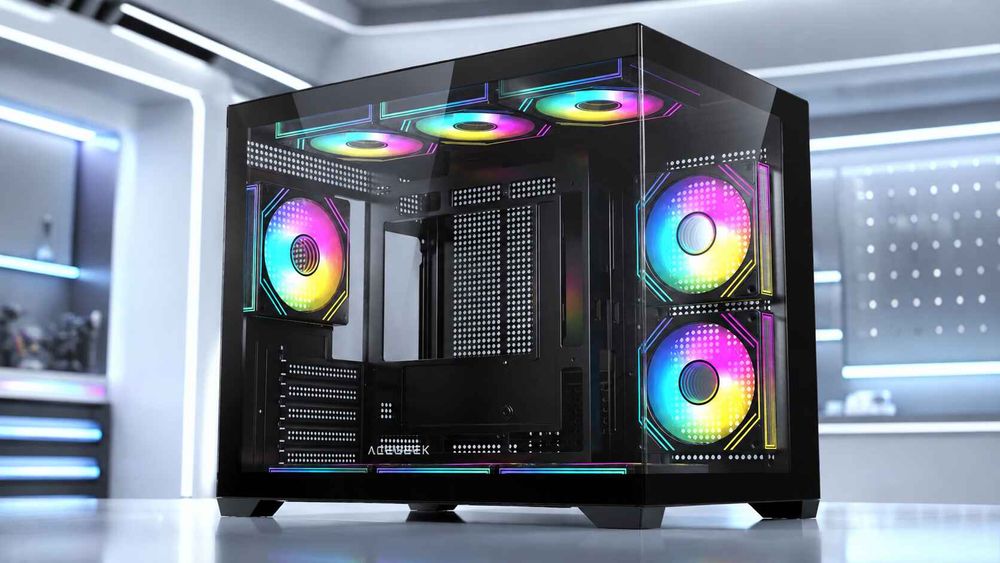
ACEGEEK's LunarisFlow is a useful example of what I want to see in a specification sheet: its top supports 3 × 120mm or 3 × 140mm fans, while the radiator specification explicitly lists 420mm/360mm AIO support at the top. The case itself measures 483 × 238 × 490mm and lists 400mm maximum GPU clearance.
Specific numbers.
Much better.
3. Measure Radiator + Fan Stack Depth
This is the measurement builders skip.
Suppose your radiator is 27mm thick and the fans are 25mm thick.
27 + 25 = 52mm.
Now compare that depth against the available space above the motherboard.
Then include:
RAM heatspreaders
RGB light bars
VRM heatsinks
rear-I/O armor
CPU EPS connector
EPS cable bend
screw heads
radiator side frame
tube fittings
And give yourself some service room.
Zero-millimeter clearance is not clever engineering.
It is a future repair problem.
For deeper measurement methodology, ACEGEEK's top-radiator clearance guide for RAM, tubes, and motherboard space is worth checking before finalizing the motherboard and memory combination.
4. Check Radiator Width, Not Just Length
This catches people.
A 420mm radiator may be roughly 138–140mm wide. Its fans are 140mm wide.
If the mounting holes sit almost directly above the DIMM sockets, that wide cooling assembly can hang into the RAM zone even when the case has ample vertical height.
An offset roof rail is therefore valuable.
The farther the radiator can sit toward the side panel—and away from the motherboard—the less likely it is to collide with tall RAM or VRM hardware.
5. Check the Front and Rear End-Tank Zones
Three 140mm fans consume 420mm of nominal mounting length.
But the radiator can approach 458mm.
Where does the other space go?
End tanks.
That extra length may run into:
rear exhaust fans
front chassis structure
cable-routing housings
fan brackets
top I/O assemblies
decorative covers
This is why I want a real radiator-length specification instead of “420 supported.”
420mm AIO Fans: Three 140mm Fans Change the Airflow Plan
A 420mm AIO is not just a longer 360mm.
Its fans change the acoustic and pressure strategy.
Three 140mm fans can move substantial air at lower rotational speeds when the fan and radiator are designed well, but a radiator remains an airflow restriction. You still need fans capable of maintaining pressure through the fin stack.
CFM alone is not enough.
ACEGEEK's guide to choosing radiator fans versus case-airflow fans explains why static pressure matters once a fan is attached to dense fins, filters or restrictive panels.
ARCTIC illustrates the point nicely. Its current P14 Pro fan used on the Liquid Freezer III Pro 420 is specified at up to 2,500 RPM, 110 CFM and 5.2 mmH₂O static pressure.
Those numbers describe a fan designed to work against resistance, not merely spin in open air.
But there is another issue.
Noise.
A 420mm radiator gives you a lot of heat-exchanger and fan area, so the sensible goal is usually not “run every fan at maximum RPM.”
The sensible goal is to use that area to achieve the required cooling at a reasonable fan speed.
Big cooling hardware should buy you headroom.
Not just bigger numbers.
Top-Mounted 420mm AIO: Exhaust or Intake?
For most conventional layouts, I prefer to start testing a top-mounted 420mm AIO as exhaust.
Why?
Because the CPU's heat leaves the chassis immediately instead of being pushed back into the GPU chamber.
But this is not a universal law.
A radiator used as intake receives cooler room air and can improve CPU temperature, while simultaneously feeding radiator-warmed air into the case. A radiator used as exhaust receives warmer case air, potentially sacrificing some CPU performance while helping the GPU, memory, motherboard and SSD environment.
ACEGEEK's radiator intake vs exhaust analysis covers this CPU-versus-GPU tradeoff in more depth.
My rule is simple:
Do not optimize one temperature sensor while making the whole PC worse.
A gaming machine with a large open-air GPU may benefit enormously from strong bottom or front intake plus a 420mm top exhaust.
A CPU-heavy rendering workstation may make a different trade.
Test both.
A 420mm AIO Case Still Needs GPU Airflow
Here is another hard truth.
A huge CPU radiator does not cool your graphics card.
And modern builds can become absurdly CPU-focused: enormous AIO on top, glass everywhere, weak intake below the GPU, then surprise when the graphics card runs hot and noisy.
The case needs separate fresh-air capacity.
That can come from:
Mesh front intake
Side intake
Bottom intake
A combination of side and bottom intake
This is another reason I find the ACEGEEK LunarisFlow layout interesting for a 420mm build.
Its official specification provides:
Top: 3 × 120mm or 3 × 140mm
Side: 3 × 120mm or 3 × 140mm
Bottom: 3 × 120mm or 3 × 140mm
Rear: 1 × 120mm
Top radiator: 420mm / 360mm AIO
Side radiator: 240mm AIO
GPU clearance: 400mm
CPU air-cooler clearance: 180mm
That does not automatically guarantee every 420mm AIO and motherboard combination will fit—the cooler's exact dimensions still need checking—but it gives us a far better starting architecture than a chassis with a giant roof radiator and starved intake.
Best Case for a 420mm AIO: My Buying Criteria
I would not choose the best case for 420mm AIO based on radiator support alone.
I would score it in this order.
1. Explicit 420mm Radiator Support
Not merely three 140mm fan positions.
The manufacturer should explicitly state 420mm radiator or AIO compatibility.
2. Actual Radiator Length Space
Look for enough room for a roughly 457–458mm-class radiator if that matches your cooler.
Do not assume.
Verify your exact model.
3. Top-Mount Offset
A wide offset away from the motherboard is extremely valuable for RAM and VRM clearance.
4. Sufficient Vertical Stack Clearance
A conventional setup may be around 52mm.
Thicker AIOs can exceed 60mm.
ARCTIC explicitly asks for at least 63mm for its current Pro 420 model.
5. Strong GPU Intake
A giant CPU radiator should not steal all the fresh air.
I want front, side or bottom intake capable of feeding the graphics card directly.
6. Large GPU Clearance
Check this with the entire cooling configuration installed.
Front-mounted 420mm radiators can reduce usable graphics-card length dramatically. Fractal's North XL, for example, lists GPU clearance up to 413mm but reduces that figure to 380mm with a 420mm front radiator installed.
That is a perfect example of why dimensions must be checked as a system.
7. Service Access
Can you remove RAM without removing the radiator?
Can you reach the EPS connector?
Can you remove the motherboard?
Can you replace a fan?
A PC that only fits when assembled in one exact sequence is not a pleasant PC to own.
420mm vs 360mm: Bigger Is Not Automatically Better
Should everyone buy a 420mm AIO?
No.
A 360mm system is easier to fit, easier to find cases for and usually leaves more flexibility around the motherboard.
A 420 makes more sense when you specifically want:
Three 140mm radiator fans
Large radiator area
Lower-speed cooling potential
High sustained CPU cooling capacity
A case already designed for large liquid-cooling hardware
More acoustic headroom under sustained loads
But if installing the 420 forces you to remove exhaust fans, replace your RAM, compromise GPU airflow or buy a chassis twice the size you wanted, the bigger cooler may have defeated its own purpose.
Cooling is systemic.
That is the point.
Before ordering the full build, I would run every component through ACEGEEK's full PC part compatibility checklist, not just the CPU socket checker.
Because the expensive mistakes usually happen after every individual component has already been labeled “compatible.”
My 420mm AIO Compatibility Checklist
Before checkout, answer every one of these:
Does the case explicitly support a 420mm radiator?
Does the desired mounting position support 3 × 140mm fans?
What is the cooler's exact radiator length?
What is its radiator width?
What is its radiator thickness?
How thick are the fans?
What is the total radiator + fan depth?
Is the radiator rail offset from the motherboard?
How tall is the RAM?
How tall are the VRM heatsinks?
Can the EPS connector remain accessible?
Is there clearance around the radiator end tanks?
Will the rear exhaust fan remain installed?
Does the tube exit have room?
Can the tubes reach the CPU block without tension?
Does the GPU still receive cool intake air?
Does a front-mounted radiator reduce GPU clearance?
Can the dust filter and top panel still be removed?
Can you replace RAM without dismantling the radiator?
If even three of those answers are “I don't know,” I would not place the order yet.
Specs first.
Checkout later.
FAQs
What size case do I need for a 420mm AIO?
A case for a 420mm AIO needs an explicitly supported 420mm radiator position, three consecutive 140mm fan mounts, enough room for a radiator that may be roughly 457–458mm long, and sufficient width and vertical clearance for the complete radiator-and-fan assembly without touching RAM, VRM heatsinks or chassis hardware.
That usually pushes buyers toward larger ATX mid-towers and full-tower designs, although exterior case size alone does not prove compatibility. Internal rail position and motherboard clearance are more important than the marketing category.
How do I check 420mm AIO compatibility?
420mm AIO compatibility is checked by matching the cooler's exact radiator length, width, thickness, fan dimensions and tube routing against the case's specified 420mm mounting position, then confirming that RAM, motherboard VRM heatsinks, EPS cables, rear fans, GPU hardware and top-panel structures remain outside the complete installed cooling envelope.
Do not use the “420mm” label as the measurement. Find the cooler's actual mechanical dimensions and compare them with the exact case configuration you intend to build.
How much top clearance does a 420mm AIO need?
A 420mm AIO may need roughly 52mm of vertical space for a conventional 27mm radiator plus 25mm fans, while thicker designs can require more than 60mm; ARCTIC, for example, states that its Liquid Freezer III Pro 420 requires at least 63mm of installation clearance.
The number alone is still insufficient because the mounting rails may sit beside the RAM rather than directly above it. Always inspect both vertical clearance and horizontal radiator offset.
Can a 420mm AIO interfere with RAM?
A 420mm AIO can interfere with RAM when its wide 140mm-class radiator and fan assembly extends inward over the motherboard's DIMM area, particularly when the roof rails have little side offset, the radiator is thick, or tall RGB memory and large VRM heatsinks occupy the same upper motherboard zone.
Fractal's Meshify 2 is a real example: its top-mounted 140/280/420mm configurations impose a 36mm maximum motherboard-component height, with the manufacturer specifically mentioning RAM and VRM hardware.
Are three 140mm fans required for a 420mm radiator?
A standard 420mm PC radiator is designed around three 140mm fan positions, so a case normally needs three consecutive 140mm mounting locations in the chosen radiator position; three 120mm mounts correspond instead to the 360mm radiator class and cannot be assumed to provide the width or mounting-hole pattern required by 420mm hardware.
Radiator fans should also be selected for resistance. Static pressure becomes especially relevant when air must pass through dense radiator fins rather than an unrestricted case opening.
Is a 420mm AIO better than a 360mm AIO?
A 420mm AIO provides space for three 140mm fans and substantially more nominal fan-frame face area than three 120mm fans, giving cooler designers more physical area to work with, but it is not automatically superior because pump design, radiator construction, fan pressure, CPU heat density, noise targets and case airflow determine real performance.
The smarter choice is the largest cooler your case can accommodate cleanly without damaging GPU airflow, RAM clearance, serviceability or your desired noise profile.
What is the best PC case for a 420mm radiator?
The best PC case for a 420mm radiator is one that explicitly supports the exact mounting position, provides enough length and depth for the chosen cooler, offsets the radiator away from RAM and VRM hardware, preserves strong GPU intake airflow, and gives enough service space that routine component removal does not require dismantling the cooling system.
For an ACEGEEK build, LunarisFlow is a relevant 420mm candidate because its published specifications include top 420mm/360mm AIO support, three 140mm top positions, three 140mm side positions, three 140mm bottom positions and 400mm maximum GPU clearance. Exact AIO dimensions should still be verified before purchase.
Choose the Case Around the Whole Cooling System
Here is the decision I would make.
Do not shop for a 420mm AIO case by filtering “420mm supported” and immediately buying whichever chassis looks best.
Start with the cooler.
Write down its actual radiator length, width, thickness and fan depth. Check RAM height. Check the motherboard VRM zone. Check the roof offset. Check the rear fan. Check the GPU intake path.
Then choose the enclosure.
If you are planning a large-airflow 420mm build, review the ACEGEEK LunarisFlow specifications and compare its top 420mm support, 3 × 140mm fan positions, 400mm GPU clearance and multi-directional airflow layout against the exact dimensions of your AIO, motherboard and memory before ordering.
Measure twice.
Build once.
A 420mm radiator should dominate your CPU temperatures.
Not your motherboard.