How to Choose a PC Case for a Large Air Cooler
Clearance is deceptive.
A case can advertise 165 mm of CPU cooler clearance, accept a 164 mm heatsink on paper, and still leave you fighting a raised front fan, tall DDR5 modules, a slightly bowed side panel, awkward motherboard tolerances, and a tower that rattles against tempered glass. Is that really compatible?
I do not think so.
When I evaluate a PC case for a large air cooler, I do not ask whether the cooler can theoretically be squeezed inside. I ask whether the system can be assembled, closed, cooled, transported, cleaned, and upgraded without parts pressing against each other.
That is a much harder test.
The Advertised Clearance Number Is Only the Beginning
CPU cooler clearance is the maximum height available between the installed processor area and the inside surface of the closed side panel. ACEGEEK’s guide to measuring CPU air cooler clearance explains why usable clearance—not an optimistic catalogue number—is what determines whether the side panel closes safely.
Most buyers compare two figures:
Cooler height: 164 mm
Case clearance: 165 mm
Then they assume the problem is solved.
It is not.
A large air cooler installation has several dimensions that may alter the final height:
The heatsink’s official assembled height
The front fan’s position above the RAM
Motherboard socket and PCB tolerances
Side-panel thickness and internal bracing
Anti-vibration pads or decorative cooler covers
Flex in a steel or tempered-glass panel
Manufacturing tolerances in both products
My working formula is simple:
Required case clearance = installed cooler height + fan-rise penalty + 5–10 mm safety margin
The 5–10 mm figure is my practical buying margin, not a universal industry standard. I use at least 5 mm for ordinary steel-panel builds and prefer closer to 10 mm for heavy dual-tower coolers, tall RAM, tempered-glass panels, or systems that will be transported.
A cooler touching the panel may technically boot. That does not make it a good build.
RAM Height Can Turn a 168 mm Cooler Into a 181 mm Cooler
This is the fitment problem most case specifications ignore.
Noctua lists the NH-D15 G2 at a total height of 168 mm with two 140 mm fans. Its standard fan arrangement accommodates RAM modules up to 32 mm high. Those figures are stated in the NH-D15 G2 specifications and Noctua’s case and RAM compatibility guidance.
Now consider a common 45 mm RGB memory kit.
If the front fan must be raised by approximately the difference between the RAM height and the standard 32 mm allowance, the calculation becomes:
168 mm + (45 mm − 32 mm) = approximately 181 mm
That 181 mm figure is an installation estimate based on the published dimensions; the exact result depends on fan position, motherboard layout, cooler orientation, and whether the front fan overlaps the memory.
But the buying implication is obvious.
A case advertising 170 mm of CPU cooler clearance may fit the bare heatsink yet fail once the front fan is positioned correctly. Even a case rated at 180 mm could become uncomfortably tight with tall memory.
This is why “will my CPU cooler fit my case?” cannot be answered from one product-page number.
Three ways to avoid the RAM penalty
The first option is low-profile memory. Modules around 30–35 mm give large dual-tower coolers far fewer reasons to misbehave.
The second option is moving the front fan upward, but only when the case has enough additional clearance.
The third option is removing or relocating the front fan. Some dual-tower coolers can operate with only the center fan, although temperatures and noise should be tested under the user’s actual workload rather than assumed from an open test bench.
Buying low-profile RAM is often cheaper than replacing the case later. It is also less glamorous, which is probably why the industry rarely leads with that advice.
Real Cooler Heights and the Case Clearance I Would Target
Large tower coolers do not occupy one universal size class. A compact dual-tower unit may be easier to house than a visually similar 140 mm model.
Air coolerPublished heightPublished design detailsCase clearance I would targetThermalright Phantom Spirit 120 SE154 mmSeven 6 mm heatpipes, dual 120 mm fans160–165 mmDeepCool Assassin IV164 mmSeven 6 mm heatpipes, 140 mm and 120 mm fans170–175 mmNoctua NH-D15 G2168 mmEight heatpipes, two 140 mm fans175–180 mm with low-profile RAMNH-D15 G2 with an estimated 13 mm fan riseAbout 181 mmExample based on 45 mm RAM versus 32 mm standard allowance186–191 mm
Thermalright specifies the Phantom Spirit 120 SE at 154 mm high with seven 6 mm heatpipes, while DeepCool lists the Assassin IV at 164 mm high and 1,575 grams. These are not minor desktop ornaments; they are large mechanical loads with fans, clips, fin stacks, and installation tolerances.
The table is deliberately conservative.
I would rather install a 154 mm cooler in a case with 165 mm clearance than put a 168 mm cooler into a case rated for 170 mm. The second build may pass a specification comparison, but it leaves only 2 mm before RAM height, tolerances, and side-panel behavior enter the argument.
Two millimetres is not headroom. It is a bet.
Real ACEGEEK Fitment Examples
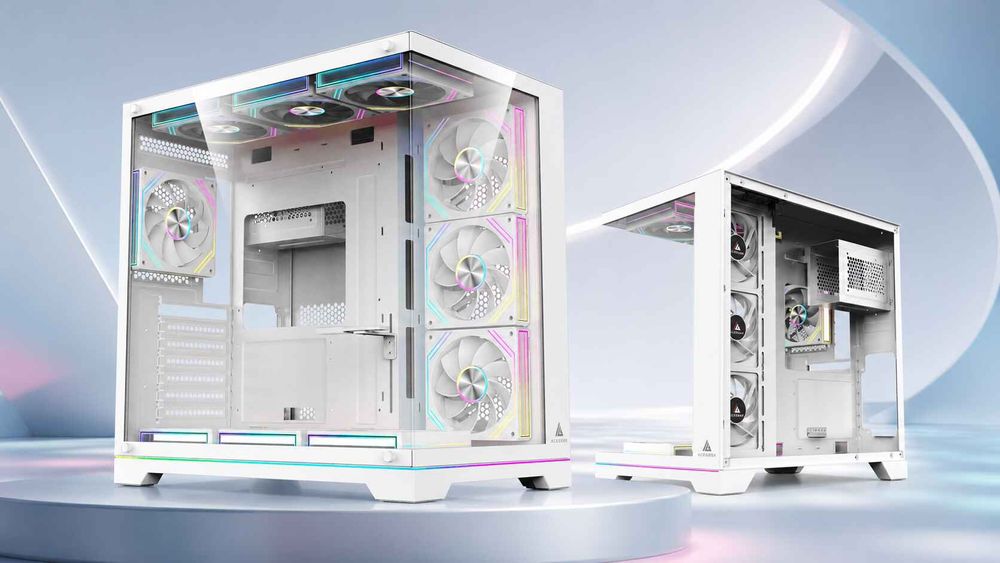
ACEGEEK’s case range illustrates why buyers need to compare exact models rather than relying on labels such as “mid-tower” or “gaming case.”
A 165 mm case
The ACEGEEK Horizon lists 165 mm of maximum CPU cooler clearance, along with side and bottom fan positions and support for a side-mounted 360 mm AIO.
That makes the case a plausible match for:
A 154 mm Phantom Spirit 120 SE
Many 150–160 mm single-tower coolers
Some compact dual-tower designs
It is not a safe match for a 168 mm NH-D15 G2. The cooler is already 3 mm taller than the published case allowance before RAM interference is considered.
A 170 mm case
The ACEGEEK Qube lists 170 mm of cooler clearance, E-ATX through Mini-ITX motherboard support, and front, side, top, rear, and bottom fan mounting positions.
On paper, a 168 mm NH-D15 G2 leaves 2 mm.
I would reject that pairing unless the manufacturer’s exact compatibility data confirmed it and the memory layout required no fan lift. A 164 mm Assassin IV is more believable, but even then I would verify the side panel, RAM, motherboard heatsinks, and fan clips.
A 180 mm case
The ACEGEEK LunarisFlow lists 180 mm of CPU cooler clearance, 400 mm of GPU clearance, three 120/140 mm fan positions at the top, side, and bottom, plus a rear 120 mm position.
A standard 168 mm NH-D15 G2 would have 12 mm of nominal clearance.
That is the sort of margin I can support for low-profile RAM. However, the estimated 181 mm configuration created by raising the front fan for 45 mm RAM would still exceed the case specification. The buyer would need lower memory, a different fan arrangement, or a shorter cooler.
The lesson is not that one case is universally better. It is that cooler height, RAM height, motherboard size, GPU dimensions, and airflow must be treated as one system.
Case Width Matters, but External Width Can Mislead You
Many buyers use external case width as a shortcut for cooler compatibility.
It can help, but it is not definitive.
A case measuring 220 mm wide may provide 170–180 mm of CPU cooler clearance. Another case with a similar external width may lose internal space to:
A deep cable-management channel
A dual-chamber layout
A recessed motherboard tray
Thick tempered-glass mounts
Side-mounted fans
Structural frame rails
Decorative exterior panels
So I never calculate cooler fit by subtracting the motherboard and cable space from the external width. Too many hidden structures interfere with that arithmetic.
Use the manufacturer’s maximum CPU cooler clearance as the starting point. Then apply your safety margin and RAM calculation.
The broader 2026 gaming PC case buying guide follows the right order: confirm motherboard support, GPU dimensions, CPU air-cooler height, PSU space, fan layout, and dust-filter access before judging lighting or glass.
Form factor is a category. Clearance is a measurement.
A Large Air Cooler Still Needs the Right Airflow Direction
A massive heatsink cannot cool a processor with air it never receives.
Large tower coolers normally work best when their fans move air toward a nearby rear exhaust. The case should provide a direct supply of cool intake air from the front, side, or another unobstructed position.
For a conventional ATX tower, my preferred baseline is:
Two or three filtered front intake fans
Tower-cooler fans pointing toward the rear
One rear exhaust fan
An optional top-rear exhaust fan
No aggressive top-front exhaust stealing fresh air before it reaches the cooler
For a panoramic or dual-chamber case without a traditional front intake, side intake can feed the tower effectively, but the fan direction must be deliberate. Bottom intake often helps the graphics card more than the CPU cooler, so it should not be counted as a complete substitute for air entering near the tower’s fan.
A March 2026 Tom’s Hardware analysis of positive versus negative case pressure identifies front mesh intake and positive pressure as a strong fit for tower air coolers. It also warns that adding more fans eventually produces diminishing returns when placement and restriction remain poor.
That conclusion matches the physics.
Three well-positioned fans can outperform seven fans fighting each other.
Mesh is usually the safer choice
A mesh or highly vented intake gives case fans a lower-resistance path. A sealed glass front with narrow edge vents can still work, but it may require faster fan speeds to supply the same tower cooler.
Faster fans mean more noise.
ACEGEEK’s guide to building a high-airflow PC without overspending makes the same practical point: intake openness and fan placement matter more than simply filling every available mount.
I would not buy a large air cooler to compensate for a suffocated case. That is paying twice for the same design mistake.
Do Not Confuse a Bigger Case With a Better Case
A full tower can provide more clearance, but size alone does not guarantee lower temperatures.
A large case can still fail when:
The intake is blocked by solid glass
Fans are too far from the components
The tower cooler receives recirculated GPU exhaust
The rear exhaust is undersized or obstructed
Cables block the intake path
Dust filters are excessively restrictive
Top fans pull fresh intake air away from the cooler
ACEGEEK’s analysis of how case size affects cooling performance notes that fan placement, airflow paths, heat density, cable obstruction, and intake restriction can matter more than raw chassis volume.
The correct buying rule is not “buy the biggest case.”
It is: buy the smallest case that provides comfortable clearance and an honest airflow path for every major component.
The article Is a Bigger PC Case Always Better? reaches the same blunt conclusion: extra size is useful when it creates meaningful clearance, cleaner cable bends, better airflow, and easier maintenance; otherwise, it is unused steel and glass.
Check These Seven Measurements Before Checkout
1. Installed cooler height
Use the manufacturer’s total height including fans and decorative covers. Do not use the heatsink-only measurement.
2. Maximum case cooler clearance
Find the figure on the exact case model and revision. A “Pro,” “Mesh,” “Mini,” or regional version may use a different internal frame.
3. RAM module height
Check the actual height in millimetres. Do not assume all DDR5 memory is “standard height.” Tall RGB heat spreaders regularly exceed the default RAM allowance of large dual-tower coolers.
4. Fan-rise requirement
Determine whether the front cooler fan overlaps the memory. Add the expected rise to the official cooler height.
5. Rear exhaust position
Make sure the heatsink, fan clips, and rear case fan can coexist. A cooler can clear the side panel but interfere with an unusually thick rear fan or mounting frame.
6. Top-panel clearance
Large towers may sit close to top fans, EPS power cables, and motherboard VRM heatsinks. Check whether top fans can be installed or removed after the cooler is mounted.
7. GPU and motherboard compatibility
Do not solve CPU cooler fit by creating another problem. Confirm graphics-card length, card thickness, power-cable bend space, motherboard form factor, PSU length, and storage positions.
A proper large CPU air cooler compatibility check is a complete-system check.
The Compatibility Table I Use
CheckMinimum I would acceptPreferred resultCase clearance versus installed cooler height5 mm extra10 mm or moreRAM interferenceFront fan fits without pressureLow-profile RAM or no fan riseMain intakeAt least two open intake positionsThree filtered mesh intakesExhaustOne rear exhaustRear plus controlled top-rear exhaustAirflow directionCooler points toward an exhaustStraight intake-to-cooler-to-rear pathSide-panel contactNo contact when closedVisible gap under normal lightingMaintenance accessCooler can be cleaned in placeFans and filters removable without dismantling the build
These are buying standards, not official certification thresholds. They are intentionally stricter than “the panel closed when I pushed it.”
Hard Truths About Large Air-Cooled Builds
The best PC case for a tower cooler is not always the most expensive model.
And it is rarely the case with the most glass.
A well-ventilated mid-tower with 175–180 mm of cooler clearance can be a better air-cooling platform than a huge showcase chassis with restricted intakes. Likewise, a compact case with 165 mm clearance may be excellent with a 154 mm cooler, even though it cannot house the largest 140 mm dual-tower design.
The cooler also does not need to be enormous merely because the processor is expensive. Workload, CPU power limits, ambient temperature, noise target, and case airflow decide how much heatsink capacity is actually useful.
My strongest recommendation is boring:
Select the cooler first. Record its installed height. Record the RAM height. Add the fan-rise penalty. Add a safety margin. Then choose the case.
Boring arithmetic prevents exciting mistakes.
FAQs
How much CPU cooler clearance should a PC case have?
A PC case should provide at least 5 mm more CPU cooler clearance than the cooler’s final installed height, and preferably around 10 mm when tall RAM may raise the front fan, because official cooler dimensions do not always include every motherboard, panel, fan-position, and manufacturing tolerance encountered during assembly.
For a 164 mm cooler, I would target at least 170 mm and preferably 175 mm. For a 168 mm dual-tower cooler, I would look for approximately 175–180 mm before accounting for unusually tall RAM.
Will a 165 mm CPU cooler fit in a case with 165 mm clearance?
A 165 mm CPU cooler may theoretically fit a case rated for exactly 165 mm, but the pairing provides no practical allowance for side-panel structure, motherboard variation, fan clips, vibration, installation error, or a raised front fan, so it should be treated as a high-risk fit rather than comfortable compatibility.
I would choose a shorter cooler or a wider case. Exact-number fitment can work, but it is difficult to recommend when alternatives provide safer clearance.
Is a mid-tower case large enough for a dual-tower air cooler?
A mid-tower case is large enough for a dual-tower air cooler when its published CPU cooler clearance exceeds the cooler’s installed height by a usable margin and its intake, rear exhaust, RAM space, motherboard layout, and top-panel components do not interfere with the heatsink or fans.
The term “mid-tower” does not guarantee a particular clearance. Some mid-towers provide 180 mm, while others stop at 155–165 mm.
How do I check whether a large air cooler fits my case?
To check whether a large air cooler fits, compare the case’s maximum CPU cooler clearance with the cooler’s fan-inclusive height, add any height required to lift the front fan above the RAM, reserve a 5–10 mm margin, and verify rear-fan, top-fan, motherboard-heatsink, and side-panel clearance.
Manufacturer compatibility databases can help, but the exact RAM and motherboard configuration still need to be checked.
Does case width determine CPU cooler compatibility?
Case width influences CPU cooler compatibility because a wider chassis may provide more space between the motherboard socket and side panel, but external width alone cannot confirm fit because cable channels, glass mounts, side fans, frame rails, motherboard-tray depth, and dual-chamber construction consume different amounts of internal space.
Always use the published CPU cooler clearance for the exact case, not an estimate based solely on external dimensions.
Is mesh or tempered glass better for a large air cooler?
A mesh intake is generally better for a large air cooler because it lets the case fans supply cool outside air with less resistance, while a solid tempered-glass front often relies on smaller edge vents that may require higher fan speeds and produce more noise to maintain comparable airflow.
A glass side panel is not automatically a problem. The main concern is whether the intake feeding the cooler is open and correctly positioned.
Can I remove the front fan from a dual-tower CPU cooler?
A dual-tower CPU cooler can often operate with only its center fan when the front fan conflicts with tall RAM or the side panel, but the thermal and acoustic effect depends on heatsink design, processor power, case airflow, ambient temperature, fan curve, and workload, so the revised configuration should be load-tested.
Removing the fan can be cleaner than forcing it upward, especially when a case has strong intake airflow. But it should be treated as a tested configuration, not an automatic fix.
What is the best fan layout for an air-cooled PC?
The best fan layout for an air-cooled PC usually feeds the tower cooler with filtered front or side intake air, directs the cooler fans toward a rear exhaust, and uses an optional top-rear exhaust without allowing top-front fans to remove cool air before it reaches the CPU heatsink.
For many mid-towers, two or three intake fans and one rear exhaust form a reliable starting point. Tune the final fan curve with CPU and GPU load testing.
Choose With Numbers, Then Buy Once
Before ordering a PC case for a large air cooler, write down these four figures:
The cooler’s official fan-inclusive height
Your RAM module height
The estimated front-fan rise
The case’s maximum CPU cooler clearance
Add a 5–10 mm working margin. Then verify motherboard support, GPU length, intake design, rear exhaust, top-panel space, and filter access.
Start with the ACEGEEK PC case selection guide, compare the exact dimensions of your cooler and components, and reject any configuration that only works when every tolerance falls in your favor.
Measure first.
Build once.