Are Three Front Fans Better Than Two? Cooling, Airflow, and Noise Explained
Adding a third front intake fan seems like an easy way to improve PC cooling. More fans should mean more fresh air, lower component temperatures, and less work for the CPU and GPU coolers.
But does that actually happen?
Three front intake fans can provide better cooling than two, but the improvement depends on fan placement, case ventilation, component heat output, and operating noise.
For many mainstream gaming PCs, two well-positioned front intake fans combined with one rear exhaust fan are sufficient. A third front fan becomes more useful when it supplies additional fresh air to the graphics card, improves airflow through a large case, or covers an otherwise underserved intake area.
However, an extra fan behind a restrictive front panel may produce little improvement.
The same applies when the lowest front fan is largely blocked by a solid PSU shroud.
This guide compares two vs three front intake fans, explains when the additional fan is worth installing, and shows you how to test the difference in your own PC.
Two vs Three Front Fans: Which Setup Is Better?
The practical difference between two and three front fans is not simply the amount of air they can move.
It is also how they distribute that air inside the case.
Two fans may provide sufficient fresh air to the CPU and GPU in a well-ventilated mid-tower.
Three fans can cover a larger vertical section of the front panel, potentially delivering air to more areas of the system.
However, the extra coverage is only useful when the case allows that air to reach the components.
Two vs Three Front Intake Fans Compared
FactorTwo Front Intake FansThree Front Intake FansCooling potentialOften sufficient for mainstream gamingMay improve airflow distributionGPU airflowDepends on lower fan placementCan provide additional lower-GPU intakeCPU coolingOften effective with rear exhaustMay provide more upper-chamber airflowNoiseFewer potential noise sourcesMore fans, but potentially lower operating speedsPower consumptionGenerally lower with comparable fansHigher with an additional motorCable managementSimplerMore wiring and controller connectionsCostLowerHigherMaintenanceFewer fans to cleanAdditional fan and possible filter loadingBest applicationEfficient, straightforward coolingBuilds that benefit from extra intake coverage
Neither arrangement guarantees lower temperatures.
A case with two well-positioned 140mm fans may perform better than another case with three restrictive 120mm fans.
Likewise, three identical fans may outperform two when the third fan adds useful airflow near a heat-generating component.
The right configuration depends on the actual chassis.
When Does a Third Front Fan Improve Cooling?
A third front intake fan is most useful when it addresses an identifiable airflow limitation.
Several conditions can make the additional fan worthwhile.
1. The Graphics Card Needs More Fresh Air
Many gaming graphics cards use open-air cooling systems.
Their fans draw air through the heatsink and release much of the resulting heat into the case interior.
The chassis must replace that heated air with cooler outside air.
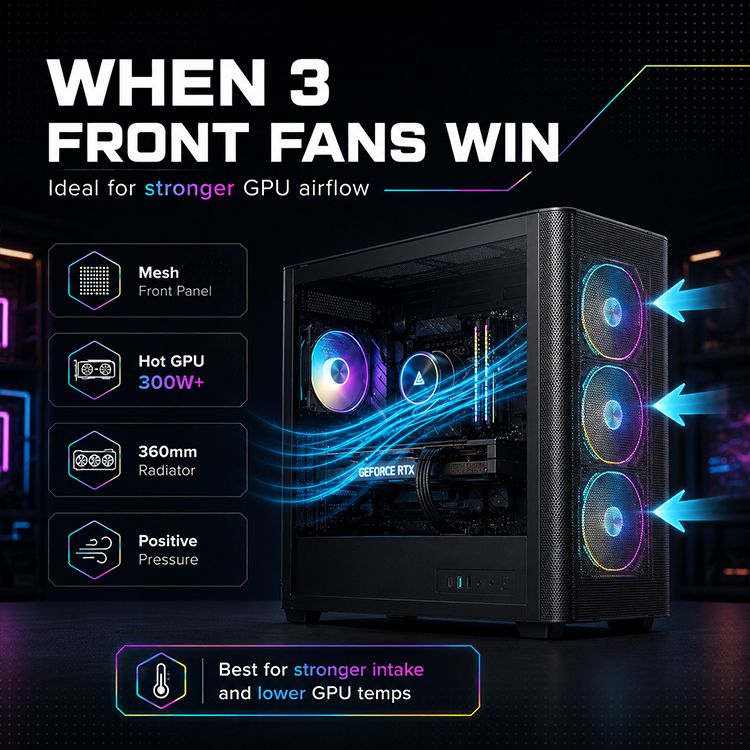
In a conventional tower, the lower front intake position may help supply fresh air to the graphics card.
Adding a third front fan can be beneficial when the original two fans primarily supply the upper and middle sections of the case.
However, the exact benefit depends on the graphics card's position and surrounding components.
If the lowest fan blows into a solid PSU shroud rather than toward an open airflow path, the improvement may be limited.
Some cases include perforated PSU shrouds or other openings that allow lower-front airflow to reach the graphics card.
Others do not.
Before adding a fan, inspect where its airflow will actually go.
For a deeper explanation, read our guide to balancing CPU cooling and GPU airflow.
2. The Case Has an Open Front Intake
A third fan needs access to outside air.
Cases with relatively open mesh front panels often provide more favorable conditions for multiple intake fans.
However, even mesh panels introduce some resistance.
The effective airflow also depends on dust filters, fan guards, internal brackets, and nearby components.
A restrictive glass-front design may force all three fans to draw air through narrow side openings.
In that situation, the third fan may provide less benefit than expected.
The key limitation may be the ventilation area rather than the number of installed fans.
For more information, see our article on how front panel design affects PC cooling.
3. The Third Fan Serves a Different Cooling Zone
A three-fan front configuration can potentially distribute intake air across three regions:
Upper Intake
Provides air toward the CPU cooler, upper motherboard, and surrounding components.
Middle Intake
Supplies the central chamber, potentially benefiting the GPU and CPU cooling area.
Lower Intake
May deliver additional fresh air toward the graphics card, depending on the PSU shroud and internal layout.
This arrangement can be useful when the components occupy a relatively large portion of the chassis.
However, airflow does not remain confined to perfect horizontal zones.
Fans, component geometry, and exhaust positions influence the final path.
The three-zone arrangement is therefore a useful planning concept rather than a guarantee of where every volume of air will travel.
When Are Two Front Fans Enough?
Two front intake fans can be an effective solution for many gaming PCs.
A typical configuration uses:
Two front intake fans.
One rear exhaust fan.
This provides a straightforward path for air to enter the chassis, pass through the main component area, and leave through the rear.
Noctua's official PC airflow guide identifies this three-fan arrangement as a useful starting configuration for budget-conscious builds.
Source: Noctua Airflow Guide — Setup Ideas.
Situations Where Two Fans May Be Sufficient
Two front fans are worth considering when:
The case has effective front ventilation.
CPU and GPU temperatures remain within suitable operating limits.
The graphics card receives sufficient fresh air.
Fan noise is already acceptable.
Additional mounting positions do not serve an obvious airflow need.
The existing fans can provide enough airflow without excessive speed.
For example, a mainstream gaming system with a well-ventilated case may gain little from adding another front intake fan.
If the GPU and CPU already maintain stable temperatures and performance, increasing the fan count may offer limited practical value.
Why Fan Position Still Matters
When using two front intake fans, their vertical positions deserve attention.
For a gaming PC with a powerful graphics card, you may want at least one fan to supply the GPU's intake region.
For a system using a large tower CPU cooler, upper-chamber intake can also be important.
The ideal combination depends on the case's mounting rails, CPU cooler orientation, and GPU position.
If the case provides flexible fan placement, comparing different two-fan arrangements may be worthwhile before purchasing a third fan.
Two 140mm Fans vs Three 120mm Fans: Which Is Better?
Fan size introduces another important variable.
Two 140mm fans and three 120mm fans are both common front intake configurations.
However, they should not be compared by fan count alone.
Two 140mm Front Fans
Two 140mm fans occupy approximately 280mm of nominal vertical mounting height when positioned directly beside each other.
Their larger diameter can provide useful airflow at relatively low rotational speeds, depending on the fan design.
Potential advantages include:
Fewer motors and cables.
Broad airflow coverage.
Potentially lower noise at comparable airflow.
Simpler installation.
Good compatibility with many mid-tower cases.
However, larger diameter does not automatically mean better performance.
Blade geometry, maximum speed, static pressure, bearing design, and ventilation resistance all affect the result.
Three 120mm Front Fans
Three 120mm fans occupy approximately 360mm of nominal vertical mounting height without accounting for gaps.
This arrangement can provide more vertical coverage, particularly in cases that support a full-height front fan column.
Potential advantages include:
Additional airflow distribution across the case.
A dedicated lower intake position near the GPU.
Compatibility with conventional 360mm radiator mounting patterns.
More flexibility in controlling airflow across different fan groups.
The disadvantages include additional wiring, electrical consumption, and potential noise.
Which Configuration Should You Choose?
Consideration2 × 140mm3 × 120mmNominal vertical fan coverageApproximately 280mmApproximately 360mmNumber of motors23Wiring complexityLowerHigherPotential low-speed airflowOften competitiveDepends on fan designGPU-zone coverageDepends on mounting heightAdditional lower position may help280mm radiator compatibilityCommon mounting matchNot the standard arrangement360mm radiator compatibilityNot the standard arrangementStandard three-fan mounting matchBest way to compareSimilar noise and thermal conditionsSimilar noise and thermal conditions
These mounting dimensions do not directly indicate airflow volume.
A fair comparison requires actual cooling measurements and consideration of noise.
For instance, running two 140mm fans at 900 RPM and three 120mm fans at 900 RPM does not create equivalent acoustic or airflow conditions.
Different fan designs produce different performance at the same rotational speed.
Whenever possible, compare the completed configurations at similar noise levels.
What Does Independent Testing Say About Front Fan Placement?
A useful example comes from Hardware Canucks.
The reviewers tested seven fan arrangements in the be quiet! Pure Base 500DX using its 140mm fans.
One test involved relocating an existing top fan to the front intake position.
The result was:
Thermal MeasurementChange After Moving the FanCPU temperatureApproximately 3°C lowerGPU temperatureApproximately 1°C lowerTotal fan countUnchanged
Source: Hardware Canucks — How Many Case Fans Do You Really Need?.
This is an important distinction.
The test did not simply demonstrate that buying an additional fan improves cooling.
It demonstrated that changing fan placement can improve the airflow delivered to components without increasing fan count.
The results also depend on the specific case, fans, and test hardware.
They are not universal temperature improvements for every front intake configuration.
Why Noise-Normalized Testing Matters
GamersNexus has also emphasized the importance of comparing case cooling performance under controlled acoustic conditions.
A system running faster fans may achieve lower temperatures while producing substantially more noise.
This does not necessarily make it the better configuration.
Source: GamersNexus — Standardized Fans and Noise-Normalized Case Thermals.
For a meaningful comparison between two and three front fans, evaluate both sustained cooling and acoustic performance.
The most useful result is not always the lowest possible temperature.
It is the configuration that provides adequate cooling at a noise level you are comfortable with.
Does Adding a Third Front Fan Improve Case Pressure?
Adding another intake fan can change the pressure balance inside a PC case.
However, it does not automatically create positive pressure.
Positive case pressure generally occurs when effective intake airflow exceeds exhaust airflow.
Negative pressure occurs when exhaust airflow exceeds intake airflow.
The relationship depends on actual airflow volume, not simply the number of fans.
Why Three Intake Fans Do Not Guarantee Positive Pressure
Consider a case with three front intake fans behind a restrictive dust filter.
The fans may experience substantial resistance.
Meanwhile, two relatively unrestricted exhaust fans may move a comparable or greater volume of air.
In that situation, the case may not have positive pressure even though it has more intake fans.
Fan size, operating speed, panel restrictions, and radiator placement all influence the pressure balance.
Does Positive Pressure Reduce Dust?
Slight positive pressure can help reduce dust entering through unfiltered openings, particularly when the intended intake paths are filtered.
However, it does not eliminate dust accumulation.
Intake filters still require maintenance.
Additional fans may also move more air through filters, changing how quickly dust collects.
The goal is to maintain effective cooling while managing dust through suitable filtration and cleaning.
For detailed guidance, read our article on positive, negative, and balanced PC case pressure.
What Changes When You Install a Front-Mounted AIO Radiator?
A front-mounted liquid-cooling radiator introduces additional airflow resistance.
Its fan requirements should be evaluated separately from those of unrestricted case intake fans.
360mm Front Radiator
A conventional 360mm AIO radiator uses three 120mm fan mounting positions.
For this configuration, three compatible fans generally provide airflow across the intended radiator area.
Using only two fans could leave part of the radiator without direct fan coverage.
Follow the AIO manufacturer's installation recommendations rather than removing a radiator fan solely to reduce the overall system fan count.
280mm Front Radiator
A conventional 280mm radiator typically uses two 140mm fan positions.
It does not automatically require a third front fan.
If the case provides another fan mounting position outside the radiator area, that position may support additional case airflow when the installation geometry permits.
How Front Radiators Affect GPU Cooling
An intake radiator draws outside air through its fins.
As the radiator releases CPU heat, that air becomes warmer before entering the main chamber.
This may affect graphics-card cooling if the GPU relies on the same airflow path.
A top-mounted exhaust radiator can offer a different balance, leaving the front fans available to supply outside air more directly to the graphics card.
Neither arrangement is universally better.
The decision should account for the actual CPU and GPU workloads, radiator performance, and available case ventilation.
Real PC Case Example: ACEGEEK Darkfate Mini Mesh
The ACEGEEK Darkfate Mini Mesh provides a useful example because its official specifications support both three 120mm fans and two 140mm fans at the front.
SpecificationACEGEEK Darkfate Mini MeshCase dimensions410 × 210 × 450mmMotherboard supportM-ATX / ITXMaximum GPU clearance360mmMaximum CPU cooler clearance165mmFront fan support3 × 120mm or 2 × 140mmRear fan support1 × 120mmTop fan support2 × 120mm or 2 × 140mmBottom fan support2 × 120mmFront radiator support360mm AIOTop radiator support240mm / 280mm AIO
These specifications offer different potential cooling configurations.
Configuration A: Two 140mm Front Intake Fans
A starting arrangement could use:
Two 140mm front intake fans.
One 120mm rear exhaust fan.
This provides a straightforward intake-to-exhaust layout.
It may be suitable for a build that prioritizes simple cable management and controlled noise.
Configuration B: Three 120mm Front Intake Fans
An alternative arrangement could use:
Three 120mm front intake fans.
One 120mm rear exhaust fan.
This increases the number of front intake positions and may provide additional airflow toward the lower graphics-card region.
However, the improvement depends on fan performance and how air moves around the internal PSU shroud and other components.
What Can We Conclude From These Specifications?
The Darkfate Mini Mesh supports both fan arrangements, making it a useful example for comparing installation choices.
However, the specifications do not establish which configuration provides lower GPU temperature or quieter operation.
That requires controlled testing with the intended cooling fans and hardware.
Buyers should also verify the exact fan mounting arrangement, required electrical connections, and any radiator-related clearance limitations.
The important benefit is the ability to choose a configuration that suits the complete system rather than being limited to one front fan size.
How to Test Two vs Three Front Intake Fans Properly
If your case supports both configurations, a controlled A/B comparison can help determine whether the extra fan is worthwhile.
The objective is to measure the actual cooling benefit without confusing changes in workload, ambient temperature, or fan speed with the effect of the added fan.
Step 1: Establish the Two-Fan Baseline
Install two compatible front intake fans.
Keep the rear and other case fans in their normal positions.
Choose a repeatable gaming or rendering workload.
Record the cooling performance after temperatures have approached stable operating conditions.
Step 2: Record the Important Measurements
MeasurementWhy It MattersGPU core temperatureEvaluates graphics-card coolingGPU hotspot temperatureDetects changes in the hottest reported GPU regionGPU power consumptionConfirms comparable graphics workloadsGPU fan RPMShows cooling demandCPU package temperatureTracks processor coolingCPU package powerProvides CPU workload contextFront fan RPMConfirms fan operating speedRear exhaust RPMConfirms consistent exhaust operationRoom temperatureAccounts for environmental differencesSystem noiseEvaluates acoustic trade-offs
Avoid judging performance using idle temperature alone.
A fan configuration that performs similarly at idle may behave differently during sustained gaming.
Step 3: Install the Third Front Fan
Shut down the computer and disconnect power before changing hardware.
Install the third fan in the intended mounting position.
For the cleanest comparison, use the same fan model as the existing 120mm front fans.
Keep the original fan positions unchanged and add the third fan to the previously unused position.
This helps isolate the effect of adding intake airflow.
Check that the motherboard or fan hub can supply the required electrical power.
Step 4: Repeat the Same Workload
Keep the following conditions as consistent as possible:
CPU and GPU power settings.
Game or benchmark settings.
Background applications.
Case and dust filter configuration.
Pump and exhaust fan settings.
Room temperature.
Test duration.
First compare the configurations with equivalent individual fan-speed settings.
Then, where practical, compare them at similar overall system noise levels.
These tests answer different questions.
A fixed-RPM comparison shows what happens when the third fan is added at the same operating speed.
A noise-normalized comparison helps determine whether the extra fan provides better cooling at a comparable acoustic level.
Step 5: Compare Temperatures Relative to Ambient
Room temperature can change between tests.
Where possible, compare component temperatures relative to the measured ambient temperature.
For example:
GPU Temperature Above Ambient = GPU Temperature − Room Temperature
If the GPU operates at 70°C in a 25°C room:
70 − 25 = 45°C above ambient.
If the same GPU operates at 69°C in a 24°C room:
69 − 24 = 45°C above ambient.
The reported GPU temperature is lower in the second test, but the temperature difference above ambient is unchanged.
This example illustrates why controlling room conditions matters.
Step 6: Decide Whether the Extra Fan Is Worth Keeping
The third fan may be worthwhile if repeated testing shows meaningful improvements such as:
Lower GPU temperature at similar power and noise.
Lower GPU fan speed while maintaining temperature.
Improved CPU cooling under sustained load.
Reduced thermal throttling.
More consistent overall thermal performance.
However, a small temperature improvement may not justify greater noise, additional wiring, and higher cost.
There is no universal temperature reduction that determines whether an additional case fan is worthwhile.
The decision depends on the system's existing temperatures, workload, noise preference, and cooling requirements.
Common Mistakes When Adding a Third Front Fan
Installing the New Fan Behind a Restrictive Opening
An additional fan cannot fully compensate for an intake path that is severely restricted.
Check the front panel, filter, and available ventilation area before purchasing more fans.
Ignoring the Lowest Fan Position
A lower front intake may benefit GPU cooling, but only when air can reach the graphics-card region.
Inspect whether the PSU shroud, drive cage, or internal structure blocks the path.
Increasing Exhaust Without Checking Intake
Adding a top exhaust fan at the same time as the third front intake makes it difficult to identify which change improved cooling.
Test one major adjustment at a time.
Comparing Different Fans Only by RPM
Two fan models running at the same RPM can produce different airflow and noise.
For purchasing comparisons, consider fan performance under resistance and at realistic noise levels.
Overloading a Fan Header
Three fans connected through a splitter still draw power from the source supplying the motors.
Check the combined rated current and any relevant startup-current requirements.
If the motherboard header cannot support the connected load, use a suitable compatible powered hub.
Assuming More RGB Fans Automatically Improve Cooling
RGB lighting does not determine fan performance.
A decorative fan can still provide effective cooling, but its airflow and pressure characteristics must suit the intended location.
Choose the cooling configuration first, then select compatible lighting features.
Frequently Asked Questions
1. Where Should I Install Two Front Intake Fans: Top, Middle, or Bottom?
The best positions depend on the case layout and installed components.
For many gaming PCs, positioning one fan toward the graphics card and another toward the CPU cooling area is a reasonable starting point.
However, some cases provide only fixed mounting positions, while others use adjustable rails.
Avoid assuming that the uppermost and lowermost positions are automatically best.
Check whether the lowest mounting position is blocked by the PSU shroud or other internal components.
Where adjustment is possible, compare temperatures using different positions before purchasing another fan.
2. Why Did Adding a Third Front Fan Not Lower My GPU Temperature?
The graphics card may already receive sufficient fresh air from the original configuration.
Alternatively, the new fan may be restricted by the front panel, filter, PSU shroud, or internal layout.
Another possibility is that the GPU's automatic fan controller reduces fan speed while maintaining a similar temperature.
Compare GPU temperature, power consumption, fan RPM, and workload before deciding that the additional fan provides no benefit.
A configuration that maintains the same temperature at lower GPU fan speed may still be an improvement.
3. Can I Mix 120mm and 140mm Fans at the Front?
Yes, if the case's mounting design explicitly supports the intended combination.
However, many cases provide overlapping 120mm and 140mm mounting holes that cannot be populated simultaneously in every arrangement.
Check the manufacturer’s mounting diagram before purchasing.
Different fan sizes may also have different RPM ranges, airflow characteristics, and noise profiles.
Mixed configurations can work, but matching fans are often easier to configure and compare.
4. Will Three Intake Fans Create Too Much Positive Pressure?
Not necessarily.
Positive pressure depends on effective intake airflow relative to exhaust airflow.
Three intake fans behind a restrictive filter may not move more air than the available exhaust fans.
Likewise, three unrestricted intake fans can create a different pressure balance from three radiator-mounted intake fans.
Focus on providing enough fresh air for the CPU and GPU while maintaining a suitable path for heated air to leave.
A slightly positive, filtered intake configuration can be a useful starting point, but actual cooling results should determine whether adjustments are needed.
5. Can I Connect Three Front Fans to One Motherboard Header?
Possibly, depending on the fans' electrical requirements and the motherboard header's capacity.
Calculate the combined rated motor current of all connected fans and compare it with the header's documented current limit.
Also consider any relevant startup or peak-current specifications.
A passive splitter does not increase the power available from the motherboard header.
If the combined load exceeds the supported limit, use a compatible powered fan hub or distribute the fans across suitable headers.
ARGB lighting connections should be checked separately from fan motor power.
6. Should I Replace Two 140mm Fans With Three 120mm RGB Fans?
Only if the replacement configuration offers benefits that matter to your build.
Three 120mm RGB fans may provide more vertical intake coverage or better match your preferred lighting layout.
However, two high-quality 140mm fans may deliver sufficient cooling with fewer cables and potentially lower noise.
The RGB feature itself does not improve cooling.
Compare actual thermal performance, noise, mounting compatibility, and electrical requirements.
If your current fans already provide stable temperatures and acceptable noise, replacing them solely to increase fan count may not be necessary.
Choose Front Fans Based on Cooling Results, Not Fan Count
Three front intake fans can provide better cooling than two, but the additional fan must have a useful role in the airflow path.
For a well-ventilated mainstream gaming PC, two front intake fans and one rear exhaust fan are often a practical starting point.
A third front fan becomes more attractive when the graphics card needs additional fresh air, the chassis provides an effective lower intake path, or the cooling system benefits from increased airflow distribution.
Fan size also matters.
Two 140mm fans can provide effective cooling without the wiring and noise characteristics of a three-fan arrangement, while three 120mm fans may offer better vertical coverage in certain cases.
Before buying another fan, inspect the front panel, dust filters, mounting positions, and GPU intake path.
Then evaluate the existing system under a repeatable workload.
If a third fan improves cooling or reduces operating noise at comparable conditions, the upgrade may be worthwhile.
If the results are negligible, the existing two-fan configuration may already be doing its job.
For builders working within a limited budget, our guide to building a high-airflow PC without overspending offers additional ways to improve cooling without unnecessary hardware purchases.
The best front intake configuration is the one that delivers enough fresh air to your components while keeping temperatures, noise, and cost under control.