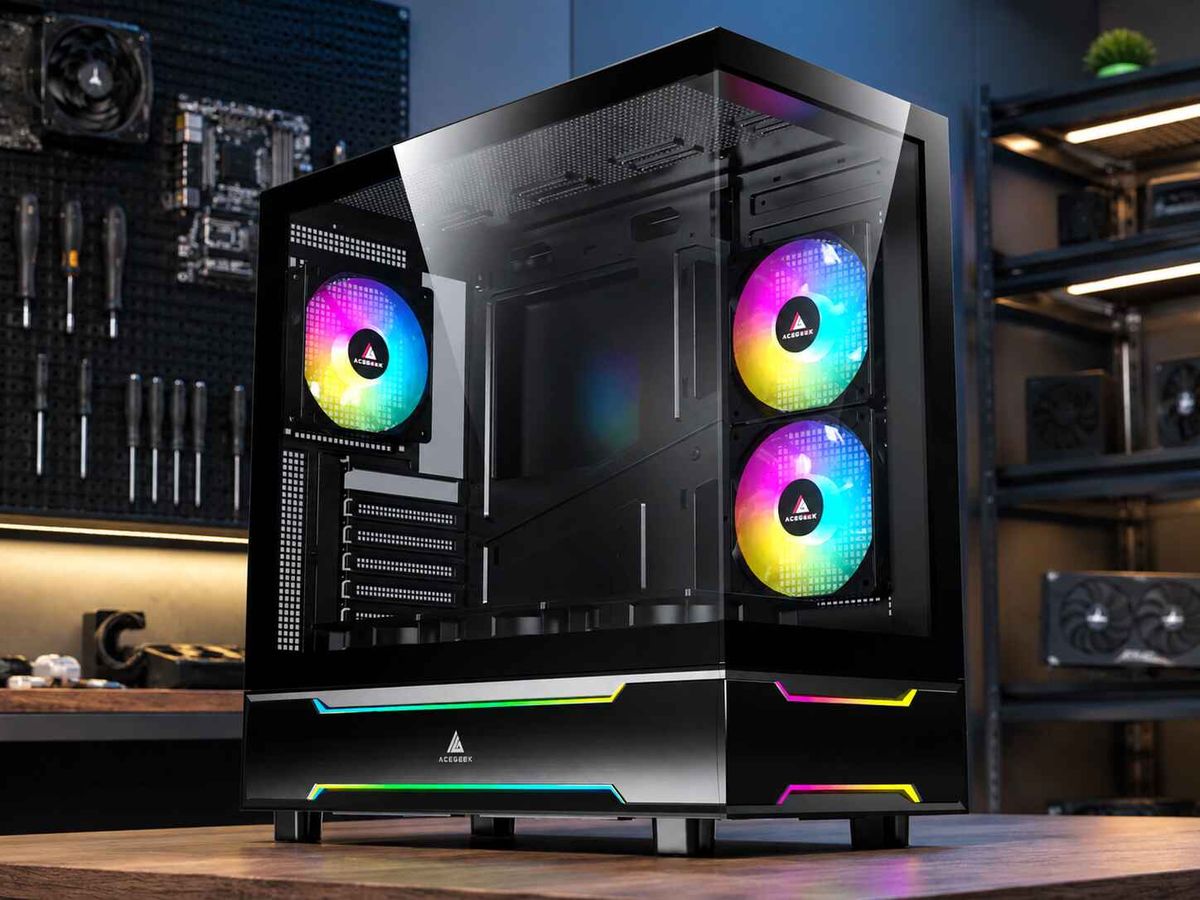
Black vs White PC Cases: Long-Term Ownership Compared
Color gets blamed.
A black vs white PC case comparison usually begins with launch-day photographs, yet the purchase is really a three-to-five-year maintenance decision involving dust contrast, fingerprints, coating damage, plastic aging, replacement-part matching, desk lighting, window exposure, and how willing the owner is to keep opening the chassis.
So which color still looks respectable in year four?
My verdict is blunt: black is the safer long-term ownership choice for most buyers, while white is the stronger visual choice for owners willing to control sunlight, smoke, component matching, and cleaning habits. Neither color inherently collects more dust. Neither color fixes poor airflow. And neither color stays pristine without maintenance.
The Verdict Before the Marketing Gets Involved
A black PC case generally ages more quietly. It accepts black motherboards, GPUs, cables, fans, screws, rubber grommets, and replacement parts without turning every shade mismatch into a design error. It also hides yellowing in plastics and adhesives better, although pale dust and oily fingerprints can stand out sharply on smooth black panels.
A white PC case is less forgiving but more revealing. Dark lint, greasy marks, cable rub, smoke residue, and uneven plastic color can become obvious, yet light household dust may be less visible from normal viewing distance. White also makes the interior brighter, which helps inspection through glass and can expose dust before filters or radiator fins become badly loaded.
That is not a contradiction. It is contrast.
The most sensible path is to choose the chassis architecture first using a real 2026 gaming PC case buying guide, then compare color only after motherboard format, GPU clearance, radiator support, intake design, filter access, and cable space are settled. A beautiful color cannot rescue a case that is miserable to build, cool, or clean.
Black vs White PC Case Comparison Table
Ownership factorBlack PC caseWhite PC caseLong-term winnerPale household dustUsually more visible on flat horizontal surfacesOften less visible until buildup becomes grayWhiteDark lint, soot, grease, or pet debrisOften blends betterUsually more visibleBlackFingerprintsVery visible on glossy or satin blackLess obvious on many matte white finishesWhitePaint chips and edge wearBright metal or primer can contrast stronglyDark chips, grime, and rubbed edges can contrast stronglyTiePlastic yellowingUsually hiddenImmediately visible beside painted steelBlackComponent matchingEasy; most parts already use blackHarder; “white” varies across steel, ABS, cables, fans, and LEDsBlackInterior visibilityDarker, especially without lightingEasier to inspect through glassWhiteCleaning disciplineDirt may be ignored until buildup is heavyVisible marks may trigger earlier cleaningWhite, for attentive ownersResale audienceBroad and neutralSmaller but enthusiastic aesthetic marketBlackDirect-sunlight toleranceAbsorbs more radiant energyReflects more visible solar energyWhite, but keep either away from sunNormal indoor coolingDetermined mainly by airflow and hardware, not colorDetermined mainly by airflow and hardware, not colorTie
The table hides one uncomfortable fact: finish matters almost as much as color. Matte, fine-textured powder coat usually disguises fingerprints better than glossy paint; a smooth black glass panel behaves differently from black mesh; and white painted steel does not age like white ABS, acrylic, silicone, or cable sleeving.
Dust Visibility: Both Get Dirty, but They Report It Differently
Dust does not choose a chassis by color.
The U.S. Environmental Protection Agency describes indoor dust as settled particulate matter from outdoor soil, pollen, mold spores, pet dander, dust mites, human skin flakes, cooking, cleaning, candles, consumer products, and other sources. Its guidance recommends frequent cleaning, damp dusting, suitable filtration, and HEPA-equipped vacuuming where appropriate. A PC case sitting in that room receives the same particle supply whether its paint is black, white, red, or bare metal. EPA indoor particulate matter guidance supports the boring answer: room conditions and cleaning behavior matter more than chassis color.
But visibility changes.
Fine gray or beige dust creates high contrast on black top panels, black fan frames, and black glass borders. White panels may conceal that same film until it becomes thick enough to look gray. Meanwhile, dark hair, black textile fibers, oily soot, rubber particles, and brown cooking residue can look worse on white.
This is why the question “Which PC case color shows more dust?” has no universal answer. The honest answer depends on the dust.
A carpeted room with pets may produce pale fibers that punish black surfaces. A room near a kitchen, open window, road, candle, or smoking area may create darker residue that punishes white. Floor placement increases exposure because settled debris and movement near the floor feed the intake more directly.
For a practical cleaning plan, the existing white PC case maintenance guide is useful even for black builds because it separates exterior wiping, filter inspection, radiator cleaning, cable checks, and deeper internal service.
Do White PC Cases Turn Yellow?
Yes, some can.
But “white PC case” is not one material. A chassis may combine powder-coated steel, injection-molded plastic, acrylic diffusers, silicone feet, rubber grommets, adhesives, printed logos, braided cable sleeving, and clear protective coatings. Those materials do not age at the same rate, so a case can look uneven long before the steel shell itself becomes yellow.
Ultraviolet exposure is a real risk, especially near a bright window. A 2026 NIST study of polymer photodegradation examined amorphous polyester under accelerated UV exposure and identified chemical changes associated with visible yellowing and loss of ductility. In that specific material and test setup, eight days of accelerated exposure produced a 96% loss of ductility and was estimated as roughly equivalent to 146 days of natural UV exposure in Florida.
This was not a PC-case test, so it cannot predict how a particular chassis will age. It does prove that “indoor plastic never changes” is a foolish assumption.
Sunlight is not the only cause. Cigarette smoke, cooking aerosols, heat, adhesive migration, incompatible cleaners, and airborne grime can produce yellow or cream discoloration. And sometimes the case did not yellow at all—the owner simply placed cool-white painted steel beside warmer ABS fan frames and cream-colored cable sleeving, making the mismatch obvious under daylight.
My hard rule: keep white systems away from direct sun, smoke, and aggressive solvents. Do not attack a stained finish with acetone, bleach, melamine foam, or unverified “whitening” products. A clean microfiber cloth and manufacturer-approved cleaner are cheaper than creating a permanently dull patch.
Does a Black PC Case Run Hotter?
Usually not indoors.
The color of a painted enclosure matters when strong radiant energy strikes it. Purdue University’s 2021 barium sulfate, BaSO₄, ultra-white paint research reported 98.1% solar reflectance and demonstrated surfaces up to 8°F below ambient under strong noon sunlight.
That is impressive solar-control research, but it does not mean an ordinary white PC case will cool a 575 W graphics card better in a shaded room. Purdue’s ultra-white paint study is evidence for keeping electronics out of direct sunlight, not evidence for buying a white gaming chassis.
Inside a normal room, the large thermal decisions are GPU and CPU power, ambient temperature, vent area, filter resistance, fan curves, radiator position, intake direction, cable blockage, and exhaust capacity. NVIDIA lists the GeForce RTX 5090 Founders Edition at 575 W Total Graphics Power. A heat source of that scale does not care whether the outer powder coat is white or black; it cares whether cool air reaches the card and hot air leaves the enclosure.
This is where buyers lose the plot. They debate black versus white while ignoring a sealed front panel, a blocked bottom intake, a radiator choking the GPU, or a case pushed against a wall.
Read the tempered-glass airflow analysis before treating color as a thermal specification. The useful question is not “Which paint runs cooler?” It is “How much unrestricted intake area feeds the hottest component?”
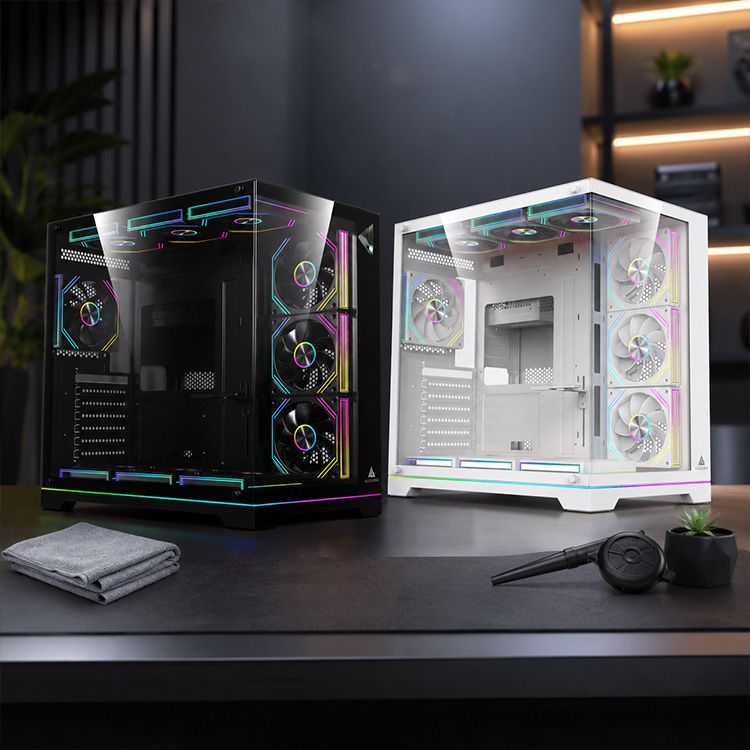
Scratches, Fingerprints, and the Slow Decline of the Finish
Black hides color mismatch. It does not hide everything.
Glossy black glass and satin black paint can display fingerprints, skin oil, cleaning streaks, and micro-scratches under side lighting. Black anodized or painted edges may also reveal bright metal when chipped. A poorly handled side panel can acquire a thin silver line that catches the eye every time the RGB turns on.
White often hides fingerprints better, especially with a matte texture, but it exposes dirt embedded in scratches. Cable rub, tool marks, dark screw heads, black rubber transfer, and grime around panel seams can become more obvious. A tiny mark may not be severe, yet high contrast makes it look severe.
So which color hides scratches better?
Neither, consistently. Surface texture, coating thickness, primer color, substrate, cleaning technique, and lighting angle decide more than the color label. A fine-textured matte finish is usually the safest ownership choice in either black or white.
And access matters. Owners scratch cases when panels are awkward, filters are trapped, screws are easy to drop, or a glass door must be twisted around a desk leg. The quick-release panel guide for building and cleaning makes the long-term point well: serviceability reduces the friction that causes delayed cleaning, forced panel removal, and accidental damage.
Component Matching: Black Is Easy, White Is a Project
Black wins this category decisively.
Most motherboards, GPU PCBs, connectors, power supplies, fan cables, radiator fins, screws, ports, and rubber parts are black or dark gray. A black chassis turns those unavoidable components into a coherent background. Replacing a fan two years later is usually painless because another black fan will not look absurd.
White is not standardized. Neutral white powder-coated steel, warm-white ABS, silver aluminum, translucent fan blades, cream cable sleeves, blue-white LEDs, and slightly yellow silicone can all sit inside one “all-white” build. Product photography often hides the differences through editing, exposure, and cool lighting.
This is why I prefer a controlled white-and-black system over a forced all-white build. Use the case and perhaps the cooler or fan frames as the dominant white surfaces. Let the motherboard, connectors, screws, and GPU details remain black. Intentional contrast ages better than five competing whites.
The wider ACEGEEK PC case collection is the right place to compare structure before committing to a theme: ATX versus M-ATX, panoramic versus airflow-first, front versus side intake, top-radiator capacity, hinged glass, quick-release panels, and back-connect layouts.
Long-Term Ownership Cost Is Mostly Time
The purchase price gets attention. Maintenance time does not.
A color that makes you clean more often may cost no extra money but consume more time. A color that hides buildup may look acceptable longer while filters quietly load up. The “best PC case color” therefore depends partly on owner psychology.
White can create a useful feedback loop: visible grime triggers cleaning. Black can create a different one: pale dust becomes obvious quickly, but dark contamination disappears until a cloth reveals it. Neither is automatically lower maintenance.
Berkeley Lab’s historical gaming-computer research estimated that high-end gaming systems represented 2.5% of the installed PC base yet used about 20% of PC energy, with a typical gaming computer estimated at 1,400 kWh per year in the study’s period.
Those 2015 figures should not be treated as a 2026 average, but they underline why sustained heat, airflow, and fan cleanliness matter more than paint color in performance systems. Berkeley Lab’s gaming-computer energy study remains a useful warning against treating the chassis as furniture.
A simple ownership schedule works:
Inspect intake filters every two to four weeks.
Wipe exterior panels with a clean microfiber cloth.
Check fan blades, radiator fins, and GPU heatsink surfaces every two to three months.
Record CPU and GPU temperatures after the build, then compare them after cleaning.
Keep the case off carpet where practical.
Leave enough desk clearance to remove filters and panels without scraping them.
Keep direct sunlight off the chassis, especially white plastics and clear parts.
Never open the power-supply enclosure for routine dust cleaning.
Which Color Should You Buy?
Buy a Black PC Case When:
You want the lowest-risk choice, expect to replace parts over time, prefer a mixed-component build, dislike shade matching, or plan to resell the chassis to a broad audience. Black is also sensible for workstations, understated gaming PCs, shared offices, and systems where visual consistency matters more than interior brightness.
Buy a White PC Case When:
You want the system to act as a visual object, have controlled room lighting, can avoid strong sunlight and smoke, and are willing to clean marks before they become stubborn. White is particularly effective for panoramic builds, bright desks, silver hardware, restrained RGB, and deliberate black-and-white contrast.
Avoid Both Color Debates When:
The case has poor intake geometry, inaccessible filters, inadequate GPU clearance, weak radiator support, no cable room, fragile panel clips, or a layout that cannot be serviced in its desk position. Color is the final decision, not the first.
For buyers thinking beyond the initial build, the strongest design question is service life. The analysis of what comes after panoramic PC cases argues for removable cooling frames, replaceable I/O, accessible filters, tool-free panels, and modular parts because the next five years matter more than the first product photo.
FAQs
Is a black or white PC case better for long-term ownership?
A black PC case is generally better for low-effort long-term ownership because it matches replacement components easily, conceals yellowing and shade variation, and appeals to a broader resale market, while a white case is better for visual impact, brighter interior inspection, and owners prepared to control sunlight, smoke, stains, and color consistency.
Black is the safer default. White is the more demanding design decision.
Do white PC cases turn yellow over time?
White PC cases can turn yellow or develop uneven cream-colored areas when plastics, adhesives, clear coats, cable sleeving, or painted components experience ultraviolet light, smoke, cooking residue, heat, chemical exposure, or material aging, although high-quality powder-coated steel may age differently from ABS, acrylic, silicone, and other white parts.
Keep the system away from direct sunlight and use only finish-safe cleaning methods.
Do white PC cases get dirty faster than black cases?
White PC cases do not get dirty faster than black cases because dust accumulation is controlled by room particles, fan pressure, filtration, floor placement, pets, carpets, open windows, smoke, and cleaning frequency; white simply makes dark lint, grease, soot, and stains more visible while sometimes concealing pale household dust.
The collection rate is the same. The visual warning system is different.
Which PC case color shows dust more clearly?
Black PC cases usually show pale gray or beige dust more clearly, especially on horizontal top panels and glossy glass, while white cases more clearly reveal dark hair, soot, oily marks, cooking residue, rubber transfer, and brown grime; the visible result depends on particle color, surface texture, lighting angle, and finish.
Choose based on your room, not a showroom photograph.
Does a black PC case run hotter than a white PC case?
A black PC case does not normally run meaningfully hotter than a comparable white case indoors because component power, ambient temperature, intake restriction, fan placement, radiator configuration, filter loading, and exhaust capacity dominate cooling; color matters mainly when strong radiant energy, especially direct sunlight, strikes the exterior surface for extended periods.
Keep either color out of direct sun and focus on airflow geometry.
Which PC case color hides scratches and fingerprints better?
A matte white PC case often hides fingerprints better than glossy black, while black may conceal dark grime and white may conceal pale dust; scratch visibility depends more on coating texture, substrate color, primer, lighting, edge design, and whether damage exposes bright metal or embeds dark contamination than on the black-or-white label alone.
Fine-textured matte finishes are the safer choice in both colors.
Should I buy a black or white PC case?
You should buy a black PC case for easy component matching, neutral styling, simpler upgrades, and wider resale appeal, or buy a white PC case when visual brightness, panoramic presentation, and a deliberate themed build justify more attention to shade matching, sunlight exposure, visible stains, and regular exterior cleaning.
First verify airflow, GPU clearance, radiator fit, filter access, and serviceability. Then choose the color.
Choose for Year Four, Not Day One
Open your parts list and your room plan before buying.
Check the motherboard size, GPU dimensions, CPU cooler height, radiator position, fan direction, cable depth, filter removal path, desk clearance, window exposure, pets, carpet, smoke, and the colors of parts you may replace later. Then choose black for flexibility or white for controlled visual impact.
Do not buy the photograph.
Compare the current ACEGEEK PC case range, shortlist the chassis that fit and breathe properly, and judge color only after the ownership problems have been solved. Your best case is the one you can still cool, clean, repair, and tolerate years after the RGB honeymoon ends.