How to Build a Cyberpunk PC That Looks Great and Runs Cool
A cyberpunk PC build combines futuristic industrial design, neon lighting, and visible hardware to create a distinctive gaming setup. Inspired by dystopian science fiction and games such as Cyberpunk 2077, this style often features dark materials, contrasting colors, and carefully placed illuminated components.
However, adding more RGB fans does not automatically create a better cyberpunk-themed PC.
The key is to build a consistent visual theme without compromising cooling, component compatibility, or everyday usability.
A good cyberpunk build should look impressive when the lights are on, maintain comfortable temperatures during gaming, and remain easy to upgrade.
This guide explains how to choose a suitable case, coordinate RGB lighting, manage visible cables, and create a cyberpunk gaming PC without unnecessary spending.
What Makes a Cyberpunk PC Build Look Authentic?
Cyberpunk design draws on the contrast between advanced technology and worn industrial environments.
For a PC build, that usually means combining a restrained color palette with visible hardware, dark surfaces, and selective lighting.
Instead of filling every available space with RGB accessories, use a few recognizable design elements.
Design ElementCyberpunk-Inspired ApproachCase finishMatte black, gunmetal, dark gray, or contrasting whitePrimary lightingCyan, violet, red, or amberSecondary lightingOne complementary or contrasting colorHardware presentationVisible GPU, cooling fans, and selected componentsCable managementOrganized wiring with optional accent-colored sleevesDecorative detailsSmall warning labels, geometric graphics, or industrial-style accents
The goal is visual consistency.
A case with coordinated lighting and a clear internal layout can communicate the cyberpunk theme more effectively than one filled with competing colors and effects.
Build Around One Visual Concept
Before selecting RGB components, decide what kind of atmosphere you want.
For example, a futuristic medical-laboratory theme might use white surfaces with cyan lighting. A darker industrial build could combine black components with red accents.
These choices establish a visual direction that makes selecting fans, cables, and cooling hardware easier.
A recognizable design theme comes from repeated visual elements, not the number of illuminated accessories.
How Do You Choose the Right Case for a Cyberpunk PC?
The case provides the visual foundation for your build.
Panoramic glass cases are popular choices because they expose the motherboard, graphics card, fans, and cooling hardware from multiple angles.
However, a cyberpunk build does not require an all-glass enclosure.
A mesh case with an angular exterior, dark finish, and carefully positioned RGB components can also create a strong industrial appearance.
When comparing cases, prioritize these features:
Hardware visibility: Can you clearly see the components you want to highlight?
GPU clearance: Does the case accommodate your graphics card and power cables?
Cooling support: Can your preferred air cooler or AIO radiator fit?
Cable management: Is there enough room to hide unnecessary wiring?
Airflow: Can fresh air reach the CPU and GPU?
Maintenance access: Can you clean filters and remove panels easily?
A visually impressive case becomes less practical if the GPU sits too close to the glass or the cooling system requires excessive fan speeds.
Does a Cyberpunk Build Need a Panoramic Glass Case?
No.
Panoramic cases work particularly well when you want layered lighting and a clear view of the internal components.
However, mesh-focused designs may offer a more straightforward intake path.
A glass-heavy case should provide suitable alternative ventilation, often through side or bottom openings.
For a more detailed explanation of the layout trade-offs, read our guide to building in a panoramic PC case.
Choose the enclosure based on your desired appearance and hardware requirements rather than treating glass as a mandatory feature.
What RGB Colors Work Best for a Cyberpunk Setup?
Neon lighting is one of the most recognizable elements of cyberpunk design.
But the way you combine colors matters more than how many colors your fans can display.
A useful starting point is to choose one dominant lighting color and one supporting accent, while leaving some areas darker to create contrast.
Three Cyberpunk Lighting Themes to Try
ThemePrimary ColorAccent ColorRecommended AppearanceNeon DistrictCyanVioletFuturistic city lightingIndustrial WarningRedAmberDark machinery and warning indicatorsCyber LabIce BlueWhiteClean, futuristic technology
These are creative starting points rather than fixed design rules.
For example, a Neon District build might use cyan lighting around the intake fans and violet lighting near the GPU or CPU cooler.
A Cyber Lab setup could combine a white case with cooler blue lighting and a few neutral-white accents.
How Do You Make RGB Lighting Look More Consistent?
When several RGB fans are installed close together, differences in color and brightness can become noticeable.
For a more coordinated appearance:
Use matching fan models where practical.
Connect lighting through compatible RGB or ARGB hardware.
Control shared lighting zones through one primary software platform.
Start with a static color before adding animations.
Adjust brightness to reduce excessive glare.
Test the lighting through the case glass under normal room conditions.
Remember that RGB and ARGB are not electrically interchangeable standards.
Standard 5V ARGB connections must not be connected directly to 12V RGB headers.
If you're planning multiple illuminated fans, our guide to keeping RGB lighting consistent in multi-fan builds explains the hardware and software considerations.
Should Every Fan Have RGB Lighting?
Not necessarily.
A combination of illuminated and non-illuminated components can create depth and visual contrast.
You may choose to highlight the side intake fans and CPU cooling area while keeping other components less prominent.
This approach can also reduce the cost of the build.
The most effective lighting arrangement is one that makes your chosen components stand out without overwhelming the rest of the setup.
How Do You Keep a Cyberpunk PC Cool?
A cyberpunk-themed build still needs to function as a reliable gaming computer.
Large graphics cards, high-power processors, and restrictive ventilation can create cooling challenges, particularly in glass-heavy cases.
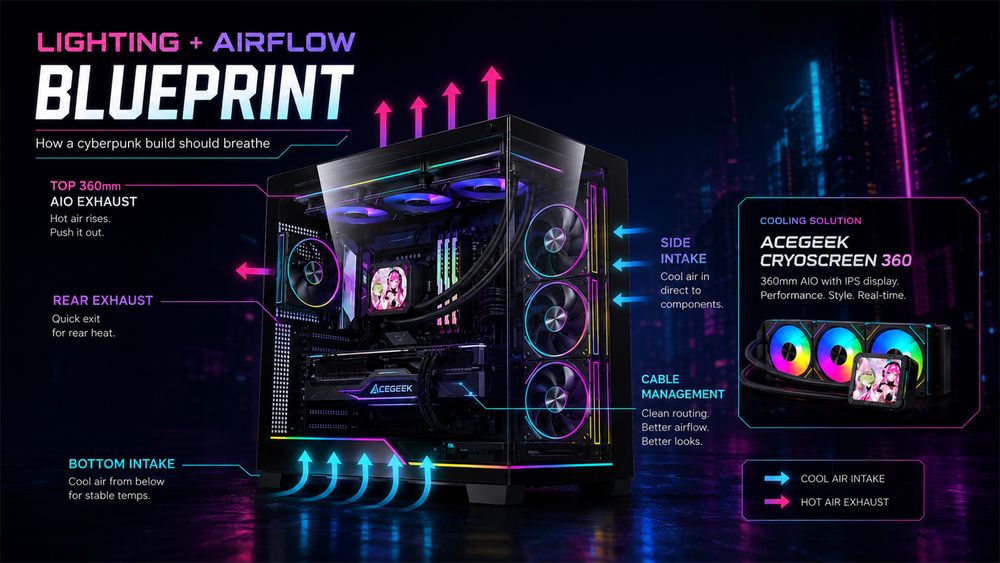
The solution is to plan an effective airflow path before installing decorative accessories.
Start With the GPU's Air Supply
Many modern graphics cards use open-air cooling systems that draw air through fans on the card and release warmed air into the chassis.
The case must supply fresh air and remove that heat efficiently.
In a panoramic case, bottom or side intake fans may help deliver air toward the GPU.
For a conventional tower, front intake can provide a more direct route.
The best configuration depends on the chassis layout and the graphics card's cooling design.
Plan Intake and Exhaust Positions
The following configurations provide useful starting points.
Fan PositionCommon ConfigurationPurposeFront fansIntakeSupply fresh air in conventional towersSide fansIntakeFeed the main chamber in panoramic casesBottom fansIntakeDirect fresh air toward the GPURear fanExhaustRemove heated airTop fans or radiatorOften exhaustProvide an upper exhaust path
These are recommendations, not universal requirements.
A particular case may perform better with a different arrangement.
Fan direction, filter resistance, radiator placement, and actual component temperatures should guide the setup.
Does a Cyberpunk PC Need Liquid Cooling?
No.
An AIO liquid cooler can contribute to a futuristic appearance through visible tubing, an illuminated pump head, or an integrated display.
However, a suitable air cooler may provide sufficient thermal performance for many gaming systems.
Choose a cooling solution based on CPU power consumption, case compatibility, noise preferences, and budget.
If you're using a panoramic case, radiator placement can also influence GPU temperatures.
See the ACEGEEK comparison of top and side radiator mounting for more detail.
Cooling hardware should be selected for the heat your components generate, not solely for its appearance.
How Can You Add Cyberpunk Details Without Cluttering the Build?
Small visual details often make a themed PC more distinctive.
A few carefully positioned accents can create a futuristic industrial appearance without interfering with normal operation.
Consider using:
Removable warning-label decals on approved exterior surfaces
Coordinated cable sleeves
Diffused LED lighting
Subtle component accents
Custom desktop wallpapers and matching peripheral lighting
A consistent color scheme across the PC and desk
Use Cable Management as Part of the Design
Visible cables do not automatically ruin a cyberpunk theme, but electrical connections should never be treated as loose decorative elements.
Route essential wiring securely behind the motherboard tray where possible.
If using visible cable extensions, choose compatible products and leave appropriate clearance around the GPU power connector.
Never force a panel closed against a compressed power cable.
Similarly, do not allow decorative cables, labels, or lighting strips to obstruct fan blades or ventilation openings.
Avoid Unsafe Cosmetic Modifications
Custom modifications should not compromise the structure or electrical safety of the case.
Avoid drilling or cutting near installed components, altering load-bearing mounts without suitable engineering, or attaching conductive decoration where it could contact electronics.
If you want a more industrial appearance, start with removable exterior accents rather than permanent structural changes.
A good custom build should remain safe, accessible, and easy to maintain.
How Much Should You Spend on a Cyberpunk PC Build?
A cyberpunk appearance does not require flagship hardware.
The graphics card, processor, memory, and storage should be selected according to your gaming or creative workload.
For example, a system intended primarily for 1080p gaming has different performance requirements from one targeting demanding 4K gaming with path tracing.
The visual theme can be adapted to either budget.
Prioritize Performance Before Decorative Upgrades
A practical purchase order is:
Choose your performance target. Decide which games, resolution, and settings matter most.
Select the core hardware. Choose a compatible CPU, GPU, motherboard, memory, and storage configuration.
Choose the case and cooling. Confirm all component dimensions and installation requirements.
Plan the lighting. Select a coordinated fan and controller setup.
Add decorative details last. Use the remaining budget for accessories that improve the overall theme.
This approach prevents decorative upgrades from consuming money needed for cooling or essential hardware.
What About Cyberpunk 2077 Performance?
If you specifically want to play Cyberpunk 2077, choose components using the game's current official requirements and independent performance testing.
Ray tracing and path tracing can place substantial demands on a graphics card, particularly at higher resolutions.
However, those requirements do not determine what a cyberpunk-themed PC must contain.
You can build an attractive cyberpunk setup around entry-level, midrange, or high-end hardware.
The important distinction is that visual design and gaming performance are separate decisions that need to work together.
Which ACEGEEK Cases Work Well for Cyberpunk Builds?
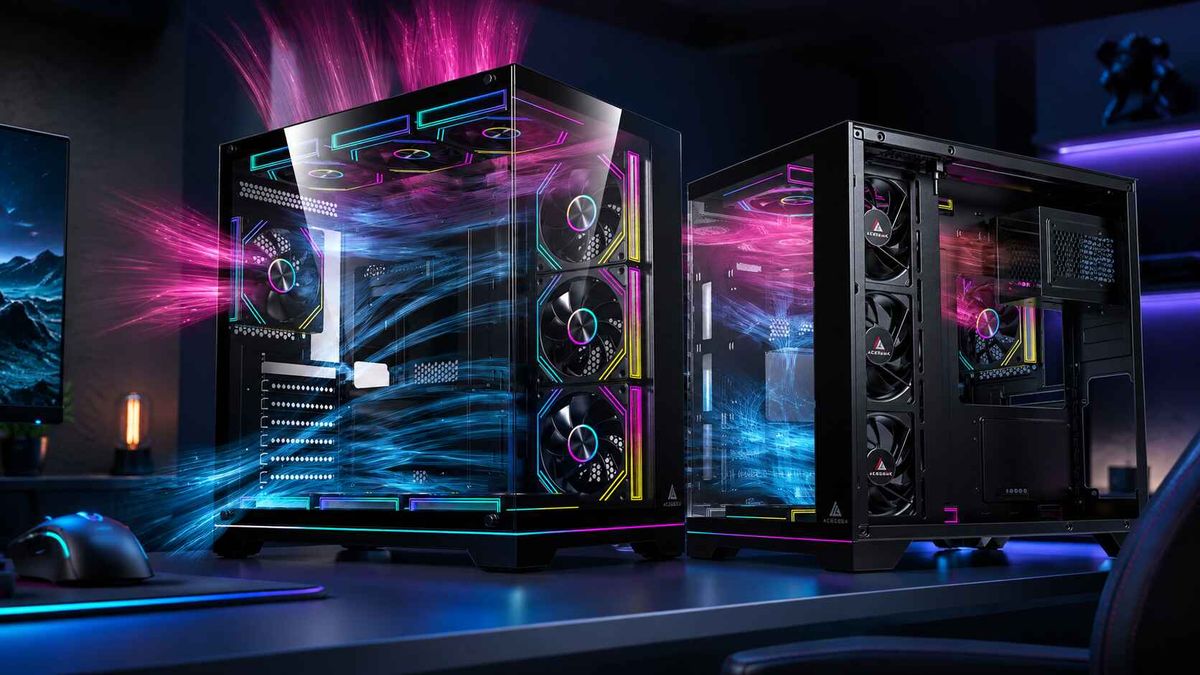
Two ACEGEEK cases offer useful starting points for different cyberpunk-inspired layouts: Nebula Pro and Mercury R425X RGB.
Both provide substantial internal visibility, but their cooling configurations and installation specifications differ.
ACEGEEK Nebula Pro: A Futuristic Showcase Approach
The ACEGEEK Nebula Pro combines a visually focused case design with support for ATX-class gaming hardware.
Its published specifications include:
SpecificationACEGEEK Nebula ProMotherboard supportATX / Micro-ATX / Mini-ITXCase dimensions445 × 235 × 472mmMaximum GPU clearance420mmMaximum CPU cooler height175mmTop radiator support360mm AIOSide fan support3 × 120mmFront I/OUSB-C, 2 × USB 3.0, HD Audio
Nebula Pro's visible hardware layout and adjustable fan-angle design make it worth considering for a futuristic gaming setup.
Its side fan positions can also be incorporated into a coordinated RGB lighting theme.
For example, a black build could use cyan lighting around the side fans with a contrasting violet accent near the CPU cooler.
However, builders should verify the exact GPU dimensions, AIO installation clearance, and fan configuration before purchasing.
The published specifications do not establish the thermal performance of every completed build.
ACEGEEK Mercury R425X RGB: A Neon-Focused Alternative
The ACEGEEK Mercury R425X RGB provides another approach through its seaview-style design and multiple cooling positions.
Its published specifications include:
SpecificationMercury R425X RGBMotherboard supportATX / Micro-ATX / Mini-ITXCase dimensions425 × 280 × 420mmMaximum GPU clearance410mmMaximum CPU cooler height165mmTop radiator support360mmSide radiator support360mmBottom fan support3 × 120mmFront I/OUSB-C, USB 3.0, USB 2.0, HD Audio
Mercury R425X RGB offers flexible fan and radiator mounting options for a visually coordinated gaming system.
Its bottom fan positions may also be useful when planning fresh-air intake for the graphics card.
For a cyberpunk theme, its interior can be styled with coordinated neon lighting, dark hardware, and subtle decorative accents.
However, the ability to install multiple fans or radiators does not guarantee better cooling.
Always verify the complete cooling configuration and component compatibility.
Which Case Should You Choose?
Buying PriorityBetter Starting PointLonger published GPU length limitNebula ProTaller published CPU air-cooler limitNebula ProTop and side 360mm radiator optionsMercury R425X RGBMultiple bottom fan positionsMercury R425X RGBAdjustable fan-angle designNebula ProATX motherboard compatibilityBoth
The right choice depends on your actual hardware and preferred visual layout.
Nebula Pro may appeal to builders who want an adjustable fan presentation and larger published GPU length allowance.
Mercury R425X RGB may be more attractive when top and side radiator flexibility or bottom intake positions are priorities.
Neither case should be considered the better thermal performer without comparable temperature and noise testing.
How Do You Keep a Cyberpunk PC Looking Good Over Time?
A themed PC should remain practical after the initial build.
Dust buildup, fingerprints on glass, disconnected RGB profiles, and poorly organized cables can gradually reduce the appearance of a showcase system.
A simple maintenance routine helps preserve both cooling and aesthetics.
Keep RGB Profiles Organized
Save your preferred lighting settings and verify that they return correctly after restarting the computer.
Avoid using multiple software applications to control the same lighting devices.
Clean Glass and Filters Regularly
Remove visible fingerprints with an appropriate microfiber cloth and a manufacturer-approved cleaning method.
Inspect intake filters and radiator fins for dust buildup.
For detailed instructions, read our guide to cleaning tempered glass PC panels without streaks.
Recheck Cooling After Hardware Changes
If you upgrade the GPU, change the fan layout, or install a larger radiator, monitor temperatures and fan noise again.
A cooling configuration that worked well before an upgrade may need adjustment afterward.
Frequently Asked Questions
What is a cyberpunk PC build?
A cyberpunk PC build is a computer designed around futuristic industrial aesthetics, often using neon lighting, dark or contrasting materials, visible components, and carefully coordinated accessories. The theme does not require any specific GPU or CPU.
Do I need RGB fans for a cyberpunk PC?
No, but RGB fans can help create the neon lighting commonly associated with cyberpunk designs. Coordinated LED strips, illuminated components, and carefully positioned accent lighting can also work.
What are the best colors for a cyberpunk gaming PC?
Popular combinations include cyan and violet, red and amber, or blue and white. The best palette depends on the case finish and the atmosphere you want to create. Consistent lighting matters more than the number of colors.
Can a cyberpunk PC build have good airflow?
Yes. A cyberpunk-themed PC can deliver effective cooling when the case provides adequate intake and exhaust paths. Glass panels, RGB accessories, and decorative components should not restrict the airflow required by the CPU and GPU.
Can I build a cyberpunk PC on a budget?
Yes. Start with a compatible case and hardware that meets your performance needs, then use a limited lighting palette and inexpensive removable accents. You do not need flagship components or custom liquid cooling to create a convincing cyberpunk aesthetic.
Build a Cyberpunk PC That Works as Well as It Looks
A successful cyberpunk PC combines a recognizable visual style with reliable hardware and thoughtful cooling.
Start with a clear design concept, choose one or two main lighting colors, and select a case that supports your components without compromising airflow.
Keep cables organized, use compatible lighting hardware, and avoid decorative modifications that make maintenance or cooling more difficult.
Whether you choose the ACEGEEK Nebula Pro, Mercury R425X RGB, or another suitable chassis, the goal is to create a system that looks distinctive without sacrificing everyday performance.
The best cyberpunk PC is not the one with the most RGB lighting. It is the one where design, cooling, and functionality work together.