ACEGEEK LunarisFlow Case: Who Benefits From Its Curved Mesh Design?
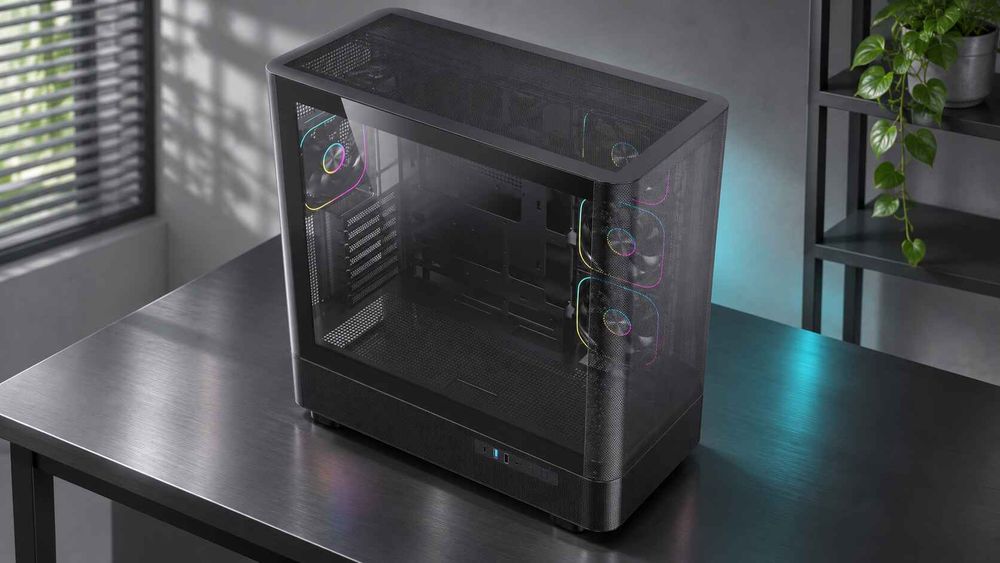
The ACEGEEK LunarisFlow is an ATX-class mid tower with a curved mesh front, a clip-on glass left panel and ten published fan positions. It benefits buyers whose systems generate sustained heat, such as high-power GPUs, large CPU coolers or radiators, and long render queues. It suits buyers who prioritize silence, compact size or a glass-dominated showcase less well. For distributors, system integrators and PC brands deciding whether to stock or specify it, the useful question is not whether mesh is "good". It is which end customers have a thermal or clearance problem this layout solves. This guide matches the published specifications of the ACEGEEK LunarisFlow PC case to buyer profiles, shows where its limits sit, and lists what to confirm before requesting a quote.
What the LunarisFlow Publishes: Specifications That Drive the Decision
ACEGEEK's product page lists three headline features: a curved mesh design, a removable top cover and a clip-on glass panel on the left side. The specification block gives the rest. Compatibility, clearance and cooling numbers matter most to a buyer, so they are summarized below with the verification step each one needs.
Published specification | What it enables | What to verify before ordering |
|---|---|---|
Motherboard support: ATX, M-ATX, ITX | Full-size gaming and workstation boards | E-ATX is not listed; confirm exact board dimensions |
Max GPU clearance: 400mm | Long triple-fan graphics cards | Length is only one dimension; check thickness, height and power-connector space |
Max CPU cooler clearance: 180mm | Tall dual-tower air coolers | Installed height, including a raised fan for tall RAM |
Fan support: 3 × 120/140mm each at top, side and bottom; 1 × 120mm rear | Up to ten fan positions | Which positions sit behind the mesh, and whether fans and filters are included |
Radiator support: 420/360mm top, 240mm side | Large AIO coolers, with a choice of intake or exhaust placement | Radiator plus fan thickness against RAM and VRM heatsinks |
Storage: 3 SSD / 2 HDD positions | Internal storage for editing or scratch disks | Bracket types and cable reach |
Front I/O: 1 Type-C, 2 USB 3.0, 1 HD audio | Fast external storage and peripherals | Motherboard header compatibility for the Type-C port |
Material: 0.7mm SPCC steel; 7 PCIe slots | Rigid steel chassis; room for multi-slot GPUs | Panel flex and edge finish on a sample unit |
Published dimensions are 483 × 238 × 490mm, which works out to roughly 56 litres of external volume. The product page does not state which wall the "side" fan positions occupy relative to the curved mesh, and it does not say whether fans or dust filters ship with the case. Those two answers change how the airflow path should be planned, so ask the supplier directly.
How a Curved Mesh Front Helps, and Where It Does Not
A curved mesh front helps cooling when it exposes a large share of each intake fan's area to room air. The curve itself is a styling and structural choice. ACEGEEK's own analysis of front-panel design and PC case cooling makes the same point: how much of the fan is exposed, how far the panel sits from the blades, and how many filter layers sit in front matter more than the word "mesh".
Independent testing of other cases shows the range of outcomes. In GamersNexus' Phanteks P400A review, the mesh-front case averaged 49.1°C over ambient in a GPU torture test, and removing the front panel lowered that to 47.2°C. When the panel is open enough, it stops being the bottleneck. In GamersNexus' Cooler Master H500M comparison, the glass-front version ran about 5-6 degrees warmer than the mesh version in CPU torture testing. GamersNexus credited widened side ventilation for keeping the glass version in a reasonable range.
Three caveats apply to these results. They come from different cases, fans and hardware, so they illustrate a principle rather than predict LunarisFlow temperatures. The reviews are several years old. And a search of available sources found no independent thermal test of the LunarisFlow itself, so any claim that it runs a specific number of degrees cooler would be unsupported.
The practical reading is that mesh helps most when heat load is high and the alternative design has weak ventilation. For modest hardware, the gap narrows. ACEGEEK's guide to mesh, glass and closed PC cases frames the same trade-off: mesh favors heat, glass favors display, and closed fronts favor noise control.
Who Benefits Most From the LunarisFlow
High-power GPU gaming and rendering builds
Graphics cards are now the main reason case airflow gets scrutinized. NVIDIA's RTX 5090 specifications list a Total Graphics Power of 575W and a required system power of 1000W. These are separate figures. The first is a planning input for GPU heat. The second sizes the power supply for the whole system.
For this buyer, the LunarisFlow's 400mm GPU clearance and its bottom and side fan positions give several ways to route fresh air toward a large card. ACEGEEK's guide on choosing a PC case based on GPU power draw adds an important limit. Extra fan positions are not proof of better cooling, and above roughly 500W, buyers should rely on independent thermal testing rather than published specifications alone.
Creators with sustained CPU and GPU workloads
Video editors and 3D artists keep hardware loaded for long periods, which exposes weak airflow faster than short gaming sessions. The LunarisFlow's three SSD and two HDD positions, front Type-C port and large radiator options fit that profile. ACEGEEK's comparison of which gamers and creators its cases suit positions LunarisFlow for high-end gaming, video editing and 3D rendering, while noting that its recommendations rest on published specifications rather than thermal benchmarks.
Radiator placement is where the case's flexibility becomes useful. Noctua's airflow guide recommends front or side radiator mounting with intake fans for the lowest CPU temperatures, and a top mount with exhaust fans for the lowest GPU temperatures. Because the LunarisFlow lists a 420/360mm top mount and a 240mm side mount, a builder can choose according to whether the CPU or GPU limits the workload, and can compare both arrangements for mixed loads.
System integrators and resellers
A chassis that accepts ATX boards, 180mm air coolers and 420mm radiators can serve both air-cooled and liquid-cooled configurations, which may reduce the number of case SKUs an integrator qualifies. As an illustrative scenario, not a customer story, an integrator building a 4K creator workstation line might use one chassis for a 360mm AIO build and an air-cooled build with a different cooler. Each configuration would still need thermal validation, but chassis tooling, panels and packaging could be qualified once. That saving only holds if fan positions, filters and panel fit stay consistent between production batches, which is a sample-approval question.
Who Should Look at a Different Case
The LunarisFlow is not the default answer for every build. These buyers should compare alternatives first:
Panoramic showcase builders. The LunarisFlow's published glass is a clip-on left side panel, not a wraparound design. Buyers who want wraparound glass should read ACEGEEK's guide to building in a panoramic PC case, which explains why those designs depend on side and bottom intake and need more planning around GPU, radiator and cable clearance.
Silence-first users. Open mesh lets more fan noise escape. ACEGEEK's front-panel analysis summarizes one independent test where an open mesh front ran cooler but nearly 3 dB louder than a more closed design. Audio producers should compare noise measurements first.
Compact or budget builds. At roughly 56 litres, it is oversized for a short GPU and a small cooler.
Oversized motherboards or unusual expansion. E-ATX is not listed, and the case has seven PCIe slots.
Dusty environments. A large mesh intake needs filter maintenance. Fine filters can add restriction as they clog.
The table below uses ACEGEEK's published specifications to place the LunarisFlow beside its two siblings.
LunarisFlow | Nebula Pro | Vault | |
|---|---|---|---|
Main design emphasis | Curved mesh airflow | Panoramic presentation | Compact M-ATX / ITX |
Max GPU length | 400mm | 420mm | 285mm |
Max CPU cooler height | 180mm | 175mm | 160mm |
Top radiator support | 420/360mm | 360mm | 240mm |
Listed SSD / HDD positions | 3 / 2 | 2 / 1 | 1 / 1 |
Typical buyer | Sustained gaming and creator workloads | Streamers and showcase builds | Budget and small-form-factor builds |
The comparison figures come from ACEGEEK's published specifications as summarized in the gamer and creator guide linked earlier. The "typical buyer" row reflects ACEGEEK's positioning, not independent testing.
A Defensible Take: Ten Fan Positions Are Flexibility, Not Cooling Capacity
A common buying assumption is that more fan mounts mean better cooling. The LunarisFlow's ten positions are an asset, but only if the fan map is planned. The P400A review makes the point from the other side: 49.1°C over ambient is a good GPU result for that test, yet it cannot match cases that aim intake fans directly at the GPU cooler. Placement counts as much as quantity.
Noctua's guidance supports that restraint. It treats a five-fan layout as a recommended baseline and adds bottom intake only as the fan count rises, and it advises most users to start with a conventional front-to-back path. It also notes that side intake slots can be treated like front intake slots, so a case built around side and bottom mounts follows the same principles. For a reseller, the right question is therefore not "how many fans can it hold?" but "which configuration does the supplier recommend, and has it been tested with a high-power GPU?"
This view has limits. If a customer plans extreme overclocking, a 575W-class GPU or a hot, unventilated room, populating more positions may help. Intake and exhaust must still form a coherent path, and the fans must not push warm radiator air into the GPU's intake.
What Should Buyers Specify Before Requesting a Quote?
The LunarisFlow product page offers a quote request rather than a public price, and it does not publish MOQ, lead time or compliance documents. Preparing the following information shortens the process and avoids rework:
Target build profile. List the GPU model with length, height and thickness, plus the CPU cooler or AIO size. This confirms the clearance claims against real parts.
Fan configuration. Specify count, 120mm or 140mm size, PWM and ARGB requirements, and whether fans should ship installed. Fan choice changes noise, cost and the airflow plan.
Dust filter setup. Ask which filters are included and whether replacements are available. Filter condition affects long-term airflow.
Color and finish. Confirm the colors actually available for your order quantity.
Glass panel protection. The left panel is clip-on glass, so ask about packaging, transit protection and replacement terms for breakage.
Front I/O compatibility. Check that your target motherboards have the header the front Type-C port requires.
Commercial terms. Request MOQ, lead time, shipping method and current availability. Do not assume them.
Samples and testing. Order a sample and test it with your intended GPU, using temperatures measured above ambient, as GamersNexus does, so results compare fairly across cases.
Required documentation. State any certification or test-report requirements for your destination market. The page does not publish them.
Frequently Asked Questions
Who is the ACEGEEK LunarisFlow best for?
It suits builders with sustained heat loads: large graphics cards, tall air coolers or 360–420mm radiators, and rendering or editing workstations. Buyers prioritizing silence, compact size or wraparound glass should compare other designs first.
Does a curved mesh front cool better than a flat mesh front?
No evidence found shows that curvature alone improves cooling. Airflow depends on open area, filter layers, panel-to-fan distance and fan placement. Judge any mesh front by measured temperatures above ambient on the intended hardware.
What GPU length and CPU cooler height does the LunarisFlow support?
ACEGEEK lists up to 400mm GPU clearance and 180mm CPU cooler clearance. Those figures cover length and height only, so verify graphics card thickness, power-connector space and any radiator that intrudes into the GPU area.
Which radiators can the LunarisFlow take?
The published specification lists 420mm or 360mm AIO support at the top and a 240mm AIO at the side. Always check combined radiator and fan thickness against RAM and motherboard heatsinks before ordering.
How many fans does the LunarisFlow support?
ACEGEEK lists three 120mm or 140mm positions each at the top, side and bottom, plus one 120mm rear position, for ten in total. Confirm with the supplier how many fans ship installed.
Is the LunarisFlow a good choice for a quiet PC?
Not as a first choice. Open mesh lets more fan noise escape than a closed front. It can run fans slower under load if airflow is good, but quiet-first buyers should compare measured noise data.